Do You Need Azure If You Already Have Microsoft 365?
Published February 2, 2022, updated August 4, 2026
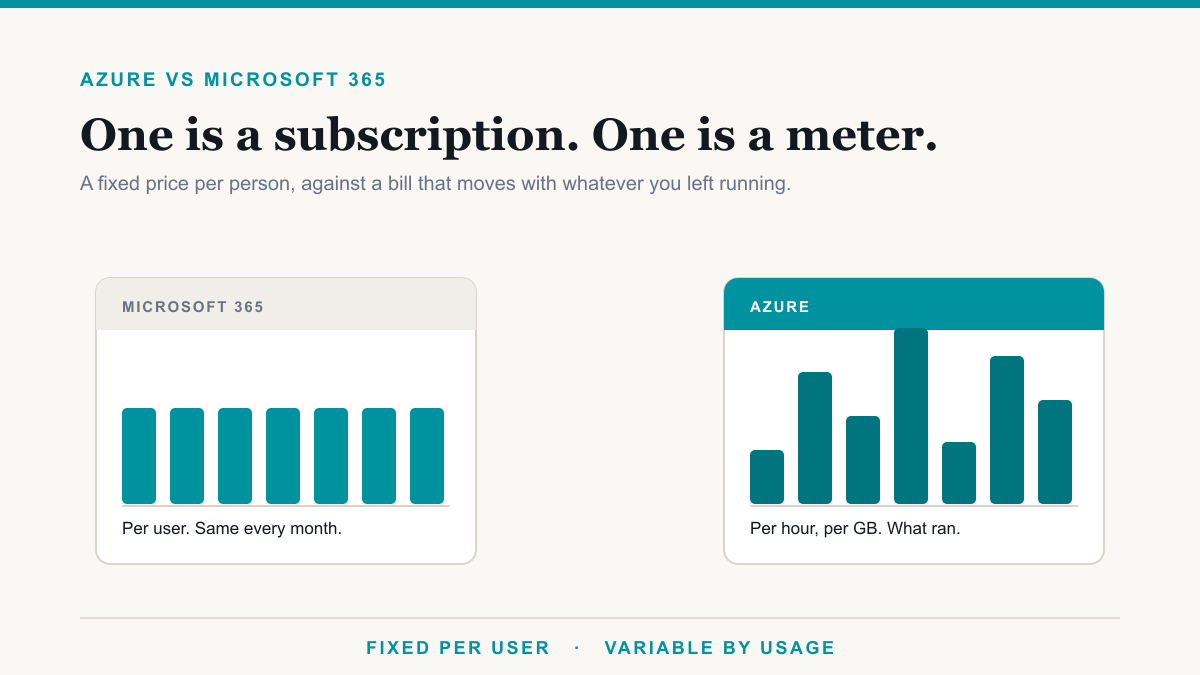
Most businesses running Microsoft 365 do not need Azure, and the two are not different tiers of the same thing. Microsoft 365 is a per-user subscription for email, files, Teams, and the Office apps, at a fixed price per person. Azure is a pay-as-you-go platform for running infrastructure, such as servers, storage, and networking, that you would otherwise run on hardware in your office. You buy Azure when you have something to run that Microsoft 365 does not cover.
Getting the distinction straight is worth a few minutes because the two products bill in completely different ways, and a business that walks into Azure expecting a per-user price gets a nasty surprise on the first invoice. This post is for owners and office administrators who have been told they should be looking at Azure and want a plain answer on whether that applies to them.
The difference, in one paragraph
Microsoft 365 is finished software. Somebody at Microsoft runs the mail servers, patches them, keeps them online, and you pay a set amount per person per month for the result. Azure is raw capacity. You get virtual machines, storage accounts, databases, and networks, and what you do with them is yours to design, secure, and maintain. Microsoft 365 is a service you consume. Azure is a place you build.
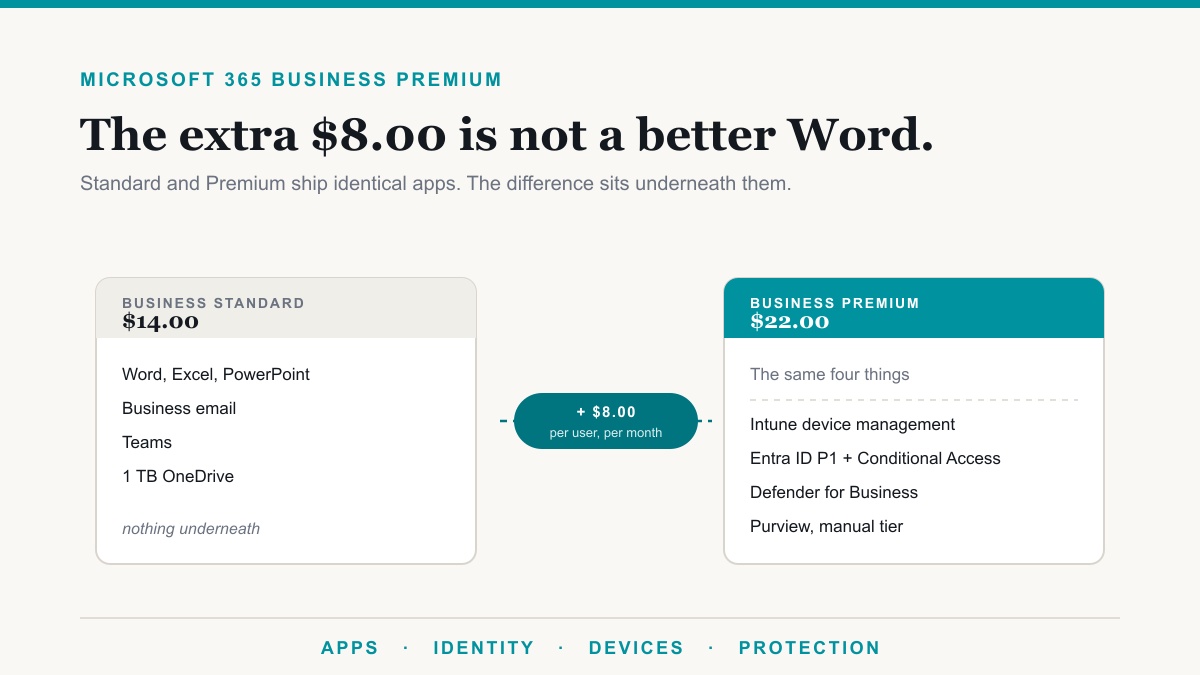
That is also why the pricing works so differently. Microsoft 365 Business Premium is $22.00 per user per month and it will be $22.00 next month. An Azure bill reflects what actually ran: how many hours a virtual machine was powered on, how much data was stored, how much left the network. Leave something running that you meant to switch off and the bill notices.
Why people think they are the same thing
The confusion is understandable and mostly Microsoft's own doing.
The identity system behind Microsoft 365 used to be called Azure Active Directory. It is now Microsoft Entra ID, but the old name is still everywhere in documentation, forum posts, and the memory of anyone who has administered a tenant for a few years. Because your Microsoft 365 accounts live in something that was called Azure, it is reasonable to assume you already have Azure. You do not. You have the identity service, which is included, and no Azure subscription.
What you genuinely do get with Microsoft 365 Business Premium is worth knowing, because it is more than people expect. Microsoft's documentation states that Microsoft 365 Business Premium includes Microsoft Entra ID P1, and that is the tier that unlocks Conditional Access, which is how you write real sign-in rules instead of taking all-or-nothing security defaults. Most businesses we look at are paying for this and have never used it. We go through the whole plan in our breakdown of what is included in Business Premium.
Four reasons a business genuinely ends up in Azure
In practice, almost every Azure project we take on comes from one of these.
1. An application that has to run on a server. A practice management system, a case management database, an engineering or manufacturing package, something with a vendor who has no hosted version and no plans for one. This is the most common reason by far. Running it on an Azure virtual machine gets it out of the closet and off hardware that is aging, without waiting for the vendor to modernize.
2. Azure Virtual Desktop. If people need a full Windows desktop they can reach from anywhere, including from a personal or unmanaged machine, Azure Virtual Desktop is the Microsoft answer. There is a licensing detail here worth knowing: Microsoft's Azure Virtual Desktop prerequisites list Microsoft 365 Business Premium among the licenses that entitle you to Windows 11 and Windows 10 Enterprise multi-session. So the user entitlement is already covered if you are on Business Premium. What you still pay for is the Azure side: the virtual machines, their storage, and the network.
3. Backup and recovery that lives somewhere else. Using Azure as the offsite copy is a sound, cheap use of it, and it is often a business's first Azure resource. This is a narrow, well-bounded use with predictable costs, and it is a genuine improvement over a backup drive somebody takes home. It fits into the wider disaster recovery conversation rather than replacing it.
4. Something that needs to be reachable and is not a document. A line-of-business web app, a file service that a piece of software expects to find at a network path, a site-to-site connection between offices. These are infrastructure problems, and Microsoft 365 has no answer for them because that is not what it is.
Notice what is not on that list: email, documents, collaboration, and video calls. If that is what your business runs on, Microsoft 365 is the whole answer and Azure adds cost without adding anything.
The cost model is the thing to plan for
This is where companies get hurt, and it is worth being blunt about it.
A per-user subscription is self-limiting. You have 30 people, you pay for 30 people. Consumption billing has no such ceiling. A virtual machine sized generously "to be safe" costs that generous size every hour it is on, whether anyone uses it or not. A test environment somebody spun up in March is still billing in November. Data leaving the platform is charged, and it is easy to overlook when you are estimating.
None of that makes Azure expensive, and for the right workload it is very good value. It makes Azure something that needs an owner. Before you put anything in it, agree who watches the bill, set a budget alert, decide what gets switched off outside business hours, and write down what each resource is for so that in a year somebody can tell whether it is still needed. That governance is a real part of the ongoing management and it is not optional.
When the answer is no
If your business runs on email, documents, spreadsheets, and Teams calls, and every application you rely on is either a website or a hosted service, you do not need Azure. Microsoft 365 covers you. Adding Azure would give you infrastructure to manage, a variable bill, and no capability you were missing.
And if the reason Azure came up is that somebody wants to retire an aging server, the better first question is whether that server's job can go away entirely. Sometimes the application has a hosted version now. Sometimes the file share it hosts belongs in SharePoint. Moving a server into Azure unchanged is the most expensive of the available answers, and it is the one that leaves you still running a server, just somebody else's. Whichever way that goes, the security work of hardening what you end up with is the same, and it is the piece our security practice tends to find has been skipped.
Frequently asked questions
What is the difference between Azure and Microsoft 365?
Microsoft 365 is a finished per-user subscription for email, files, Teams, and the Office apps, billed at a fixed price per person. Azure is a platform for running infrastructure such as servers, storage, and networks, billed by consumption. One is software you use, the other is capacity you build on.
Do I need Azure if I have Microsoft 365?
Usually no. A business whose work happens in email, documents, and Teams is fully served by Microsoft 365. Azure enters the picture when you have something Microsoft 365 does not cover, most often an application that has to run on a server you control.
Is Microsoft 365 built on Azure?
Microsoft 365 runs on Microsoft's cloud infrastructure and uses Microsoft Entra ID, formerly called Azure Active Directory, for identity. That shared identity layer is why the two feel connected. It does not mean you have an Azure subscription or that Azure services are included.
Does Microsoft 365 Business Premium include anything in Azure?
It includes Microsoft Entra ID P1, which Microsoft documents explicitly, and that is what gives you Conditional Access. Business Premium is also a qualifying license for Azure Virtual Desktop, though you still pay Azure separately for the virtual machines themselves.
How is Azure billed compared to Microsoft 365?
Microsoft 365 is a predictable per-user price. Azure is consumption-based, so the bill reflects what ran and how much data moved, and it changes month to month. That difference is the single most common surprise for a business moving into Azure for the first time.
Can we move our old server to Azure?
Yes, and it is a common first step, but lifting a server into Azure as-is means paying monthly for a virtual machine that does the same job the old one did. It is worth first asking whether the application has a hosted version, because that is usually cheaper and less work to run.
Is Azure more secure than an on-premises server?
The platform underneath is held to a standard almost no in-house IT team can match on its own. What Azure does not do is configure your side of it. Most cloud incidents trace back to customer configuration, such as an exposed management port or an over-permissioned account, rather than the platform.
Deciding between Azure vs Microsoft 365 for your business
The Azure vs Microsoft 365 question usually answers itself once you name the specific thing you are trying to run. If it is email, files, and collaboration, Microsoft 365 is the product and Azure is not needed. If it is an application, a desktop, or infrastructure, Azure is the right tool and the work is in sizing it sensibly and keeping an eye on the bill.
If you would like a straight answer for your situation, including whether that old server actually needs replacing at all, Desert Lakes Solutions offers a no-pressure discovery call to look at what you are running and what it would cost either way. Book a discovery call.