SharePoint Migration for a Small Business: What It Takes
Published January 30, 2024, updated August 4, 2026
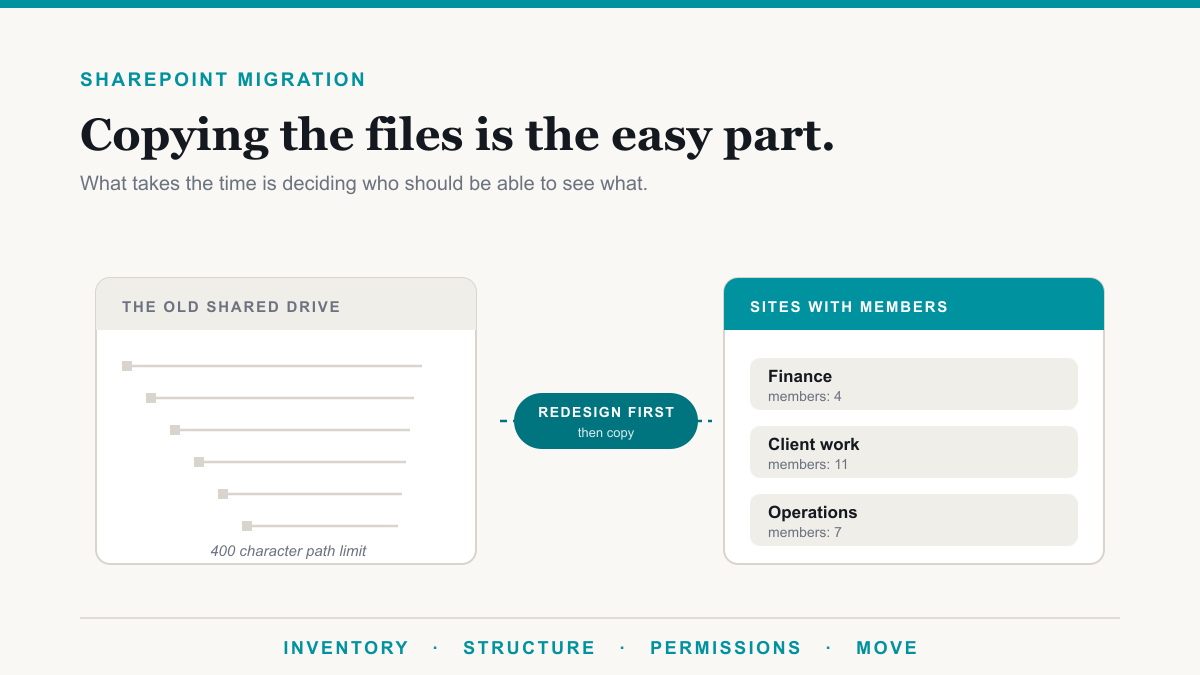
A SharePoint migration is mostly not a file copy. The copying is handled by free Microsoft tools and often runs over a weekend. The work that takes real calendar time is deciding how content should be organized, redesigning who can see what, and cleaning up the files that will not move as they are. Budget four to eight weeks end to end for a business under 50 people, and expect most of it to be decisions rather than technology.
Getting this right matters because the file server is usually the last thing tying a business to a physical office and a piece of hardware that will eventually fail. This post is for owners and office administrators at professional-services, healthcare, legal, and accounting businesses who are looking at a shared drive that has grown for a decade and trying to work out what moving it to SharePoint actually involves.
What you actually get
The honest list, without the brochure language.
- The office stops being a single point of failure. Files are reachable from anywhere without a VPN back to a server in a closet, and there is no aging box to replace every five years.
- Version history on everything. Someone overwrites a document, you roll it back. On a file server that conversation usually ends with restoring last night's backup and losing the day.
- Real co-authoring. Two people in the same document at once, rather than the file-locked message and a document named final-v3-JS-revised.
- It is where Microsoft 365 expects your files to be. Teams, search, retention, data loss prevention, and Copilot all read SharePoint and OneDrive. Content sitting on a file server is invisible to every one of them.
- Sharing outside the business becomes controllable. Sending a link with an expiry beats emailing a 40 MB attachment or standing up an FTP site.
What you do not get is a backup. Microsoft runs the service reliably and gives you recycle bins and version history, which handle accidental deletion well. Neither is a restore point you control after a ransomware event or a quiet deletion nobody noticed for four months. Budget for backup separately.
What it actually takes
Four phases, in this order. Skipping straight to the fourth is the classic failure.
1. Inventory. Find out what is actually on the drive: total size, file count, how deep the folder tree goes, what has not been opened in five years, and where the duplicates are. Most businesses are startled here. It is common to find that a large share of the data is old backups, installer files, and copies of copies that nobody needs to move at all.
2. Decide the structure. This is where SharePoint differs from a file server. A file server is one tree. SharePoint is a set of sites, usually one per department, project, or client, each with its own document libraries and its own membership. Getting this right is mostly a conversation with the people who use the files, not a technical exercise.
3. Redesign permissions. Covered on its own below, because it is the part that takes the longest and causes the most trouble when it is rushed.
4. Move the data. Run a test migration on one department first, let them work in it for a week, fix what surfaced, then do the rest. Run a final pass to catch everything that changed since, and set the old share to read-only rather than deleting it. Keep it for a few months.
The storage math
Worth checking before you commit, because it is not unlimited and the formula is not obvious.
Microsoft allocates SharePoint storage as 1 TB per organization plus 10 GB for every license purchased, pooled across the whole tenant. A 25-person business has 1.25 TB. A 60-person business has 1.6 TB. That is separate from OneDrive, where each licensed person gets their own 1 TB.
For most offices that is comfortably enough, especially after the inventory step removes the junk. If it is not, extra storage is sold in 1 GB increments. The one thing to avoid is drifting over the limit without noticing: Microsoft's documentation warns that a tenant operating above its storage limit risks being put into read-only mode, which means people cannot add or change content until it is resolved.
The limits that bite
These are the ones that actually cause failed files and support calls during a typical migration. All are from Microsoft's published service limits.
| Limit | Figure | Why it matters to you |
|---|---|---|
| Full file path length | 400 characters | The big one. Counts the whole decoded path plus file name. Deep folder trees built over years blow through it easily. |
| Single file upload | 250 GB | Rarely hit outside video and design work, but worth checking if you have large archives. |
| Files synced to a PC | 300,000 recommended | A soft performance limit across everything a person syncs. Syncing an entire company library to every laptop is how you hit it. |
| Unique permissions per library | 5,000 recommended | What happens when you recreate a file server's per-folder permissions one by one. Group-based permissions avoid it. |
| Max storage per site | 25 TB | Rarely a real constraint, but it is why one giant site is technically possible and still a bad idea. |
The 400-character path limit is the one to check before you start. Migration tools will report the offenders, and the fix is either shortening folder names or flattening the structure, which you should be doing in step two anyway.
Permissions are the real work
Here is the mistake worth spending a paragraph on. A file server's permissions are usually a decade of exceptions layered on top of each other: this folder opened up for one project, that subfolder locked down for one person, an inherited set nobody remembers configuring. If you migrate that structure faithfully, you have moved the mess into a system where it is easier for people to share things outward.
SharePoint's model is different in a way that helps if you use it. Permissions come from site membership, and the default should be that a site's members can see the site's content. Where you need exceptions, they should be few and deliberate. This is what keeps you under that 5,000 unique-permission recommendation and, more importantly, keeps the answer to "who can see this?" something a human can work out.
The stakes go up once Copilot is in the picture, because Copilot respects permissions exactly as configured and will surface anything a person already had access to, including the folder they were never supposed to find. We wrote about that specifically in our post on SharePoint oversharing, and if you want to know what sensitive content is in there before you move it, our guide to finding sensitive data in Microsoft 365 covers the scanning side.
A practical rule: migrate content into a clean permission design, then compare it against the old one and consciously decide which exceptions to recreate. Do not start from the old one.
Tools and cost
Microsoft provides two migration tools at no extra charge with a Microsoft 365 subscription. The SharePoint Migration Tool is a Windows application you run locally, and it handles file shares as well as older SharePoint Server versions. Migration Manager does the same job from the admin center with agents on one or more servers, which suits larger or multi-site jobs. Either is fine, and neither costs anything.
Paid third-party migration tools exist and are genuinely better at reporting, retries, and preserving metadata at scale. For a business under 50 people with a reasonably tidy share, they are usually not necessary.
So the cost is not licensing, it is time. The inventory and structure work is a handful of meetings. The permission design is a day or two. The migration runs mostly unattended. The part people underestimate is the two or three weeks afterwards, when people cannot find things and need showing where they went. Plan for that rather than treating it as a surprise, and the whole thing goes better. It is the same pattern we see across the day-to-day IT work we run for clients: the technology is the short part.
Frequently asked questions
How long does a SharePoint migration take?
For a business under 50 people with a few hundred gigabytes on a file server, plan on four to eight weeks end to end. The copying itself is often a weekend. Most of the calendar time goes to inventorying what you have, agreeing the new site structure, and redesigning permissions.
Is there a free tool to migrate file shares to SharePoint?
Yes. Microsoft provides both the SharePoint Migration Tool and Migration Manager at no extra cost with a Microsoft 365 subscription, and both handle file shares. Paid third-party tools are worth it mainly for large or messy migrations where reporting and retry handling save real time.
How much SharePoint storage do we get?
1 TB per organization plus 10 GB for every license you buy, pooled across the tenant. A 25-person business gets 1.25 TB. That is separate from the 1 TB of OneDrive each licensed person gets, and you can buy more in 1 GB increments.
What files will fail to migrate to SharePoint?
Mostly two kinds. Files whose full decoded path including the name exceeds 400 characters, which deep nested folders produce easily, and files above the 250 GB single-file upload limit, which is rare. Migration tools report these so you can shorten paths or restructure before the real run.
Should we move everything to SharePoint or use OneDrive too?
Both, for different things. SharePoint holds shared departmental and project content that outlives any one person. OneDrive holds an individual's working files. The common mistake is putting shared business records in someone's OneDrive, because they leave with that account.
Can we keep our existing folder structure?
You can, and the tools will happily copy it. It is usually the wrong call. Folder trees built over a decade on a file server tend to be deep, duplicated, and organized around people who no longer work there. A migration is the cheapest chance you will get to fix that.
Do we still need backup after moving to SharePoint?
Yes. Microsoft protects the service and provides recycle bins and version history, which cover accidental deletion well. They are not a substitute for backup you control when you need to recover from ransomware or a deletion nobody noticed for months.
Planning a SharePoint migration
A SharePoint migration succeeds or fails on the two weeks of thinking that happen before anything is copied: what content you actually need, how it should be organized, and who should be able to see it. The tools are free and the copying is the easy part.
If you would like help working out what is on your file server and what a clean structure would look like for your business, Desert Lakes Solutions offers a no-pressure discovery call to walk through it and give you a realistic scope. Book a discovery call.