Microsoft Copilot consulting
Microsoft Copilot consulting, governance before seats
You hire Desert Lakes Solutions to run Microsoft Copilot consulting as a scoped engagement. We start with permissions and oversharing, then the right licenses, then a staged rollout with training so the seats get used.
The Copilot Exposure List is no charge for qualified businesses.
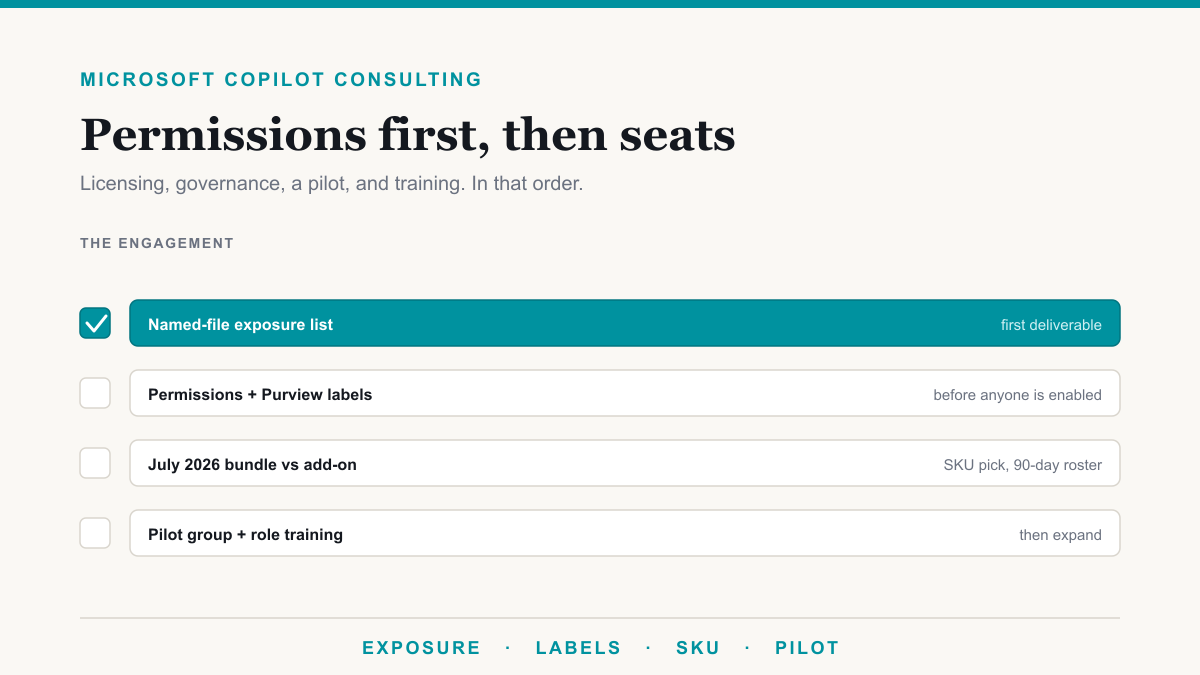
What Microsoft Copilot consulting covers
The work runs in this order. We quote the engagement against that sequence so you are not paying for seats while SharePoint is still wide open.
- Exposure. Named files in one sensitive category that anyone at the company can already open. You leave with real file names you can review.
- Permissions. Sharing defaults and membership on HR, finance, legal, and client sites, until organization-wide access is off those libraries.
- Purview. Labels that encrypt, a Copilot DLP location, and audit actually on, so a user who should not open a file does not get it back from Copilot.
- Licensing. Bundle vs add-on against the July 2026 SKUs, plus a named 90-day roster. The quote matches Microsoft's current page.
- Pilot. 10 to 20 people, three tasks, a 30-day review, and role-based training. Seats are assigned only to that group until you expand.
Microsoft documents the permission boundary in its Copilot privacy documentation: Copilot surfaces organizational data the signed-in user can already view, and prompts, responses, and Graph data are not used to train foundation models. If "already view" includes the HR site, Copilot will answer from the HR site.
The scored version of this work is the Copilot readiness assessment: permissions posture, labels, licensing fit, pilot use cases, and a training plan, out of 30. Most tenants lose points on the permissions rows. The named-file version is The Copilot Exposure List, one sensitive category, no charge for qualified businesses. We treat those as the start of the engagement, not a quiz after licenses are already on the bill.
Permissions, Purview, and the files Copilot would name today
Oversharing is the usual problem. Organization-wide sharing links, Everyone except external users on an HR or finance site, and a Teams file tab that still holds a compensation workbook from 2021 show up often. Copilot does not create that access. It makes it searchable in plain English.
That is the core of Microsoft Copilot data security: find the overshared files on HR, finance, and client sites, remove the broad links and group memberships, then put Purview labels, DLP, and audit in front of enablement. Labels that encrypt a file and deny a user access are the ones Copilot honors. A watermark-only label does not create that stop. Audit logging is often still off on Business plans until someone turns it on. Microsoft's Purview protections for generative AI is the vendor map for those three levers.
Do this before company-wide seats. Labeling after launch means Copilot spent a month answering from unlabeled, overshared libraries. If you only do one thing before you buy, pull the exposure list for one category and look at the names.
July 2026 Copilot prices, quoted as part of the same project
Since July 1, 2026, Microsoft sells Business Standard with Copilot at $23.50 per user per month and Business Premium with Copilot at $32, both on an annual commitment. The Copilot increment over the base plan is about $10, not the $21 add-on most older quotes still use. The standalone Copilot Business add-on lists at $21, with an $18 promotional price through September 30, 2026. Enterprise remains a $30 add-on. Prices verified August 21, 2026 against Microsoft's Copilot pricing page.
The engagement includes who gets a seat in the first 90 days, which SKU matches the base plan you already own, and whether you are under the 300-seat Business cap. You do not have to license every mailbox on day one. Run the Microsoft 365 licensing calculator so the quote matches current SKUs, including the July 2026 bundles.
The SKU named Microsoft 365 Copilot is the assistant in Word, Excel, Outlook, and Teams. It is not Copilot Studio, and it is not Security Copilot. If a quote mixes those names, ask which product you are buying.
Who this engagement is for
Owners and administrators ready to buy the work, including practices and professional-services firms in Phoenix and the East Valley already on Microsoft 365. We also run this remotely for clients nationwide.
This page is the hire-us door. For a plain explanation of what Microsoft 365 Copilot is, and how a rollout is sequenced, see the Copilot page.
Start with named files. The Copilot Exposure List pulls one category of sensitive data: the actual files anyone in the company can open today. If you already want the full consulting engagement scoped, book a discovery call.
What you hire us to do
Exposure list and permissions
We start with what Copilot would surface today: named files in one sensitive category that anyone at the company can already open, then we tighten sharing and membership on HR, finance, legal, and client sites.
Purview before enablement
Encrypting sensitivity labels on the files that must stay protected, a Copilot DLP location, and audit actually turned on. A watermark-only label does not create that stop. Labels go on before seats, not after Copilot has already been answering from unlabeled libraries.
Licensing against July 2026 SKUs
Bundle vs add-on against current Microsoft prices, who gets a seat in the first 90 days, and whether you are under the 300-seat Business cap. You do not have to license every mailbox on day one.
Staged rollout and training
A named pilot of 10 to 20 people, three real jobs for week one, a 30-day review, and a 30-minute session per role with a file from their world. Expand after the permissions hold and the use cases prove out.
Frequently asked questions
Do I need a Microsoft Copilot consultant?
If Copilot is not on yet, or it went on over loose sharing, yes: the work is still an exposure list, sharing cleanup, Purview, a license plan, and a real pilot. Buying seats does not tighten Everyone except external users on the HR site. If your sharing is already tight and you only need a SKU recommendation, we will say so on the discovery call and keep the scope small.
What does Microsoft Copilot consulting cost?
Microsoft's Copilot licenses are public list prices, not our fee. Business Standard with Copilot is $23.50 per user per month, Business Premium with Copilot is $32, the add-on is $21 or $18 on promo through September 30, 2026, and enterprise is $30. The consulting engagement is quoted after we see your tenant. The Copilot Exposure List is no charge for qualified businesses.
How long does the engagement take?
A focused review of permissions, labels, licensing, and a pilot plan often takes days to a couple of weeks for a small Microsoft 365 tenant. Cleanup on overshared SharePoint sites is what stretches it. A pilot of 10 to 20 people can start once the sensitive sites are in good shape.
Is Copilot safe if we hire you to turn it on?
Copilot only surfaces what a signed-in person can already open. We treat that as a permissions project: list the overshared files, tighten sharing, apply encrypting sensitivity labels, confirm DLP and audit, then license a small pilot. The exposure list is read-only. We do not turn Copilot on for the whole company as the first step.
Ready to hire this work?
Start with The Copilot Exposure List if you want named files first, or book a 30-minute discovery call. We will tell you whether the engagement is worth doing on your tenant, and give you a written quote.
Call (855) 737-9500 / (480) 573-3349
Email [email protected]
15-minute response on critical issues, 24/7. Onboarding in two to three weeks.