Pen Testing on Open Dental: What a Test Actually Finds
Published July 15, 2026
Pen testing on Open Dental almost never finds a problem with Open Dental. In the practices we assess, the findings land in the network around the software, not in the software itself. That answer surprises people who came looking for a list of Open Dental vulnerabilities, so it is worth explaining properly, because the question behind it is a fair one and the on-premise server in your closet genuinely does deserve attention. This post is for dental practice owners and office managers who want to know what a real test looks at, what it tends to find, and why that answer protects patient data better than a software-specific hunt would.
The question, and why it is the wrong shape
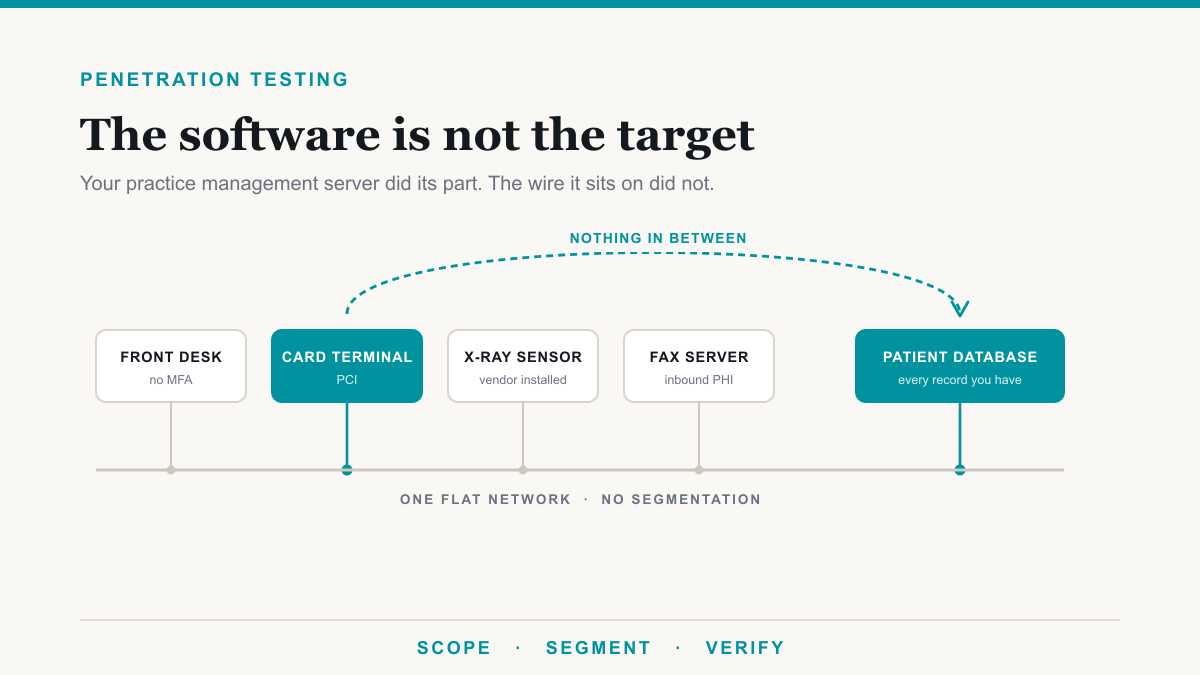
Asking what we find when we pentest Open Dental is a bit like asking what we find when we pentest someone who uses Calendly. The software is not the attack surface. The network around it is. Practice management software and most electronic records platforms are either a vendor's web portal, which is the vendor's problem and outside your test scope, or an application installed on hardware you own. Either way, the interesting weaknesses are almost never in the application. They are in everything the application is sitting on.
That said, we are not going to wave the question away, because the instinct behind it is half right.
Why your Open Dental server really is in scope
Open Dental is typically installed on-premise, and that is the important difference. When a practice runs a cloud-only records platform, there is often nothing in the building to test beyond the workstations and the wifi. When a practice runs Open Dental the traditional way, there is a real server in a closet or under a desk, and on that server is a database holding your patients' names, addresses, insurance details, treatment history, and payment information. It is on the same network as every computer in the office.
So yes. That server is a legitimate target, it holds protected health information, and it belongs in the scope of an internal penetration test. The person who typed "pen testing on Open Dental" into a search box is not confused about that part. They are just looking one layer too close.
Open Dental is the best-behaved vendor in this category, and we should say so
Credit where it is due, because this matters for what comes next. On the specific question of exposing a patient database to the internet, Open Dental tells you the right thing, in plain language, in its own published manual.
Its MySQL security page states: "Do not open the MySQL port (default is port 3306) on routers and do not allow incoming traffic for that port. The port can be opened as a Firewall exception rule on servers but NOT on routers." That is about as clear as vendor documentation gets. The same page adds the honest part most vendors leave out: "MySQL is only as vulnerable as the local network security allows."
Open Dental also documents an architecture for practices that need remote access, the Middle Tier, whose stated purpose is "preventing client workstations from directly accessing the database." Its own manual explains the tradeoff directly: in a direct connection the database username and password must be stored on the client computer, but with a Middle Tier the client does not need access to those credentials at all. Direct connection is the default, and most small practices we look at are running it, but the safer option exists, it is documented, and the vendor explains why it is there.
If your practice has followed that guidance, you have already avoided the single worst mistake available to you. Hold that thought.
The vendor who tells you to open the router is not your PMS vendor
Here is the turn, and it is the actual point of this post.
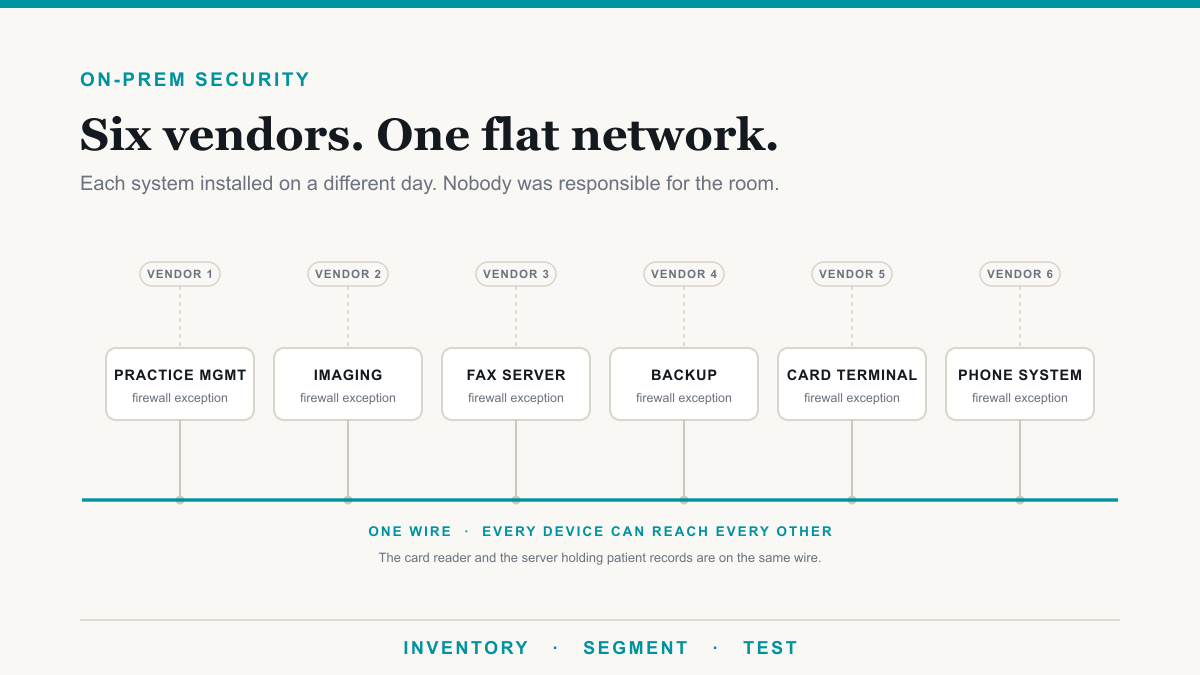
Open Dental can do everything right and it does not matter, because your practice did not buy one system. It bought six, from six vendors, on six different days, and only one of them was thinking about your network. The one telling you to punch a hole in your router is almost never the practice management vendor. It is the X-ray sensor software.
Planmeca's mRomexis documentation says ports 8093 and 10222 may need to be forwarded to the server via the router, and then adds that they are not able to provide instructions for forwarding ports, and to contact your local IT. Read those two sentences together. That is a dental imaging server with a vendor-sanctioned inbound path from the internet, no security guidance attached, and the hard part handed to whoever answers the phone.
It is not just one vendor:
- Sidexis. Dentsply Sirona's imaging platform wants roughly twenty ports open, including TCP 1433, which is SQL Server. The firewall guidance warns that if some ports are closed the unit will not function, and the install guidance is to switch off the firewall and antivirus for the database step. That is the sentence that convinces a busy office to turn protection off and never turn it back on.
- CS Imaging. Carestream's published firewall instruction is to answer the Windows security prompt by selecting private networks, public networks, and clicking allow access. Ticking the public box puts the imaging service on every network profile the machine ever joins.
- PracticeWorks. The Carestream Dental and Sensei technician's installation guide (document DE550-03, June 2024) instructs the installer to "Configure the hardware and software firewall to open ports 3351 to 13024 internally." Same bullet list, same page: "Each Windows user profile should be an Administrator or Power User," and "Share the PWORKS folder with full permissions and security for everyone using the software." That range is internal rather than internet-facing, which genuinely matters, but it means the firewall between machines inside your office is doing close to nothing, and every user is an admin while it does it.
None of these vendors are acting in bad faith. Each is solving its own support problem, which is getting its product working on day one in ten thousand different offices it will never see. Nobody owns the sum. You do.
The spread is the finding
Put two of those side by side and you have the whole problem in two sentences.
Open Dental: never open the database port on a router. Planmeca: forward 8093 and 10222 on the router.
Same building. Same flat network. Opposite instructions. And the person expected to adjudicate between two vendors who will never speak to each other is a dentist, between patients, with a sensor that will not come up and a schedule that is already running behind.
That is not a knock on the practice owner. It is a description of a job nobody hired anyone to do. The finding on a penetration test is rarely a clever exploit. It is the seam between two vendors who were each individually reasonable.
The pattern is not confined to dental. On the medical side of the same problem, one vendor's requirements document published in December 2025 still mandates a database engine that SAP no longer provides mainstream maintenance for and has no successor version planned for, which is not a misconfiguration anyone can fix on a Tuesday afternoon. And NextGen's Mirth Connect, an integration engine often installed on site, carries CVE-2023-43208, a flaw scored 9.8 out of 10 that lets an attacker run code without a password. CISA added it to the Known Exploited Vulnerabilities catalog in May 2024 and flags it as known to be used in ransomware campaigns. If you run Mirth anywhere, the version number is worth checking today. We go through both in more detail in our post on on-prem server security for medical and dental practices.
What we actually find, every single time
These are the findings that show up on dental and medical engagements, in rough order of how often we see them. None of them are about your practice management software.
- No multi-factor authentication. A password alone still gets someone into email or remote access. This is the most common serious gap and one of the fastest to close.
- Network segmentation that does not exist. One flat network where every device can talk to every other device, including the server holding patient records.
- Credit card machines on the same network as patient data. A payment terminal sitting alongside clinical systems, which is both a security problem and an awkward conversation about your payment card obligations.
- FTP services still running. An old file-transfer service, usually left on by a piece of imaging equipment or a long-departed vendor, quietly accepting connections.
- Old web services nobody turned off. Management pages and web consoles switched on once during setup and never revisited.
- Conflicting group policy settings. The central rules that configure the office computers contradict each other, so what you think is enforced is not actually enforced anywhere.
- Windows file-sharing authentication weaknesses. Legacy settings on the protocol that shares files and printers, which can let an attacker capture or relay a login.
- IPv6 left in limbo. The newer network addressing standard is switched on by default, nobody configured it, and nobody disabled it, which quietly opens a second path into the network that no one is watching.
That is the list. Notice that fixing every item on it would not require Open Dental to change a single line of code.
What an internal penetration test actually looks at
An internal test starts from the position an attacker reaches after someone clicks a bad link or a laptop is compromised: on your network, without credentials, seeing what is reachable. From there the work is answering practical questions. What can this network position reach? Can it reach the server holding patient records, and how many steps does that take? Are database credentials sitting on a workstation, and can they be pulled off it? Is the payment terminal separated from the clinical systems, or is it not? What is listening on the network that nobody remembers turning on? Did an imaging vendor leave a path in from the internet that nobody told you about? Can an ordinary user account be walked up into an administrator account?
The output is a short, specific list of things to fix, ranked by what an attacker could actually do with them, not a scanner dump of theoretical severity scores. That distinction is the difference between a report you act on and a PDF that gets filed. You can read more about how we approach penetration testing and how it fits alongside the rest of your dental IT and security. Specialized engagements run through azpentest, our dedicated Arizona pentest practice, and an internal penetration test is the shape of the work this post describes.
It is also the most direct way to satisfy the risk analysis the HIPAA Security Rule expects of you. The rule requires a documented, honest evaluation of where patient data could be exposed, which you can read in plain terms on the HHS HIPAA Security Rule page. A test does not replace that analysis, but it gives you evidence rather than assumptions to write it from, and it feeds directly into the rest of your compliance work.
Frequently asked questions
Does pen testing on Open Dental find vulnerabilities in Open Dental?
Almost never. In the practices we assess, the findings are in the network around the software, not the software itself. Open Dental's own documentation gives sound guidance on securing the database. What a test finds is the environment it was installed into: flat networks, missing multi-factor authentication, and old services nobody turned off.
Is my Open Dental server in scope for a penetration test?
Yes, if you run Open Dental on-premise. There is a real server in your building holding a database of patient records, and it sits on the same network as your workstations. That makes it a legitimate target for an internal test, which is exactly why an internal test is the one worth running.
Can I open port 3306 so I can get to Open Dental from home?
Open Dental's manual tells you not to. It says not to open the MySQL port on routers and not to allow incoming traffic for that port, and that the port can be opened as a firewall exception rule on servers but not on routers. Remote access should go through a VPN or the Middle Tier instead.
My imaging vendor told me to forward a port on the router. Should I?
Not without asking what it exposes and what else would work. Imaging systems generally need to be reachable from operatory workstations inside the office, not from the public internet. A port forwarded on the router is the one thing your practice management vendor explicitly tells you not to do, so get the request in writing and treat a VPN as the default answer instead.
Will a penetration test take our practice down?
It should not. Testing in a live practice is scoped and scheduled so that production systems and patient care are protected. Fragile devices are handled carefully or tested outside hours, and the goal is a written list of fixable issues, not a disruption to the schedule.
The bottom line on pen testing on Open Dental
Pen testing on Open Dental is worth doing, just not for the reason most people ask about it. The software is fine, the vendor's own security guidance is sound, and if you have followed it you are ahead of many practices. The risk lives in the room the software was installed into: a flat network, an imaging vendor who asked you to open the router, a card terminal that can reach the patient database, no multi-factor authentication, and a handful of services that should have been switched off years ago. Open Dental can do everything right and still not save you from that, because no single vendor was ever responsible for the whole room. A good internal test finds those, hands you the list, and stops the guessing.
If you would like a clear read on where your practice stands, Desert Lakes Solutions offers a no-pressure discovery call to walk through your current setup and where the easy wins are. Book a discovery call and we will start with what is actually reachable in your office today.