On-Prem Server Security for Medical and Dental Practices
Published July 15, 2026
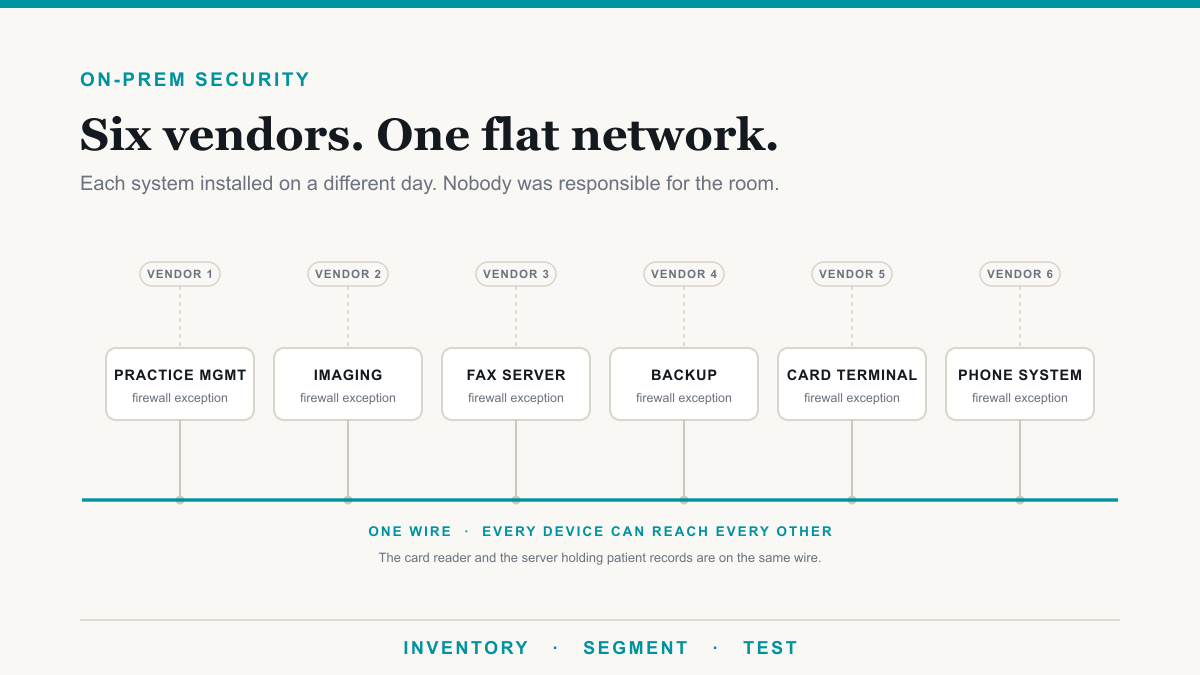
On-prem server security for medical practices is mostly not about your EMR. It is about the room your server lives in: the practice management database, the imaging box, the fax server, the backup drive, the card terminal, and the phone system, each installed by a different vendor on a different day, each granted its own firewall exception, and none of them talking to each other except that they all sit on one flat network. This guide is for owners of independent medical and dental practices who still run servers on site. It is about the systems around the EMR, because that is where the exposure actually lives, and because keeping the schedule running is the thing that pays for all of it.
Start with the imaging vendors, because they are the ones telling you to open the router
Most owners assume the practice management software is the risky part. It usually is not. The clearest instructions to punch a hole in your network come from the X-ray and imaging vendors, and they are published in the vendors' own documentation.
- Romexis. Planmeca's mobile access documentation says ports 8093 and 10222 may need to be forwarded to the server via the router. It then adds that they are not able to provide instructions for forwarding ports, and to contact your local IT. That is a dental imaging server holding CBCT scans and radiographs, with a vendor-sanctioned inbound path from the internet, and no security guidance attached to it.
- Sidexis. Distributor firewall guidance for Dentsply Sirona's Sidexis lists roughly twenty ports, including TCP 1433, which is SQL Server. The same guidance warns that if some ports are closed the unit will not function, and the install steps have you temporarily switch off the firewall and antivirus for the SQL portion. That is exactly the sentence and exactly the step that convince a busy office to turn protection off and never turn it back on.
- CS Imaging. Carestream's published firewall instruction is to answer the Windows security prompt by selecting private networks, public networks, and clicking allow access. Ticking the public box puts the imaging service on every network profile, including whatever your guest network happens to be.
Now hold those against Open Dental, which forbids precisely this. Its MySQL security page states that you should not open the database port on routers and should not allow incoming traffic for it, and that the port may be opened as a firewall exception on servers but not on routers. Open Dental also documents a Middle Tier whose stated purpose is preventing client workstations from directly accessing the database, so the database credentials never have to sit on a front-desk computer at all. Credit where it is due: on this specific question, Open Dental is the best-behaved vendor in the category, and they published the right answer without waiting for anyone to be breached first.
That contrast is the structural point of this whole post. One vendor says never forward the database port on the router. Another says forward 8093 and 10222 on the router. Same building, same flat wire, opposite instructions, and the practice owner is expected to adjudicate between two vendors who will never speak to each other. None of them are acting in bad faith. Each is solving its own support problem, which is getting its product working on day one in ten thousand different offices. Nobody owns the sum. You inherit it.
PracticeWorks: nearly ten thousand ports, and everyone an administrator
If you want a single document that shows how this happens, it is the technician's installation guide for PracticeWorks, now a Sensei product with Carestream Dental retaining the copyright. Document DE550-03 carries a print date of June 2024, which is to say this is current guidance, not an artifact from a filing cabinet. The guide instructs the installer to configure the hardware and software firewall to open ports 3351 to 13024 internally. Read literally, that range is 9,674 ports.
The same bullet list, on the same page, adds two more items. Each Windows user profile should be an administrator or power user. And the PWORKS folder should be shared with full permissions and security for everyone using the software.
Give that its due weight. The instruction is scoped to internal traffic, so this is not a vendor telling you to publish anything to the internet, and it would be unfair to say otherwise. But inside your office, the effect is that the firewall between machines is doing close to nothing, every staff login carries administrative rights, and the folder holding patient records is shared to everyone with full permissions. There is no security caveat anywhere in the document walking that back. PracticeWorks is also no longer sold to new customers while existing users continue to be supported, which is the tell: this is a legacy installed base, running guidance that was written for a network that no longer exists.
The database engine nobody can patch
Some of what we find is not a misconfiguration, and that is the uncomfortable part, because a misconfiguration can be fixed on a Tuesday afternoon.
Medisoft's client/server edition runs on Advantage Database Server, and the system requirements state that Advantage 11.10 is required for CGM MEDISOFT v30. That document carries a publication date of December 2025. SAP's published maintenance schedule put the Advantage 11.x line out of mainstream maintenance at the end of 2016. Mainstream maintenance for the final version of the engine, 12.0, ended on December 31, 2022, and according to an SAP product expert relaying the vendor's own note in the SAP community, there are no successor versions planned.
So a requirements document dated last month mandates a database engine that left mainstream maintenance roughly nine years ago, from a product line with no future. To be precise about what that does and does not mean: there are no published vulnerabilities for this engine, and we are not going to imply otherwise. The risk is the absence of a patch pipeline. If something is found tomorrow, there is no fix coming, and no version to upgrade to. You cannot patch your way out of that, and neither can your IT partner. What you can do is know it is there, isolate the box, control what can reach it, and write it into your risk analysis honestly rather than hoping the question never comes up.
The one on-prem flaw that is genuinely being exploited
If you take one technical item from this post, take this one. Mirth Connect is an integration engine that moves data between clinical systems. It can be self-hosted, and where it is self-hosted, it is a server in your building. CVE-2023-43208 lets an unauthenticated attacker run code on it, scoring 9.8 out of 10. Unauthenticated means no password is required. The flaw exists because an earlier patch was incomplete, and it affects every version before 4.4.1.
CISA added it to the Known Exploited Vulnerabilities catalog in May 2024 and flags it as known to be used in ransomware campaigns, which is the federal government's way of saying this is not theoretical. Across this entire category, it is the clearest example of a genuinely on-prem, genuinely exploited healthcare vulnerability. If Mirth Connect runs anywhere in your practice, the version number is worth checking today.
The honest part: the breaches you have heard about were the vendor's cloud
We should say this plainly, because the opposite claim is the standard sales pitch and it is not true. Nearly every EMR breach you have heard of hit the vendor's hosted platform, not a customer's server. When SamSam ransomware hit Allscripts in January 2018, it took down applications in the vendor's own data centers, affecting roughly 1,500 practices. The NextGen breach that reached more than a million patients in 2023 was NextGen Office, the cloud product, entered with credentials harvested from unrelated incidents. Mirth is the exception, not the pattern.
So on-prem is not where the famous breaches are. Nothing about your closet caused any of those, and no firewall rule of yours would have prevented them. The honest argument is narrower, and we think it is stronger: on-prem is where nobody is looking. It is where vendor guidance contradicts itself, where a system installed in 2014 still runs because it still works, and where one flat network turns a card reader into a path to patient records. Nobody writes a headline about that. It is just quietly true in a lot of buildings.
Which is also why asking what we find when we test Open Dental is a bit like asking what we find when we test someone who uses Calendly. The software is not the attack surface. Most EMR platforms are web portals, they are the vendor's responsibility, and they are usually out of scope. But an on-prem install changes the question, because now there is a server in your building holding patient data on your network. That server is yours. Its operating system, its patch level, its backups, and everything else plugged into the same wire are your responsibility, not the vendor's. That is in scope.
The fax server nobody has ever looked at
Your fax server holds every referral, lab result, script, and records request the practice has ever sent or received, which quietly makes it one of the richest collections of patient data in the building. It is also a system almost nobody has ever examined.
OpenText RightFax is the dominant on-prem healthcare fax server. There are no published vulnerabilities against it in the national database, and the only RightFax entry that exists at all is CVE-2000-0111, a predictable session ID issue from the year 2000. That is not a clean bill of health. Compare Multi-Tech's FaxFinder, a fax appliance researchers actually did examine: CVE-2016-10512 scores 9.8 because it stores directory passwords unencrypted, meaning a compromised fax box can hand over a credential to your network, and a separate flaw allows unauthenticated SQL injection. Same category, same closet. The only difference is whether anyone bothered to check. An empty vulnerability list on a twenty-five-year-old system that aggregates patient data by design measures attention, not safety.
There is also a wrinkle that surprises most owners: your fax number itself is an attack surface. Check Point researchers demonstrated full remote code execution on an all-in-one fax printer using nothing but a phone line and the target's fax number, then loaded EternalBlue into the payload so the compromised device spread across the network on its own. No email, no click, no internet connection involved. Their conclusion was that a fax machine should be treated as a possible infiltration vector into the corporate network, because it touches the phone line and the Ethernet jack at the same instant. Every referral form, superbill, and letterhead your practice prints publishes that number on purpose. No firewall rule addresses it, because the traffic never reaches your firewall.
Your imaging server speaks a protocol that never had to authenticate anyone
DICOM is the standard your sensors, CBCT, and imaging server use, and its security is explicitly optional by design. The standard's own security profiles section says systems can optionally use security mechanisms depending on the level of trust they place in the communications channel, and that the standard does not address issues of security policies. In practice, an imaging server will often hand over studies to anything on the network that asks correctly.
At scale, this has gone about how you would expect. Greenbone audited roughly 2,300 internet-connected imaging servers in 2019 and found 590 freely accessible with no authentication at all, covering 24.3 million records, 13.7 million of them US patients. The parallel ProPublica investigation found the detail that should stop an independent practice owner cold: most of the unprotected data they found involved independent radiologists, medical imaging centers, or archiving services, not hospitals. That is not a big-health-system story. That is this reader. Smaller practices were overrepresented, not spared. And it is not a solved historical problem either. Researchers who ran a medical-protocol honeypot for nine months, in work published this month, reported that it was regularly scanned for DICOM the entire time and never once scanned for the other clinical protocols they offered. Somebody is looking for these servers right now.
What we actually find on a practice network
Across dental and medical engagements, the findings are boringly consistent, and almost none of them involve the EMR:
- No multi-factor authentication on accounts that reach patient data
- FTP services still running on systems nobody remembers turning on
- Old web services from a decommissioned project, never switched off
- Conflicting group policies that quietly cancel each other out
- SMB authentication weaknesses, usually kept alive by one legacy device
- IPv6 running unconfigured, because nobody set it up and nobody disabled it
- No VLAN segmentation whatsoever
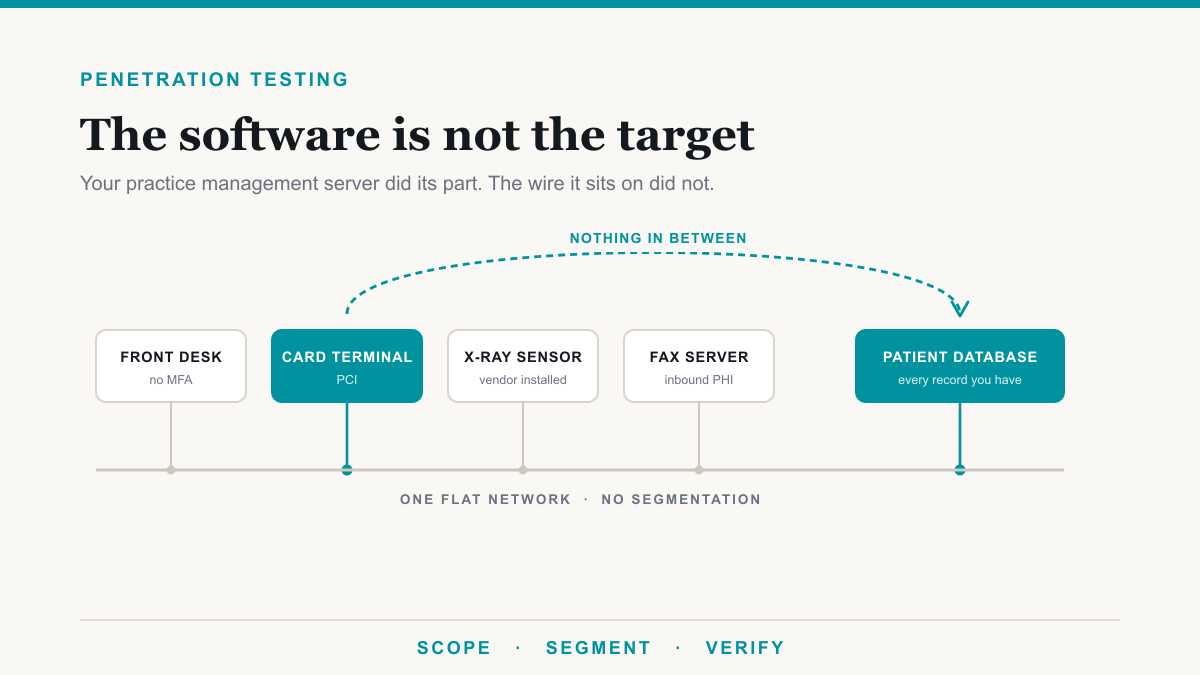
- Credit card terminals on the same network as patient data
The segmentation point ties this together, and it is measurable. Palo Alto's Unit 42 analyzed 1.2 million connected devices and found 72% of healthcare networks mixing connected devices and IT assets on the same segment, and 83% of medical imaging devices running unsupported operating systems. A flat network is not an unusual failure. It is the default state of a practice that grew one vendor at a time.
The card terminal on the data VLAN
That last bullet deserves its own moment, because it is the whole post in one image.
The PCI Security Standards Council is clear that segmentation is not a PCI DSS requirement. It is the recommended method for reducing your assessment scope, cost, and risk. Most owners never hear the consequence of skipping it: if you do not segment, everything on that flat network is in scope. The fax server is in scope. The imaging server is in scope. The backup drive, the time clock, and the waiting-room TV are in scope. Plenty of small practices are self-attesting on a questionnaire that quietly assumes a scope they do not actually have.
But set the paperwork aside for a second and just look at the wire. Your card terminal, a device you did not choose, cannot patch, and never think about, is plugged into the same flat network as the server holding your patients' records. Nothing stands between them. That is not a compliance abstraction. That is a path, and it exists in a lot of buildings right now, because no single vendor was ever responsible for the whole room.
OCR does not fine you for the breach. It fines you for the risk analysis you never did.
This is the part worth remembering, and you can follow it end to end on one imaging server.
Greenbone found the Northeast Radiology and Alliance HealthCare imaging system in that 2019 scan: roughly 61 million images, about 1.2 million patients. Researchers notified them in December 2019. NERAD reported the breach to OCR in March 2020 and notified 298,532 patients, though it could confirm unauthorized access for only 29 of them. In April 2025, OCR settled for 350,000 dollars plus two years of monitoring. The cited violation was not the exposure. It was the failure to conduct a compliant risk analysis, the requirement that sits at 45 C.F.R. 164.308(a)(1)(ii)(A).
Read the headline on that announcement, because it is the part that should change how you think about this: "Settlement Marks OCR's 6th Enforcement Action in OCR's Risk Analysis Initiative." This is not a regulator reacting to one bad breach. It is a named, running enforcement program aimed at a single failure, and Northeast Radiology was the sixth. OCR Acting Director Anthony Archeval, in the same announcement: "A failure to conduct a risk analysis often foreshadows a future HIPAA breach."
The small-practice version landed a month later. Vision Upright MRI had a PACS server exposed, affecting 21,778 individuals, and had never conducted a risk analysis at all. The settlement was 5,000 dollars and a two-year corrective action plan. Being small buys a smaller number. It does not buy a pass.
OCR's own framing of why it works this way is worth quoting plainly: a failure to conduct a risk analysis often foreshadows a future HIPAA breach. The enforceable failure is the assessment nobody got around to. That is it. That is the whole rule in one sentence, and it is the one thing on this page that is entirely within your control.
Frequently asked questions
Is on-premise software less secure than cloud for a medical practice?
Not inherently. Most of the large EMR breaches you have read about hit vendor-hosted platforms, not customer servers. The real difference is attention. A cloud vendor has a security team watching its platform full time. An on-prem practice usually has a room nobody has reviewed since installation day, and that gap is the risk.
What should I ask my practice management vendor about firewall ports?
Ask which ports the software needs, whether each one has to be reachable from the internet or only from inside your office, and what breaks if it is closed. Get the answer in writing. Vendor guidance in this category varies widely, and some documentation asks for far more access than the software actually needs.
Does my dental imaging server need to be reachable from the internet?
Almost never. Imaging systems generally need to be reachable from operatory workstations inside the office, not from the public internet. If remote access is genuinely needed, it should run through a VPN or a controlled remote-access tool rather than a port forwarded on the router to the imaging server.
Why does network segmentation matter if I already have a firewall?
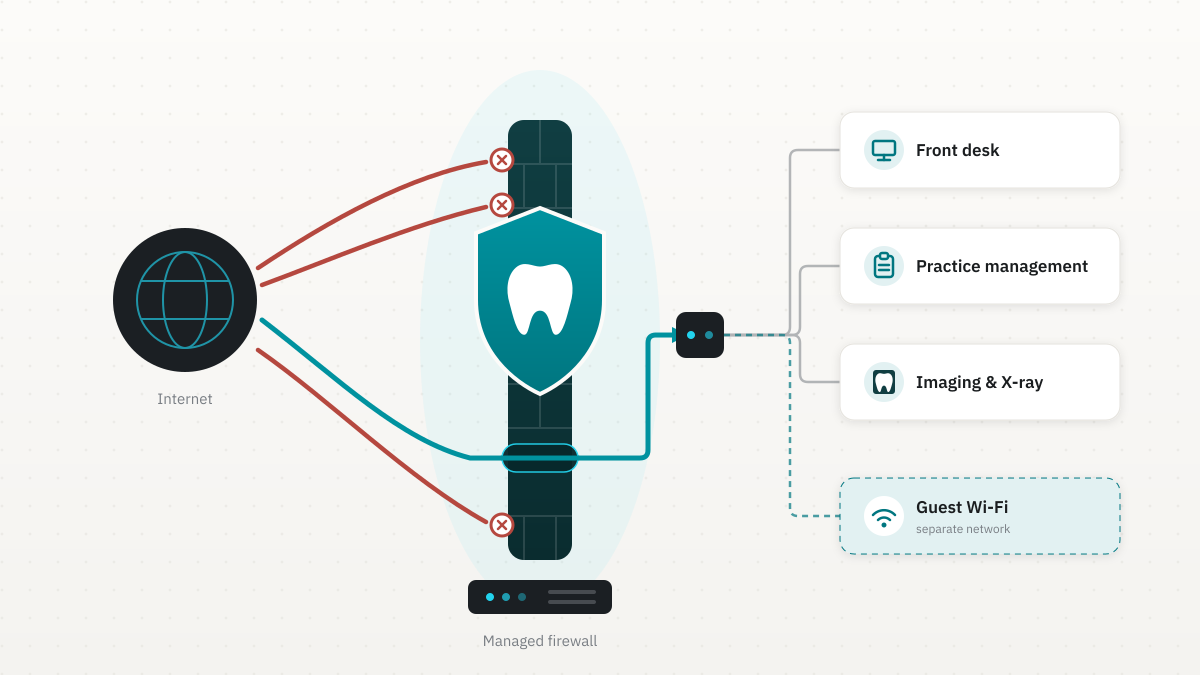
A firewall controls traffic entering and leaving your office. Segmentation controls what devices inside the office can reach each other. Without it, anything that gets a foothold on any device, including a card terminal or a waiting-room TV, can reach the server holding patient records.
What does OCR actually penalize practices for after a breach?
In published settlements involving exposed imaging servers, the cited failure was not the exposure itself but the absence of a compliant HIPAA risk analysis. OCR has pursued practices of every size on this point, including a small imaging provider that had never conducted one and settled for 5,000 dollars plus two years of monitoring.
Where to start with on-prem server security for your practice
The first move is not expensive, and it is not a purchase. It is an inventory. Walk the room and write down every device with a network cable, including the ones no vendor claims: the imaging server, the fax box, the backup drive, the card terminal, the phone system, the time clock, the TV. For each one, answer three questions. What is it? Who installed it? What can it reach? Most practices cannot finish that list from memory, and the gaps are the finding.
From there the work is unglamorous and effective: segment the network so the card terminal and the imaging server stop being neighbors, which in a small practice is usually done on a business-grade firewall (we use Fortinet firewalls sized for dental and medical practices), get multi-factor authentication onto anything touching patient data, close the services nobody uses, and write the risk analysis down.
If you would like a clear picture of what is actually on your practice network and which of it matters, Desert Lakes Solutions offers a no-pressure discovery call to walk the room with you and point out the easy wins. We do medical practice IT and dental practice IT for a living, and this inventory is where every engagement starts. Book a discovery call and we will take it from there. If you want to go deeper on the underlying controls, our security and compliance pages cover what the work looks like.