Tesla Fleet Management Starts With Getting the Data Out of the App
Published June 7, 2026, updated July 18, 2026
Getting your Tesla fleet’s data out of the app comes down to the Tesla Fleet API, the official channel that streams location, charging, mileage, and usage into your own reports instead of trapping it in the driver app. Managing a fleet should be straightforward. The cars already know where they are, how they are charging, how far they have driven, and how hard they are being used. The problem is that all of it lives inside an app built for a driver checking on one car, not an operations lead managing twenty, and you cannot manage what you cannot see. Real fleet management starts with getting that data out and into your own reports. This post is for fleet owners and operations leads who want exactly that, and it walks through what it actually takes, because the path has a few traps that sink most do-it-yourself attempts.
The short version: the data comes out through the Tesla Fleet API, the single biggest reason it fails to flow is a missing permission scope, and a clean enrollment is what keeps the connection alive past the first week. Get those right and you have the foundation everything else, tracking, utilization, charging, cost, sits on.
The Fleet API is the front door, and it has rules
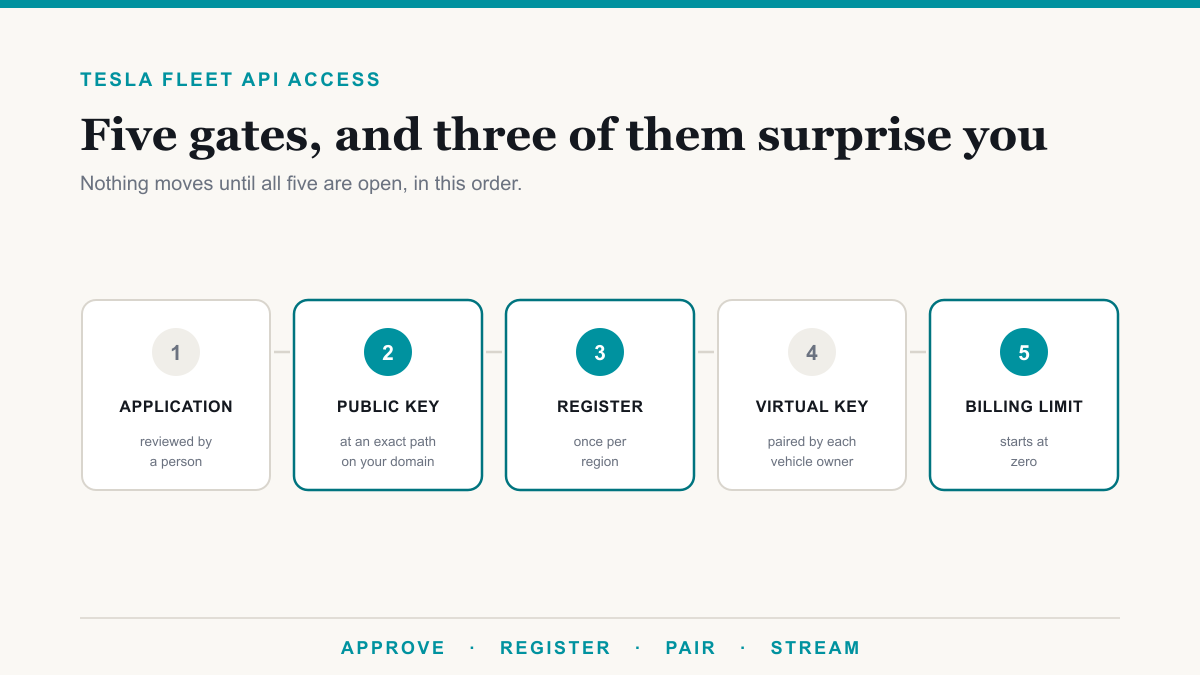
Tesla exposes vehicle data through its Fleet API. That is the supported, official way to read location, battery and charging state, trips, mileage, and overall status out of the cars and into something you control. There is no shortcut around it, and the API expects you to do things in a particular order: register as a partner, authenticate, and request exactly the permissions you intend to use. If you are starting from zero, getting Tesla Fleet API access walks through the approval and registration sequence step by step.
That last part is where most projects quietly break.
Scopes are why your dashboard is blank
Tesla gates vehicle data behind specific OAuth permission scopes. The one that catches everyone is the location scope: without it, the API will happily tell you a car is asleep or awake but return nothing when you ask for actual drive, charge, or position data. Every request comes back empty, and because the app’s own settings all look enabled, it feels like the integration is working when it is returning nothing useful.
The fix sounds simple, ask for the right scope, but there is a second trap waiting. If a vehicle has already authorized the connection without that scope, re-running the approval does not add it. Tesla reuses the existing grant and reissues the same limited permissions, even though the screen says it succeeded. The only reliable way through is to have the owner revoke the connection first, then approve it fresh so the location permission is actually granted. Knowing that ahead of time is the difference between a thirty-minute fix and a week of chasing a problem that never shows an error.
Enrolling vehicles so the connection holds
Reading data is one thing; keeping it flowing is another. Each vehicle should be paired with a virtual key and registered against your partner credentials. The virtual key is what lets the platform authenticate to the car in a stable, secure way, and it is also what makes it possible to send commands to a vehicle later, like adjusting charging, through Tesla’s command proxy.
A casual setup that skips proper enrollment tends to work in the first demo and then fall over, because tokens expire and connections that were never properly anchored stop refreshing. A clean enrollment, with keys paired and credentials registered correctly, is what turns a one-time pull into a pipeline you can rely on.
Live or historical: you want both
There are two ways to get data, and a good build uses each for what it is good at. A streaming connection gives you near real-time position and status, useful when you genuinely need to know where a vehicle is right now. Periodic reads and stored history give you everything else: the ability to look back at a single trip or report across a whole quarter of utilization.
Raw API output, though, is not something anyone wants to read. Positions come back as coordinates, and activity comes back as a stream of events. The useful step is turning that into something human: reverse-geocoding locations into real places, and reconstructing the raw stream into drives and charges you can actually interpret. That processed history is what makes reporting possible.
When streaming is the whole point
For many fleets, near real time is not a nice-to-have, it is the requirement, and that pushes you from periodic reads into Tesla Fleet Telemetry, the streaming side of the platform. Streaming is where the data gets both cheaper and more demanding to set up, so it is worth understanding before you commit.
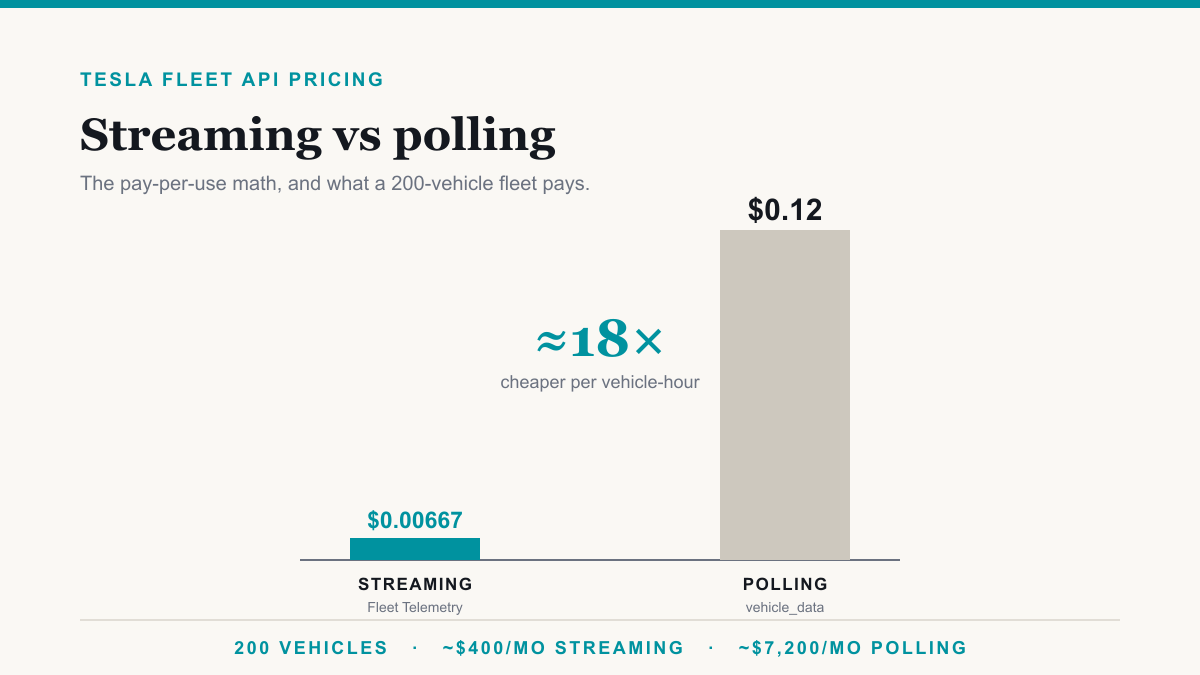
On cost, streaming runs far below polling, roughly $0.00667 per vehicle-hour against about $0.12 for polling the same data on a schedule, which for a fleet of any size is the difference between a monthly bill in the hundreds and one in the thousands. We break the numbers down, with a worked 200-vehicle example, in Tesla Fleet API pricing: streaming vs polling.
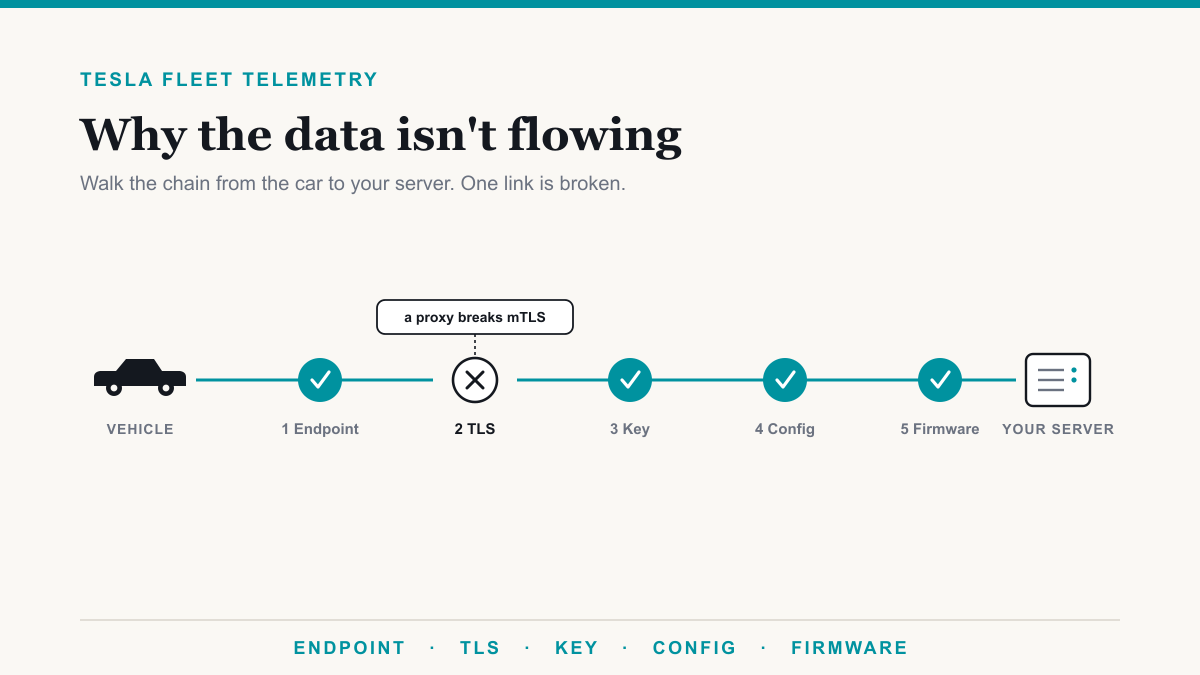
On setup, the vehicles are strict about what they will stream to, and a home-grown endpoint is the single most common reason a streaming build authorizes cleanly and then produces nothing. If you have hit that wall, the fix is almost always one of a short list of specific problems, which we walk through in why your Tesla Fleet Telemetry server isn’t receiving data. And if the platform receiving the stream lives on your own hardware, there is a clean way to bridge Tesla’s public requirement to your private network without exposing it, covered in getting Tesla telemetry into an on-prem platform. That on-prem, feed-into-your-own-platform path is a growing part of what we do alongside the dashboards this post describes.
Where the data should live
A recurring reason businesses want this in the first place is ownership. A third-party telematics app holds your data on its terms and often charges per vehicle just to see it. The alternative is to land the telemetry in a database on infrastructure you control, then surface it wherever your team already works.
In practice that means clean dashboards, white-labeled with your own branding so the login and the views read as your platform. And because everything lands in a standard database you control, the data stays yours to work with. The data is yours, the pipeline is yours, and nobody is metering access to numbers your own vehicles produced.
What the reporting answers
Once the data flows and lands somewhere usable, the reporting writes itself around the questions operators actually have. Utilization, so you know which vehicles earn their keep. Charging cost and patterns, so the energy line is not a mystery. Mileage and trips, per driver and per vehicle, so accountability and planning have real numbers behind them. None of that is exotic; it is just data that was previously stuck in an app, finally sitting where decisions get made.
Frequently asked questions
Do I need to be technical to do this?
No, but the integration does. The work of partner registration, scope handling, virtual key enrollment, and the data pipeline is genuinely fiddly, which is the value of having it built correctly once rather than rediscovering each trap yourself.
Can the system control the vehicles, not just read them?
Yes, with the right setup. A paired virtual key and Tesla’s command proxy allow authenticated actions like climate or charging control. It is optional, and it should be built with proper security around it, but it is on the table.
Who owns the data once it is set up?
You do. The whole point of this approach is that the database and the reporting run on infrastructure you control, rather than inside a vendor app that rents your own data back to you.
The bottom line
Managing a Tesla fleet well is less about the cars and more about the plumbing underneath: the Fleet API, the right scopes, a clean vehicle enrollment, and a data pipeline that lands everything somewhere you own. Get that foundation right and the management layer, tracking, utilization, charging, cost, follows naturally. The traps are real and mostly invisible until you hit them, which is exactly why doing it once, correctly, beats fighting blank dashboards.
If you are running a Tesla fleet and want to actually manage it instead of checking cars one at a time, Desert Lakes Solutions can help. Learn more about our Tesla fleet management work, or book a discovery call and tell us what you want to see.