Why Your Tesla Fleet Telemetry Server Isn't Receiving Data
Published July 18, 2026
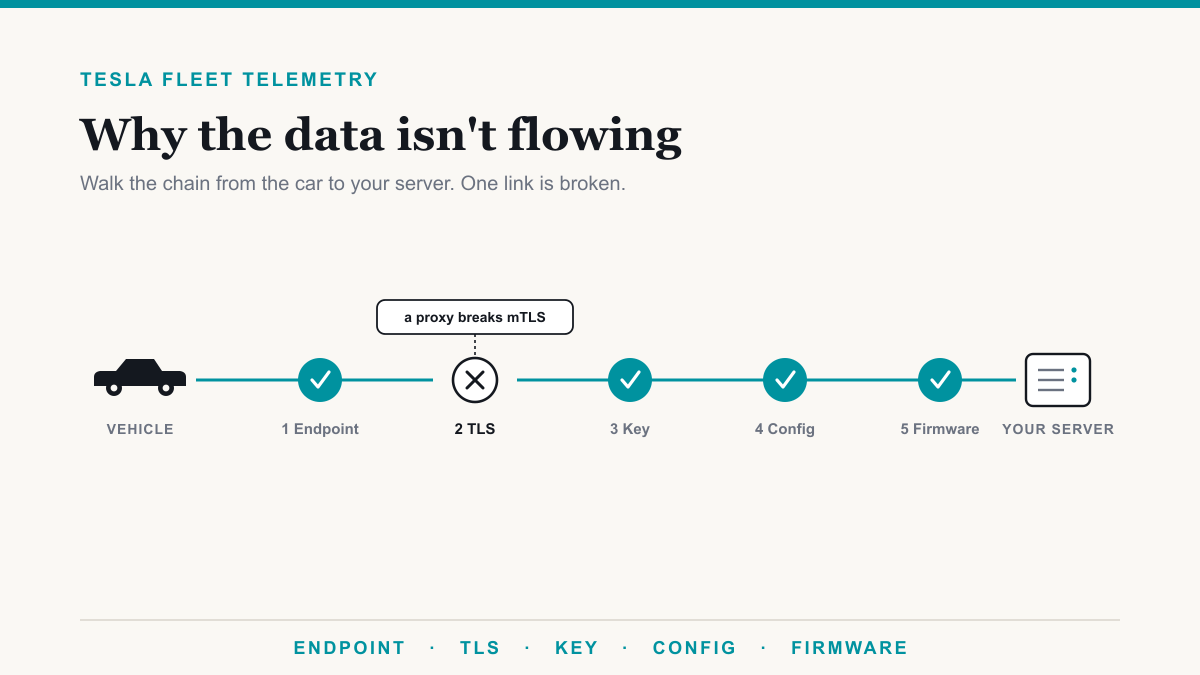
If your Tesla Fleet Telemetry server is not receiving data, the cause is almost always that the vehicles cannot complete a secure connection to it, and that traces back to one of five specific things: the endpoint is not Tesla's own fleet-telemetry server, TLS is being terminated in the wrong place, a virtual key was never paired, the per-vehicle config never synced, or the firmware is too old. This post is for the developer or platform team that has already wired up the Tesla side, watched the vehicles authorize, and then stared at an empty pipeline wondering where the data went. The good news is that a silent Fleet Telemetry failure is almost never mysterious once you know the chain. Walk it in order and you will find the break.
The short version: Tesla's telemetry is a push model, the vehicles are strict about who they will connect to and how, and the failure is usually structural rather than a bug in your code. Below is the chain from the car outward, with the reason each link tends to snap.
1. The endpoint has to be Tesla's fleet-telemetry server, not your own socket
The single most common reason a build stalls is that the vehicle-facing endpoint is a service someone wrote in house, a custom websocket or a SignalR or .NET listener, standing where Tesla's fleet-telemetry server is supposed to be. That will not work, and it is worth understanding why so the fix is obvious.
Tesla ships an open-source fleet-telemetry server that the vehicles are built to talk to. The cars authenticate to it with TLS client certificates, send their data as protobuf messages, and expect the server to acknowledge those records. A hand-rolled endpoint does none of that: it does not present the handshake the vehicles expect, it cannot validate the client certificate, and it cannot parse protobuf or send back an acknowledgement. So the connection opens, gets nowhere, and closes, which is exactly the "the session connects but never terminates properly" symptom teams describe. The fix is not to patch your socket service. It is to run Tesla's server and point your platform at its output.
2. TLS has to terminate at that server, with nothing decrypting in front of it
Once you are running the real server, the next thing that breaks it is the network layer in front. Because the vehicles use mutual TLS, the client certificate the car presents has to reach the fleet-telemetry server intact so the server can verify it. Anything that terminates TLS before the traffic gets there will quietly kill the connection.
In practice that means a reverse proxy, an application load balancer, an API gateway, or an IIS or nginx site sitting in front and ending the TLS session is the problem. Those Layer 7 devices decrypt the connection to inspect or route it, and in doing so they either drop the client certificate or fail the mutual check, and the vehicle cannot connect. Tesla's own setup guidance is blunt about it: the mTLS connection must be terminated on the fleet-telemetry service itself. If you need a load balancer, keep it at Layer 4 so it passes the raw TCP through untouched. The server also needs a publicly trusted certificate on a real hostname, because the vehicles validate what they are connecting to. A self-signed certificate that works fine in your browser will be rejected by the cars.
3. Each vehicle needs your virtual key paired
With the endpoint and TLS correct, the connection can happen, but the vehicle still has to be told to trust your application and stream to it. That trust comes from a virtual key. Each car needs your app's virtual key added to it, which the owner or driver does once per vehicle through a pairing link. The key is what lets your later instructions to the car be authenticated.
When the virtual key is missing, everything upstream can look healthy and the vehicle still will not report, because the command that configures its telemetry cannot be authorized. If a subset of your fleet streams and the rest is dark, an unpaired virtual key on the dark vehicles is one of the first things to check.
4. The per-vehicle config has to be a signed command that reports as synced
Telling a car where to stream is not a setting you flip in a dashboard. You push a telemetry configuration to each vehicle by its VIN, and that configuration has to be sent as a signed command through Tesla's vehicle-command proxy. The proxy signs the config with your private key, which is why Tesla itself cannot alter it, and forwards it to the car. Skip the signing path and the vehicle rejects the instruction.
The step teams miss is verification. After you push a config, read it back and confirm the vehicle reports it as synced. A config that was sent but never synced means the car was handed instructions it never accepted, so it will sit there producing nothing. If a VIN will not sync, work back up this same chain: the virtual key may be missing, the car may be asleep or offline, or its firmware may be below the minimum. The synced flag is the honest signal that the vehicle is actually configured, which is why it belongs in your monitoring rather than a one-time check at setup.
5. The vehicles need firmware new enough to stream
Last, a vehicle can be paired and configured correctly and still stay silent if its firmware is too old. Tesla sets minimum versions for Fleet Telemetry, and a car below the line will not report no matter what you do on your side.
As a working baseline, most vehicles need firmware 2024.26 or later to stream telemetry. Applications still using the legacy certificate signing process need 2023.20.6 or later, and older Model S and Model X built on Intel Atom computers need 2025.20 or later. Tesla documents the current minimums in its Fleet Telemetry overview, and they move over time, so check them against the specific models in your fleet rather than assuming. If one older car in a mixed fleet is the only one not reporting, firmware is the usual answer.
Working the chain, in order
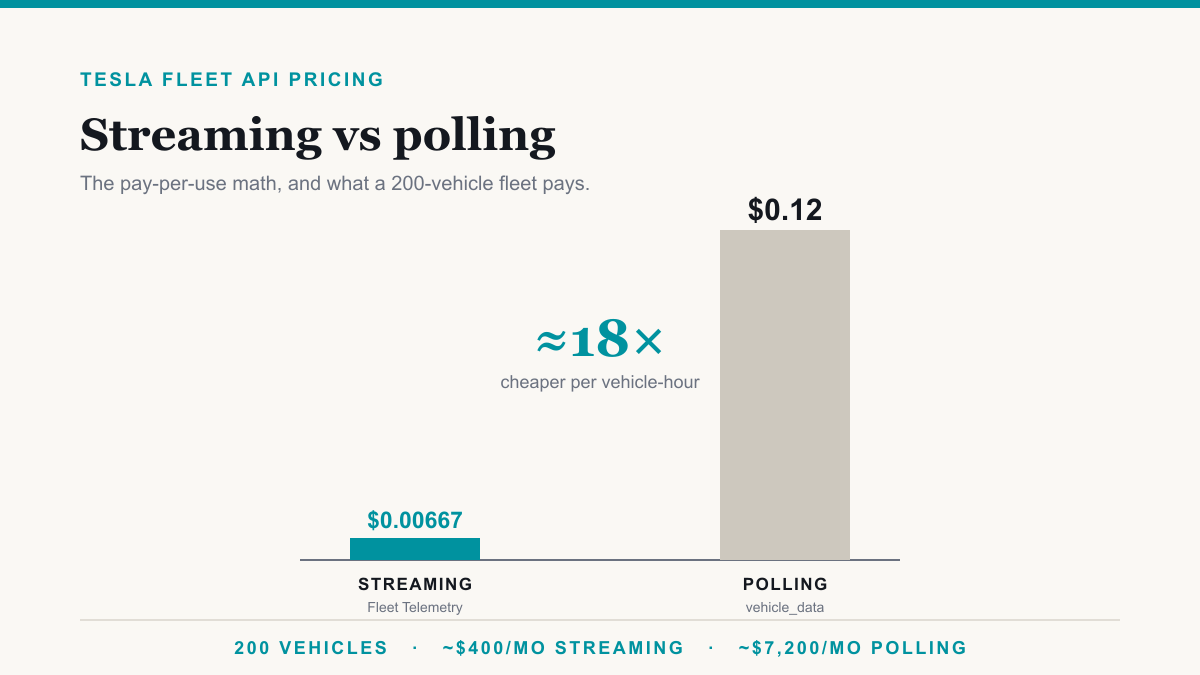
When data is not flowing, resist the urge to jump straight to packet captures. The failure is nearly always structural, and the chain above is ordered roughly by how often each link is the culprit. Confirm the endpoint is Tesla's server, confirm TLS reaches it untouched, confirm the virtual key is on the car, confirm the config comes back synced, and confirm the firmware clears the minimum. One of those five is almost certainly where your data is stopping. It is worth working through rather than falling back to polling, which runs roughly eighteen times more for the same data, as we show in Tesla Fleet API pricing: streaming vs polling.
None of this is a knock on the teams who hit it. The Fleet Telemetry path is genuinely particular, most of the failure modes throw no error, and the documentation assumes you already know the shape of the system. That combination is exactly why a build can look finished and produce nothing. If you would rather not spend another week bisecting it, that is the work we do: a short, fixed-scope assessment that walks your developer app, endpoint, certificates, and per-vehicle configs, tells you precisely where the break is, and then finishes the integration. You can see how we deliver Tesla fleet data as a feed or as dashboards, and if you are aiming everything at an on-prem platform, we cover that in getting Tesla telemetry into an on-prem platform. If you are starting clean rather than debugging, our Tesla Fleet Telemetry server setup guide walks the happy path in order.
Frequently asked questions
Why isn't my Tesla Fleet Telemetry server receiving data?
Almost always because the vehicles cannot complete a secure connection to it. The usual causes, in order, are an endpoint that is not Tesla's fleet-telemetry server, TLS terminated by a proxy in front of it, an unpaired virtual key, a per-vehicle config that never synced, or firmware that is too old.
Can I use my own websocket or SignalR endpoint instead of Tesla's fleet-telemetry server?
No. The vehicles authenticate with TLS client certificates, send protobuf messages, and expect acknowledgements from Tesla's open-source fleet-telemetry server specifically. A custom websocket or SignalR service does not implement that handshake, so the connection never completes and no data lands.
Does putting Tesla Fleet Telemetry behind nginx or a load balancer break it?
It does if that layer terminates TLS. The vehicles use mutual TLS, so the connection has to reach the fleet-telemetry server with the client certificate intact. Any Layer 7 proxy that ends the TLS session breaks the certificate check. Use Layer 4 passthrough at most, or none at all.
How do I know if a vehicle's telemetry config was actually applied?
Check that the vehicle reports the config as synced. You push the per-vehicle telemetry configuration as a signed command through the vehicle-command proxy, then read it back. If it does not come back synced, the car was told where to stream but never accepted the instruction, so it will not report.
What firmware do vehicles need for Tesla Fleet Telemetry?
Most vehicles need firmware 2024.26 or later to stream telemetry. Apps still using the legacy certificate signing process need 2023.20.6 or later, and older Model S and Model X with Intel Atom computers need 2025.20 or later. A vehicle below its minimum will not report even when everything else is correct.
Getting your Tesla Fleet Telemetry server receiving data again
A Tesla Fleet Telemetry server that is not receiving data is a solvable problem, and it is usually one of five known breaks rather than a deep bug. Run the real server, let TLS reach it untouched, pair the virtual keys, push signed configs and confirm they sync, and keep the firmware current. If you would rather have someone pinpoint the stall and finish the build, Desert Lakes Solutions runs a short, fixed-scope assessment that does exactly that. Book a discovery call and tell us where your data stops.