Getting Tesla Telemetry Into an On-Prem Platform
Published July 18, 2026
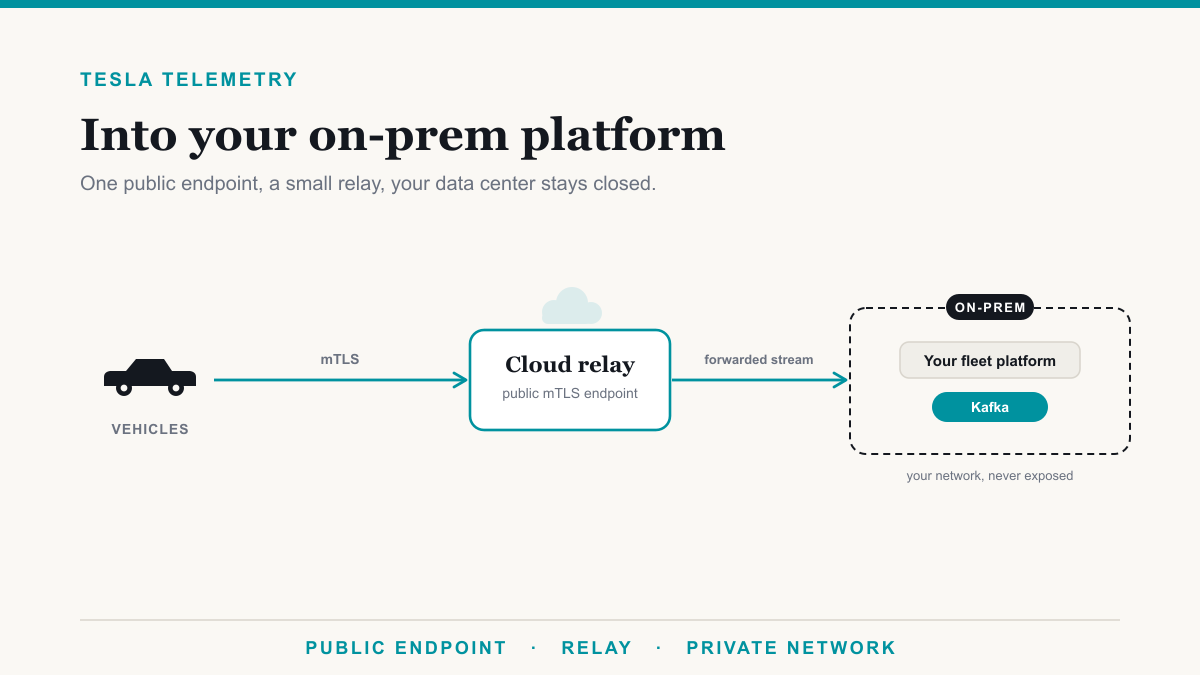
Getting Tesla telemetry into an on-prem platform works like this: the vehicles connect to one public endpoint, and a small cloud relay forwards that stream down into your private network, so your platform stays on premises and your data center never has to face the internet. This post is for the team that has committed to an on-prem or self-hosted fleet platform and needs Tesla data flowing into it without turning the whole architecture inside out. The tension is real, because Tesla's vehicles insist on reaching a public server while your platform lives behind your firewall, but the two are reconciled with a relay and one careful decision about a hostname. Here is how the pieces fit.
The one hard constraint: vehicles need a public endpoint
Start with the fact that shapes everything else. Tesla vehicles stream telemetry by opening an outbound connection to a server on the public internet. They authenticate to it with a mutual TLS client certificate and push their data to it. What they cannot do is dial into your private network, sit on your VPN, or discover a server that only exists behind your firewall. From the car's point of view, there has to be a public address with a valid, publicly trusted certificate waiting to receive it.
That is the part people hope to avoid when the goal is on-prem, and it is not avoidable. But notice what it does and does not require. It requires that something internet-facing receives the vehicles. It does not require that the something be your data center. That distinction is the whole game, and it is what makes a genuinely on-prem platform compatible with Tesla telemetry.
Pick the hostname once, because it is baked into every vehicle
Before you stand anything up, decide on the public hostname carefully, because it is unusually sticky. When you configure a vehicle for telemetry, the endpoint's hostname is written into a per-vehicle configuration that is signed with your private key and pushed to the car. The vehicle then streams to that exact address. The hostname is not a setting the car checks each time; it is part of the signed instruction it is carrying.
The consequence is that moving the endpoint later is not a DNS change. If you decide to change the hostname the vehicles stream to, every car in the fleet needs a brand-new signed config generated, pushed, and confirmed as synced. On a couple of vehicles that is a chore. Across a real fleet it is a project, and any car that is asleep or offline when you re-push lags behind until it catches up. So treat the endpoint hostname as a long-lived decision. Pick a name you control and can keep, put it on infrastructure you will not need to move, and you spare yourself a fleet-wide re-push down the road. This, incidentally, is another reason a thin relay is attractive: it lets the stable public name live in one small place that rarely has to change, independent of whatever you do to your platform.
Two ways to bridge to on-prem
With those constraints in mind, there are really two shapes for connecting Tesla's public requirement to your private platform.
The first is to expose your data center directly. You place Tesla's fleet-telemetry server in a DMZ at your edge, give it a public hostname and certificate, and let the vehicles connect straight to your perimeter. It works, and for some organizations it is fine, but it means your core network is now hosting an internet-facing service that hundreds of vehicles connect to, with all the hardening, patching, and monitoring that a public attack surface demands. If the reason you are on-prem in the first place is to keep your environment closed, this quietly undoes part of that.
The second, and usually the better fit, is a small cloud relay. You run the public endpoint, the fleet-telemetry server itself, in a compact cloud footprint. The vehicles connect there, the relay terminates their mutual TLS and decodes the stream, and it then forwards that stream down into your on-prem network over a single controlled channel. Your platform stays exactly where it is, your data center only accepts a forwarded feed rather than raw vehicle connections, and the internet-facing surface is isolated in a small, purpose-built place you can lock down independently. You get the public endpoint Tesla demands without putting your core network on the internet. It is the arrangement we reach for most often when a platform has to remain on premises.
Kafka-native output, without running a Kafka cluster
The last piece is how the data actually lands in your platform, and here Tesla is helpfully conventional. The fleet-telemetry server dispatches decoded records to Kafka as its preferred output, among other backends. Kafka is a natural fit for a telemetry stream, and if you already run Kafka on premises, the relay can forward straight onto your existing topics and you are done.
If you do not run Kafka and would rather not operate a cluster just to receive a feed, you still have a clean path, because the Kafka protocol is widely spoken. Azure Event Hubs, for instance, exposes a Kafka endpoint that Kafka clients connect to with only a configuration change and, in Microsoft's own words, "without running your own cluster." There are no brokers to stand up, patch, or scale. The relay writes to that endpoint using the ordinary Kafka protocol, and your on-prem consumer reads from it the same way it would read from any Kafka topic. You get Kafka semantics and a durable buffer between the vehicles and your platform without taking on the operational weight of Kafka itself. Either way, the output side is a solved problem; the interesting decisions are all on the endpoint and relay side above.
Frequently asked questions
Can Tesla telemetry stay entirely on premises?
Not entirely. The vehicles have to connect outbound to a public endpoint, so something internet-facing has to receive them. Your platform can absolutely stay on premises, though. A small cloud relay takes the vehicle connections and forwards the stream down into your private network, so only the relay is exposed.
Why does the Tesla telemetry endpoint hostname matter so much?
Because the hostname is written into every vehicle's signed telemetry configuration. The cars stream to that exact address. If you move the endpoint later, every vehicle needs a fresh signed config pushed and confirmed as synced, which is a fleet-wide operation. Choosing a stable hostname up front avoids it.
What is a telemetry relay and why use one?
A relay is a small internet-facing service that runs the public mTLS endpoint the vehicles connect to, then forwards the decoded stream into your private network. It lets your platform stay fully on premises while keeping your data center off the public internet, since only the relay is exposed.
Do I need to run a Kafka cluster for Tesla telemetry?
No. Tesla's fleet-telemetry server outputs to Kafka natively, but you do not have to operate a cluster to receive it. Azure Event Hubs exposes a Kafka endpoint that Kafka clients talk to without any cluster to manage, so you can consume the stream on premises with no brokers to run.
Is exposing our data center to the internet required?
No, and it is usually the wrong move. The whole point of a cloud relay is that the internet-facing surface lives in a small, hardened footprint you control separately, while your data center only accepts a forwarded stream over a controlled channel. Your core network never has to face the open internet.
Bringing Tesla telemetry to your on-prem platform
Getting Tesla telemetry into an on-prem platform is less about your platform and more about respecting one constraint gracefully: the vehicles need a stable public endpoint, so you give them a small relay that owns that surface and forwards the stream inward. Choose the hostname once, keep your data center off the internet, and let Kafka carry the feed the rest of the way. Done that way, your platform stays fully on premises and the Tesla side simply works. If you want help designing the relay, locking down the endpoint, or making sure the stream is set up correctly, Desert Lakes Solutions does exactly this. See how we deliver Tesla fleet data as a feed, read up on what streaming actually costs, or book a discovery call to talk through your setup.