Tesla Fleet API Access: Getting Approved and Connected
Published July 31, 2026
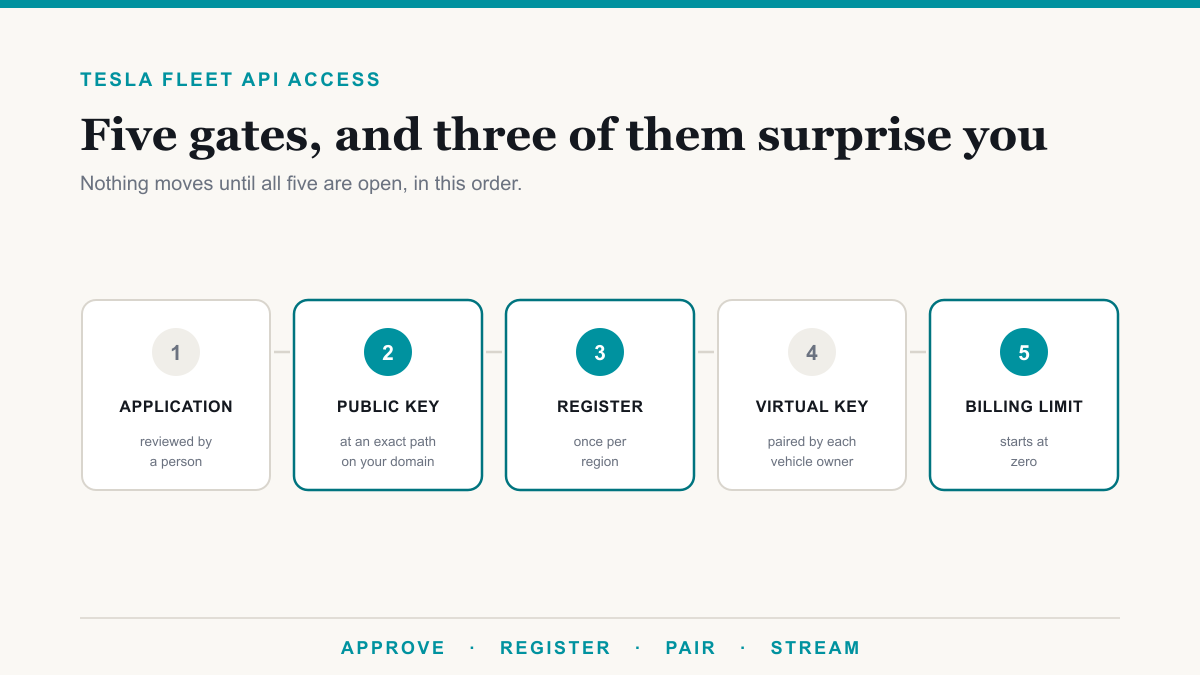
Getting Tesla Fleet API access takes five things in order: an application Tesla reviews and approves, the client credentials it issues, a public key hosted on your own domain, a partner account registered in each region you operate in, and a virtual key paired with each vehicle. Most teams budget for the first two and get caught by the middle three, which is why a build that looks two days long turns into two weeks. This guide is for the developer or platform team standing at the beginning of that process, and it covers the order that works and the two steps that are easy to miss entirely.
Worth saying up front: none of this is the hard part of a fleet integration. It is paperwork and plumbing. But it all has to be right before a single byte of vehicle data moves, so it is worth doing deliberately rather than discovering each requirement one error at a time.
Step 1: The application Tesla actually reviews
Access starts on Tesla's developer portal, with a Tesla account that has a verified email address and multi-factor authentication enabled. The application itself asks for your legal business details, the name and description of your app, and what you intend to use the data for. Once approved, you receive a client ID and client secret.
Two practical notes. This is a human review rather than an instant provisioning step, so treat it as a lead time in your project plan and submit it early. And write the purpose-of-use answer as if a person is reading it, because one is. A specific description of the application you are building tends to move faster than a generic one.
Step 2: Host your public key where Tesla will look for it
This is the step teams most often do not see coming. You generate a key pair and publish the public key at a fixed path on the domain your application is registered against:
https://your-domain.com/.well-known/appspecific/com.tesla.3p.public-key.pem
The path is exact, and the file has to be publicly reachable before the next step will work. Its first job is proving you control the domain. Its second job is larger: the same key pair is what signs vehicle commands and underpins Fleet Telemetry, so this is infrastructure rather than a one-time verification hoop. If your domain is behind a proxy or a security product that intercepts unusual paths, confirm this one is served cleanly.
Step 3: Register your partner account, once per region
Having credentials is not the same as being registered. You generate a partner authentication token, then use it to call the register endpoint, and this has to be completed in every region you operate in. That regional detail catches people, because an integration that works perfectly for North American vehicles will return nothing for a car in Europe until the same registration is repeated against the European base URL.
The partner token comes from a client credentials request to Tesla's auth endpoint at https://fleet-auth.prd.vn.cloud.tesla.com/oauth2/v3/token, with the audience set to the regional base URL you are registering against. The regions are:
| Region | Base URL |
|---|---|
| North America and Asia-Pacific, excluding China | https://fleet-api.prd.na.vn.cloud.tesla.com |
| Europe, Middle East, and Africa | https://fleet-api.prd.eu.vn.cloud.tesla.com |
| China | https://fleet-api.prd.cn.vn.cloud.tesla.cn |
With that token you call POST /api/1/partner_accounts with your domain. To confirm it worked, call GET /api/1/partner_accounts/public_key with the same domain and check that the key it returns is the one you published in step 2. That check is worth doing rather than assuming, because a mismatch here produces confusing failures much later. Tesla documents the flow in its partner tokens guide.
Step 4: Pair a virtual key with each vehicle
Registration gets your application recognized by Tesla. A virtual key gets it recognized by an individual car. The owner of each vehicle pairs it by visiting https://tesla.com/_ak/your-domain.com from a phone with the Tesla app installed, which enrolls your application's key in that vehicle.
This is the gate for authenticated commands and for streaming telemetry, so for a fleet of any size it is worth treating as an onboarding workflow rather than an afterthought: a link you send, a way to see which vehicles have completed it, and a way to chase the ones that have not. One useful exception, documented in Tesla's vehicle command SDK: pre-2021 Model S and Model X do not support the protocol, and Fleet API continues to work on those vehicles without it.
The billing limit that silently blocks a working integration
There is one more setting that stops a correctly built integration, and it is not in the code. Every account starts with a billing limit of zero, which can only be raised once a payment method is on file. If everything above is done and usage still will not proceed, check this before you start debugging anything else.
The rest of the billing model is worth knowing before you scale. Tesla applies a $10 monthly credit per account, which is enough to cover a small pilot, and it publishes the per-unit rates in its billing and limits documentation. Billing cycles run monthly, and you get an email at 80 percent of your limit and again when you hit it. The detail that surprises development teams is what counts: any request returning a status code below 500 is billable usage, including your own client errors, while 500 and above is not. A retry loop against a malformed request is real spend.
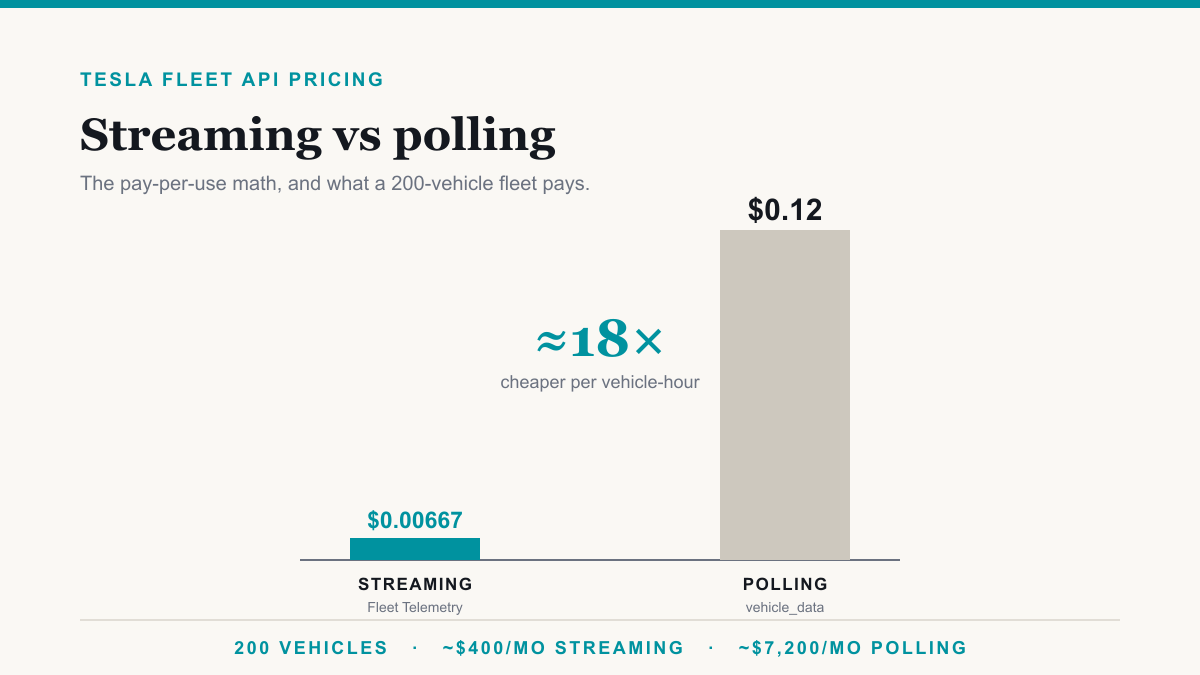
This is also where the architecture decision you make later has the largest cost consequence. Streaming telemetry runs roughly eighteen times cheaper than polling the same data on a schedule, which we work through with a 200-vehicle example in Tesla Fleet API pricing: streaming vs polling.
What to do once Tesla Fleet API access is working
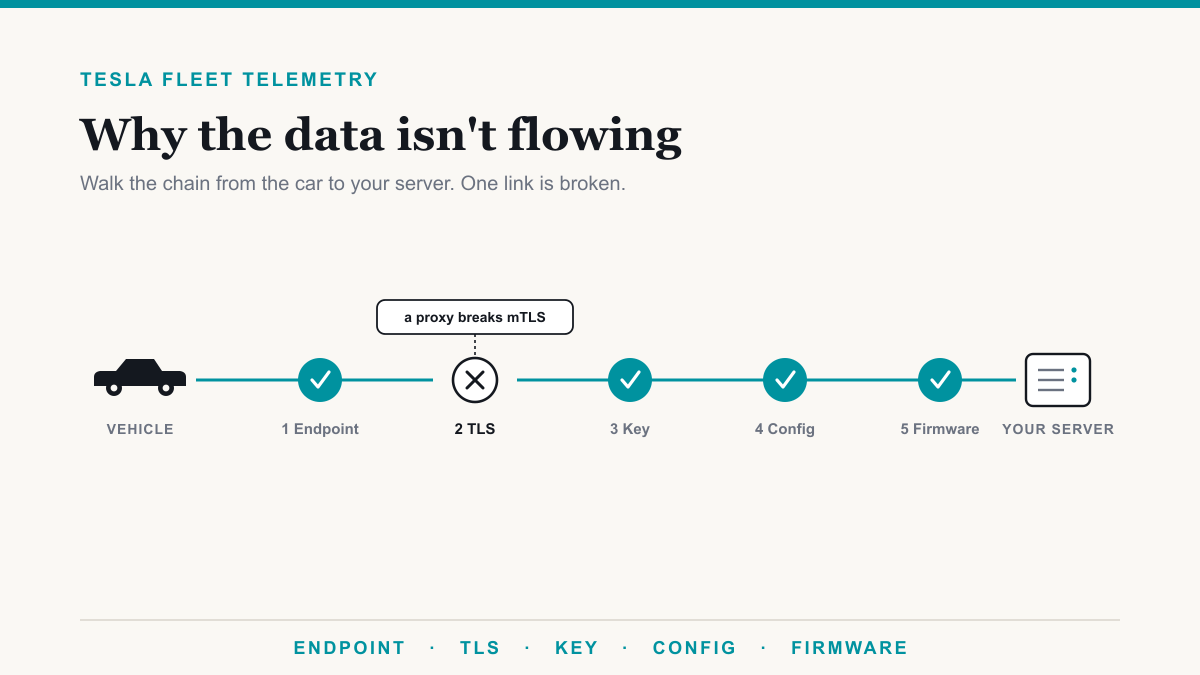
With access in place, the build splits along a fork. If periodic reads are enough for your use case, you are effectively done with onboarding and into normal API work. If you need near real time data, the next step is standing up Fleet Telemetry, which has its own short list of strict requirements and is walked through in our Tesla Fleet Telemetry server setup guide. If you have already built that and it is authorizing cleanly but delivering nothing, the cause is almost always one of five specific things, covered in why your Fleet Telemetry server isn't receiving data. And if the platform consuming the stream runs on your own hardware, there is a clean way to bridge Tesla's public endpoint requirement into a private network, described in getting Tesla telemetry into an on-prem platform.
The other honest option is not building the onboarding layer yourself. Plenty of teams have a product to ship and no appetite for becoming experts in someone else's key distribution model, which is the work we take on with Tesla fleet telematics builds: access, enrollment, and a data feed delivered into whatever your platform already speaks.
Frequently asked questions
How long does Tesla Fleet API approval take?
It is a review, not an instant switch, so plan for it taking days rather than minutes. The application asks for legal business details and a description of what you intend to build, and a vague answer is the most common reason a request stalls. Get the application in early, because the technical work behind it can start while you wait.
Why do I have to host a file on my own domain?
The public key at /.well-known/appspecific/com.tesla.3p.public-key.pem is how Tesla verifies you control the domain your application is registered against. The same key pair also underpins vehicle commands and Fleet Telemetry, so it is not a one-time formality. It has to be reachable publicly before registration will succeed.
Do I need to register separately in each region?
Yes. The partner account registration call has to be completed in every region you operate in, against that region's base URL. North America and Asia-Pacific outside China, Europe with the Middle East and Africa, and China are separate. Registering in one does not carry over to the others.
What is a virtual key and does every car need one?
A virtual key is your application's key enrolled in an individual vehicle, which is what lets you send authenticated commands and stream telemetry. Each vehicle owner pairs it by visiting a link at tesla.com/_ak followed by your domain. Pre-2021 Model S and Model X do not support the protocol and continue to work through Fleet API without it.
Why is my Fleet API integration blocked even though it is approved?
Check the billing limit before debugging code. Every account starts with a billing limit of zero, which can only be raised once a payment method is on file. Tesla also applies a $10 monthly credit, so a small pilot may cost nothing, but the limit still has to be raised from zero for usage to proceed.
Does a failed API call still cost money?
Mostly yes. Tesla counts requests returning a status code below 500 as billable usage, which includes your own client errors. Responses of 500 and above are not billed. That matters during development, when a retry loop against a bad request can quietly generate real usage.
Getting Tesla Fleet API access right the first time
Tesla Fleet API access is not difficult so much as unforgiving about order and easy to underestimate: the application is reviewed by a person, the public key has to sit at an exact path on your domain, registration is per region rather than once, each vehicle needs a virtual key paired by its owner, and the billing limit starts at zero regardless of how well the rest is built. Work through those deliberately and the integration behind them is ordinary engineering. If you would rather hand the whole onboarding and data-feed layer to someone who has already walked it, Desert Lakes Solutions builds exactly that, and a discovery call is a good place to tell us what your platform needs to receive.