What Is a Managed Service Provider? A Plain-English Guide
Published January 31, 2024, updated August 4, 2026

A managed service provider (MSP) is a company that runs and supports your business's IT systems, security, and everyday technology for a flat monthly fee, instead of charging you each time something breaks. If you have ever wondered who keeps a company's computers, network, and data safe and working when it has no IT department of its own, an MSP is usually the answer. This guide explains, in plain terms, what a managed service provider does day to day, the different types, how the pricing works, and how to tell whether moving your IT to one is the right call. It is written for owners and operators, not engineers, so there is no jargon to wade through.
The short version: a managed service provider keeps your technology running for a predictable monthly cost, focuses on preventing problems instead of just reacting to them, and gives a small or mid-sized business the kind of IT and security coverage that used to require hiring a whole team.
What a managed service provider actually is
A managed service provider, often shortened to MSP, takes over the day-to-day running of your IT for a predictable monthly price. Instead of calling a technician and paying by the hour every time something breaks, you hand the whole job, keeping your systems running, secure, and current, to a team that does this as their core business.
The important word is managed. An MSP is not a repair shop you call in a crisis. It is a partner that watches your systems continuously, applies updates and security fixes before they turn into problems, and is accountable for keeping everything healthy. The model grew up as a replacement for the old break-fix way of buying IT, where help only arrived after something had already gone wrong. The goal of an MSP is fewer fires, not faster firefighting.
What an MSP does day to day
The exact mix varies, but a full-service MSP usually covers most of the following:
- Help desk and support. A real person to call or email when something is not working, with agreed response times rather than "we will get to it."
- Monitoring and maintenance. Software that watches your computers and network around the clock and flags trouble early, often before you notice it. A lot of issues get fixed quietly in the background this way.
- Cybersecurity. Firewalls, endpoint protection that watches each computer for signs of an attack, multi-factor login, and regular patching. Good MSPs build security in from the start, following recognized guidance like the NIST Cybersecurity Framework and the CIS Controls, rather than bolting it on later.
- Backup and recovery. Tested copies of your data so a failure, mistake, or ransomware attack does not put you out of business.
- Microsoft 365 and cloud management. Email, file sharing, licensing, and user setup handled for you.
- Strategy and planning. Budgeting for hardware, planning upgrades, and advising on what technology actually serves the business, a role sometimes called a virtual CIO.
- Compliance support. Help meeting the IT requirements behind frameworks like HIPAA, PCI, and SOC 2. You can see how this fits into broader compliance work.
You can see how these pieces come together on our managed services page.
The types of managed service providers
Not every MSP does the same thing or covers the same ground. It helps to know the main ways they differ before you start comparing providers.
By how much they cover. Some MSPs are fully managed, meaning they own your entire IT operation end to end. Others offer co-managed IT, where they work alongside an in-house person or team and take on the parts that are hard to staff, like security or after-hours coverage. A few are monitoring-only, watching your systems and alerting you but leaving the fixing to someone else.
By size and sophistication. Providers range from small generalist shops that handle the basics for very small offices, up to mature MSPs that deliver security operations, compliance support, and strategic planning for regulated and growing businesses. The right fit depends on how much your business leans on its technology.
By specialty. Some MSPs are generalists. Others focus on a single industry, such as healthcare, legal, or finance, and understand the privacy and compliance expectations that come with it. A growing number lead with security and are known as managed security service providers, which brings us to a term worth clearing up.
MSP vs MSSP: where security fits
You will run into the term MSSP, which stands for managed security service provider. The simplest way to think about it: an MSP keeps your technology running, while an MSSP specializes in keeping it secure. An MSSP typically runs things like around-the-clock threat monitoring, a security operations center, and incident response when something goes wrong.
In practice the line is blurring, because security is no longer optional for any business. Many capable MSPs now deliver strong security as part of the core service rather than sending you to a separate vendor for it. That matters most for regulated businesses, where a breach is not just downtime but a reportable event. If your industry carries compliance obligations, look for a provider that treats security as standard, not an upsell. A true penetration test, where someone actively tries to break in to find the gaps, is a specialized job that sits alongside this ongoing work.
The managed model: flat fee, proactive, on your side
Two things separate the managed model from the old way of buying IT.
First, the pricing is predictable. Most MSPs charge a flat monthly rate, commonly per user or per device, so your IT cost becomes a line item you can plan around instead of a surprise invoice after every problem.
Second, and this matters more than it sounds, the incentives line up. When you pay a technician by the hour to fix things, they earn more when more things break. When you pay an MSP a flat fee to keep everything running, the provider earns more by preventing problems, because every fire is work they have to do without extra pay. The flat-fee model quietly pushes your provider to keep your systems stable.
MSP versus in-house versus break-fix
There are really three ways to handle IT, and each fits a different situation.
| Approach | How it works | Best for |
|---|---|---|
| Break-fix | Call a technician when something breaks, pay by the hour | Very small offices with simple, low-stakes IT |
| In-house IT | Hire one or more employees to run IT | Larger organizations with constant, complex needs |
| Managed service provider | A team runs your IT for a flat monthly fee | Most small and mid-sized businesses, especially regulated ones |
Break-fix is cheap until something serious goes wrong, and it does nothing to prevent the next problem. In-house IT gives you dedicated attention but is expensive once you add salary, benefits, tools, and coverage for nights and vacations, and one person cannot reasonably be an expert in networking, security, and cloud all at once. We walk through the real numbers in in-house IT versus managed services.
For most small and mid-sized businesses, an MSP lands in the sweet spot: a whole team's worth of coverage for less than the cost of a single hire.
What a managed service provider costs
Pricing varies by provider and by how much you need covered, but a handful of common models show up again and again:
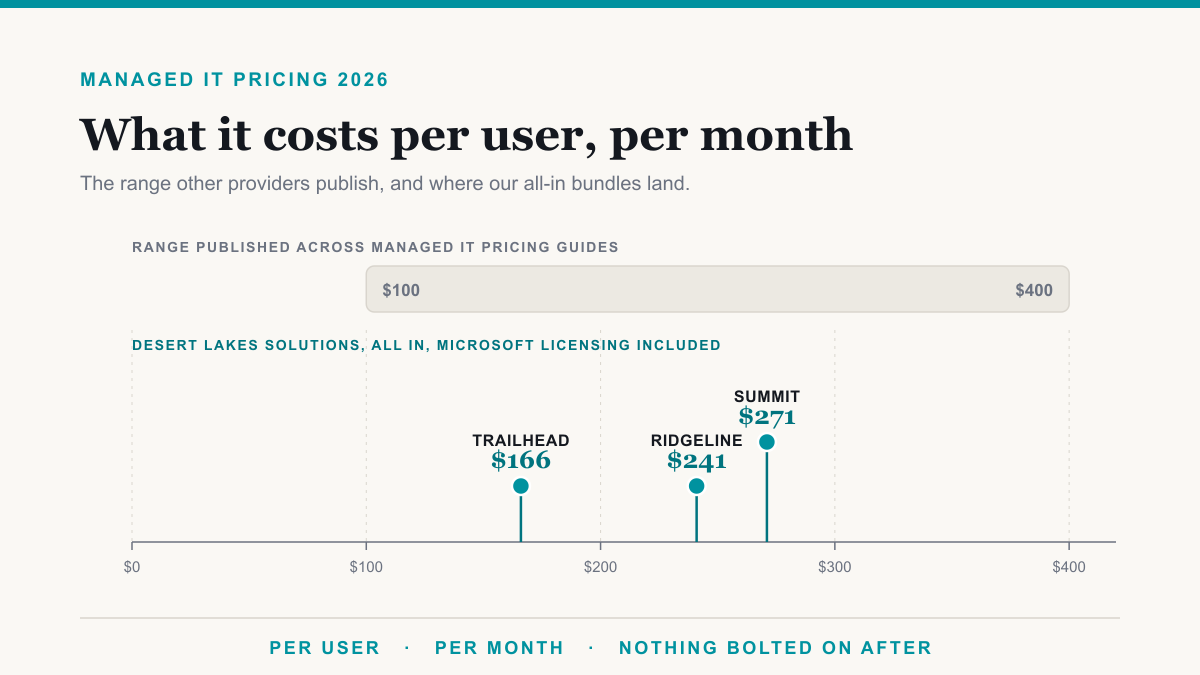
- Per user, per month. A flat price for each employee, covering their devices and accounts. This is the modern norm and the easiest to budget as you hire.
- Per device, per month. A set price for each computer, server, or piece of network gear under management.
- Tiered bundles. Good, better, and best packages, where higher tiers add things like advanced security or compliance support.
- All-inclusive. One flat fee that covers support, monitoring, security, and licensing, with few or no add-on charges.
- Monitoring-only. A lower fee to watch your systems and alert you, with hands-on fixes billed separately.
The thing to watch for is what is and is not included. Some providers advertise a low headline rate, then bill separately for security, backups, or after-hours support. A clear, all-in price is usually a sign of a provider comfortable being measured on outcomes. You can see how transparent bundle pricing looks on our pricing page.
What to watch out for with an MSP
An MSP is the right answer for most small and mid-sized businesses, but it is worth going in with eyes open. A few things to check for:
- Thin security. Some general IT providers are light on real security. If your business handles sensitive data, confirm what protection is actually included.
- Slow response when it counts. Ask what happens the moment a critical system goes down, and how quickly a human gets involved, in writing.
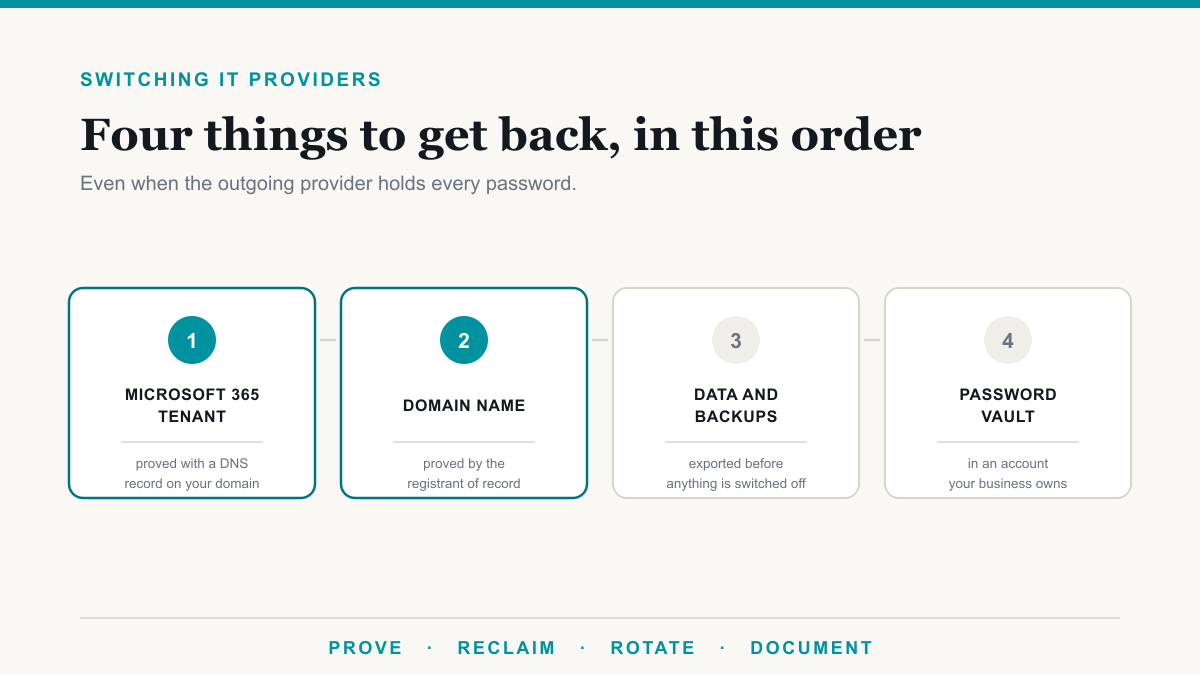
- Lock-in. A few providers build on tools that make it hard to leave. Ask how your data and accounts come with you if you ever switch.
- Upselling. A good provider recommends what you need. Be wary of constant pressure toward extras that do not map to a real business problem.
None of these are reasons to avoid the model. They are simply the questions that separate a provider who will look after the business from one who will not.
How to choose the right managed service provider
Beyond avoiding the red flags above, a few positive signs separate a strong MSP from a forgettable one:
- Security is built in, not extra. Multi-factor login, endpoint protection, and patching should be standard, not add-ons.
- The scope is clear. You should be able to read, in plain language, exactly what is covered and what is not.
- They speak your language. A provider that explains things without drowning you in acronyms is one that will be easy to work with.
- They fit your industry. In healthcare, legal, or finance, look for an MSP that understands the compliance and privacy expectations that come with it, including obligations like the HIPAA Security Rule.
Who actually needs a managed service provider
An MSP makes the most sense for small and mid-sized organizations that depend on their technology but cannot justify a full internal IT department, and especially for regulated businesses where downtime or a data breach carries real consequences. Healthcare practices, law firms, accounting offices, and other professional-services companies are common fits, because for them IT is not just convenience, it is continuity and compliance. We work with several of these, from medical practices to dental offices and beyond.
Frequently asked questions
What does MSP stand for?
MSP stands for managed service provider. It is a company that manages a business's IT systems, support, and security for a recurring monthly fee, rather than charging each time something needs fixing. The goal is to prevent problems, not just react to them.
What is the difference between an MSP and regular IT support?
Regular IT support is usually reactive: you call when something breaks. A managed service provider is proactive and ongoing. It monitors, maintains, and secures your systems continuously to prevent problems, and it covers the full scope of your IT rather than handling one-off fixes.
What is the difference between an MSP and an MSSP?
An MSP keeps your technology running, while an MSSP, a managed security service provider, specializes in keeping it secure, with services like 24/7 monitoring and incident response. The line is blurring, and many strong MSPs now deliver real security as part of their core service.
What are the main types of managed service providers?
MSPs differ mainly in how much they cover and what they specialize in. Some are fully managed and run everything, some are co-managed and work alongside your staff, and some are monitoring-only. Others focus on a single industry like healthcare or finance, or lead with security.
How much does a managed service provider cost?
Most MSPs charge a flat monthly fee, commonly priced per user or per device, that bundles support, monitoring, security, and everyday licensing. The exact figure depends on your size and what you need covered, but the value of the model is a predictable cost instead of surprise hourly bills.
Do I still need internal IT if I hire an MSP?
Often, no. For many small and mid-sized businesses a managed service provider replaces the need for internal IT entirely. Larger organizations sometimes keep a small internal team and use an MSP through a co-managed arrangement to extend its reach, handle security, or cover after hours.
The bottom line on managed service providers
A managed service provider gives a business that cannot staff its own IT department the same thing a large company gets from one: systems that stay up, data that stays safe, and a team that handles the technology so the business can get on with its work. The model is predictable, proactive, and built around keeping problems from happening in the first place.
If you are weighing whether a managed service provider is right for your business, Desert Lakes Solutions offers a no-pressure discovery call to look at your current setup and where the easy wins are. Book a discovery call and we will give it to you straight.