How Much Should Managed IT Cost Per User Per Month in 2026?
Published August 6, 2026
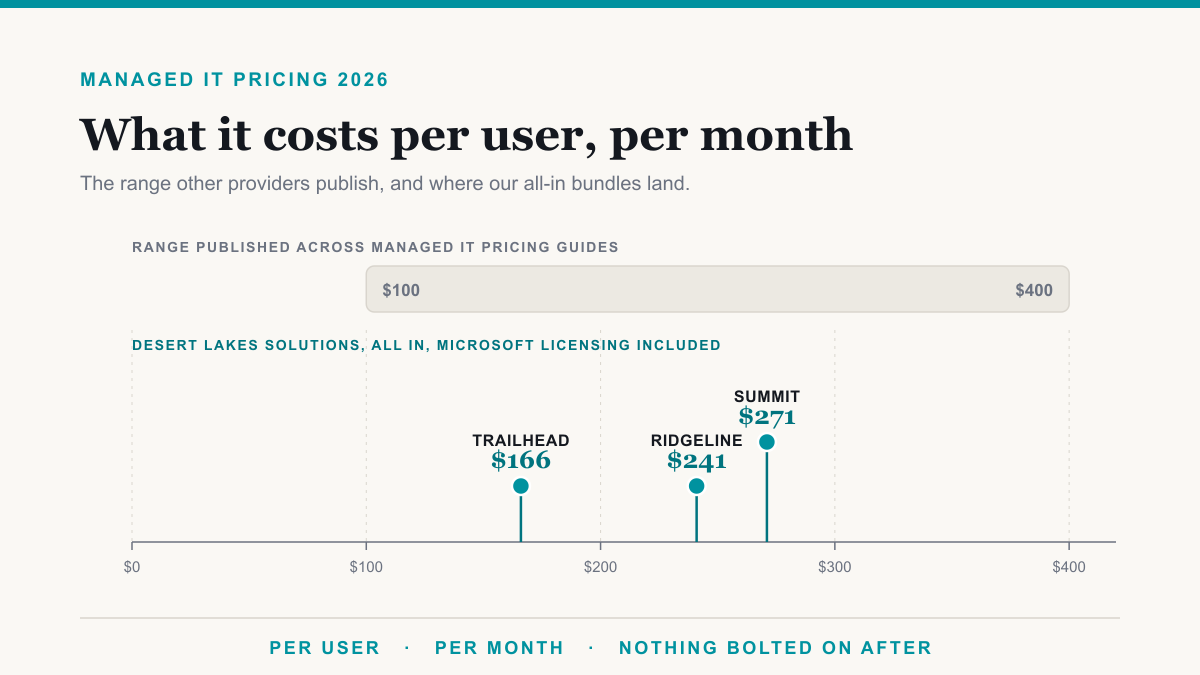
Managed IT costs roughly $100 to $400 per user per month in 2026 across published pricing guides, with $150 to $200 the figure most often named as typical for a smaller company. Desert Lakes Solutions publishes three fixed bundles at $166, $241, and $271 per user per month, with the Microsoft 365 license included. This post is for the owner, office manager, or controller setting a budget for next year, or holding a quote and trying to work out whether it is fair.
The trouble with published ranges is that a $150 quote and a $250 quote can describe nearly the same service, or two completely different ones, and the number alone will not tell you which. Below are the market bands, our real prices, two worked examples, and a checklist you can run against a live quote.
Figures are current as of August 2026. Microsoft prices are US list prices and change over time.
How much should managed IT cost per user per month in 2026?
Across five separately published 2026 pricing guides, the low end of the quoted range runs from $100 to $150 and the high end from $250 to $400. Here is what each one says.
- VC3 puts managed IT packages in the US and Canada at $150 to $400 per user per month, with common per-user charges of $150 to $175. Packages at the $250 to $400 mark are generally fully hosted or cloud systems.
- Accent Consulting, on a page dated June 25, 2026, gives $100 to $250 per user per month and says most companies pay $150 to $200 for fully managed IT support.
- myDatapath, published April 2026 and updated June 2026, gives about $100 to $400.
- Solution Builders, published January 2026, gives $110 to $400, split into standard packages at $110 to $175 and advanced security packages at $175 to $400.
- Flamingo, published June 2026, gives $100 to $400, with $150 to $200 typical for smaller companies.
Put the five together and the summary is $100 to $400 per user per month, clustering around $150 to $200 for a company on a standard plan. That synthesis is ours, not any one publisher's. All five are marketing content from companies selling into this market, not survey data.
The closest thing to survey data is the 2026 Kaseya State of the MSP Report, which polled 1,061 providers worldwide in November 2025. It publishes no per-user pricing but does show the market's shape. The share of providers reporting average monthly recurring revenue, meaning what a client pays them each month, of up to $1,000 per client grew from 24 percent to 30 percent and is now the largest single group. Separately, the share whose typical customer spends under $25,000 a year more than doubled, from 24 percent to 55 percent.
What do the three tiers of the market actually buy?
Tiers go by different names but break at roughly the same three places. If the vocabulary is new, our guide to what a managed service provider is covers it.
- $100 to $150 per user per month: basic support. A help desk during business hours, remote monitoring, patching, meaning keeping software updated, antivirus, and often workstation backup. Accent Consulting calls this band basic IT support and prices its own entry plan from $88 per user per month, just under the band.
- $150 to $250: fully managed. Everything above, plus cloud backup, Microsoft 365 administration, security awareness training, a named account contact, and endpoint detection and response, which is software that watches each computer for signs of a break-in and can shut it down. Solution Builders draws a similar line at $175, calling packages below it standard and above it advanced security.
- $250 to $400: security-led and advisory. In our reading, this band buys a 24/7 security operations center, which is staffed analysts watching alerts at 3 a.m. It also buys log monitoring, compliance evidence work, and virtual CIO advisory, which is senior IT strategy on a retainer instead of a full-time hire. VC3 characterizes the same band differently, noting that packages at this level are generally fully hosted or cloud systems.
Those bands are a useful sanity check against a quote you are holding. What they leave out is whether the Microsoft 365 license sits inside the per-user price.
Is Microsoft 365 licensing inside or outside the per-user price?
In the proposals buyers bring us, this is the most common reason two managed IT quotes are not really comparable, and it is easy to check once you know to ask. Microsoft publishes these list prices, per user per month:
- Microsoft 365 Business Basic, $7.00 paid yearly.
- Microsoft 365 Business Premium, $22.00 paid yearly, or $26.40 on a monthly subscription.
- Microsoft 365 E3, $39.00 paid yearly.
- Microsoft 365 E5, $60.00 paid yearly.
Note the two Business Premium figures. An annual commitment paid yearly is $22.00. Month to month is $26.40, exactly 20 percent more. The license line by itself can move a per-user quote by several dollars on billing terms that never appear in a proposal.
Now hold that against the published ranges. We read the VC3 and Accent Consulting pages specifically to see whether either states that licensing sits inside or outside its numbers. Neither says. VC3 describes its services as coming for a single flat fee without clarifying whether software subscriptions are part of it. Accent lists cloud and Microsoft 365 management among its included services, which is administering the platform rather than paying for the seats. That is not a knock on either company. It is the ordinary state of published pricing, and it means a buyer cannot tell from the number what is covered.
Our prices are all-in and the license is inside them. You can do the subtraction yourself using Microsoft's list prices:
- Trailhead, $166. Includes Business Premium. $166 minus $22.00 leaves $144 of services.
- Ridgeline, $241. Includes Business Premium. $241 minus $22.00 leaves $219.
- Summit, $271. Includes Microsoft 365 E5. $271 minus $60.00 leaves $211.
Two caveats. That is arithmetic, shown so you can follow the logic, not a published statistic. And list price is not what any provider pays Microsoft, so do not read those remainders as margin. What they show is the comparison problem: a $271 seat with E5 inside it and a $271 seat where E5 is billed separately are not the same deal. The second is $331.
Ask any provider: is the Microsoft 365 license included in this per-user price, and if so, which plan, on annual or monthly billing?
What do the Desert Lakes Solutions bundles cost?
Three bundles, one flat price per user per month, priced on the assumption of one computer per person. Each includes the license named in the table.
| Bundle | Per user, per month | Microsoft license included | What it covers |
|---|---|---|---|
| Trailhead Essential IT | $166 | Business Premium ($22.00 list) | Managed help desk during business hours, endpoint protection, patching, and backup |
| Ridgeline Business Security | $241 | Business Premium ($22.00 list) | Everything in Trailhead, plus a 24/7 help desk, managed detection and response (a 24/7 watch on your computers), security awareness training, and identity and access management (control over who can sign in to what) |
| Summit Full-Stack IT | $271 | Microsoft 365 E5 ($60.00 list) | Everything in Ridgeline, plus a 24/7 security operations center, cloud security monitoring, and virtual CIO advisory |
Against the published ranges, and on price alone, Trailhead at $166 sits inside the $150 to $200 band Accent calls typical, though its scope is closer to what we described as basic support, and the included license is part of what carries it up. Summit at $271 sits in the $250 to $400 band VC3 calls the top of the market, carrying a $60.00 license. Both are our comparisons.
The full scope behind each bundle is on our managed services page, and the pricing page has a live calculator that returns your monthly figure with the volume discount applied.
Per user, per device, or flat rate: which model favors the buyer?
Three models dominate, each favoring a different buyer.
- Per user, per month. Favors organizations whose people carry more than one device. A salesperson with a laptop, a phone, and a tablet costs the same as a receptionist with one desktop. It works against you if many light users share a handful of machines, such as shift workers on shared terminals.
- Per device, per month. VC3 publishes per-device rates of $100 to $400 per server, $50 to $100 per workstation, $30 to $75 per firewall, and $15 to $40 per switch, though the page does not state the billing period. This favors buyers with fewer devices per head, and creates an awkward incentive, because every new laptop raises the bill.
- Flat rate for the whole environment. Easiest to budget, least responsive to change. Fine if headcount is stable, expensive if you shed 20 percent of your staff mid-term.
Our bundles are per user, priced on the assumption of one computer per person, and managing your servers, firewalls, switches, and access points is inside that price rather than billed per device. Watch for this when you compare: a provider who charges per device on top will look cheaper per user and cost more in total.
What moves the number up or down?
Six things account for most of the gap between two quotes for the same office.
- Devices per user. A price that assumes one computer per person stretches where everyone has a laptop and a desktop.
- Servers and network gear. Three servers, two firewalls, and a dozen switches add a monthly line unrelated to headcount.
- Hours of coverage. The step from our $166 tier to our $241 tier is $75 per user per month, and it buys more than clock coverage: a 24/7 help desk, plus the three security services priced below.
- Security depth. Managed detection and response, meaning a team watching the alerts from your computers around the clock, is $30 per month for each computer or server. Identity and access management, meaning control over who can sign in to what and from where, is $12 per user. Security awareness training is $6 per user. For one person with one computer that is $48; a second computer adds another $30.
- Compliance requirements. HIPAA for health records, CMMC for defense contractors, PCI DSS for card payments, and SOC 2 for software and service vendors each add documentation and evidence collection that continues whether or not anything breaks. Some of them, PCI DSS and SOC 2 in particular, also require recurring assessment work by an outside firm.
- License tier. E5 at $60.00 against Business Premium at $22.00 is a $38.00 swing per user before a single hour of work is done.
If you are weighing this against hiring instead, we ran that comparison in in-house versus managed IT.
How do volume discounts work?
Providers commonly give them above a certain size. Very few publish the schedule. Ours steps up at set user counts on the managed services monthly fee, meaning the discount jumps at each threshold rather than rising gradually:
- 25 users: 4 percent
- 50 users: 5.5 percent
- 100 users: 10 percent
- 200 users: 17 percent
- 300 users: 23.5 percent
- More than 300 users: custom quote
Two things are worth knowing. The discount applies at the threshold rather than gradually, so 24 users pays full price and 25 users does not. And the steps widen as you scale, from 1.5 points between 25 and 50 users to 7 points between 100 and 200. If you are close to a threshold, ask where the next one sits before you sign.
What does a monthly minimum mean for a small office?
Our floor is $1,400 per month. Below a certain headcount you pay the floor rather than the per-user price.
- A four-person office on Trailhead: 4 times $166 is $664, below the floor, so the bill is $1,400. That works out to $350 per user per month.
- Trailhead crosses the floor at nine users. 9 times $166 is $1,494. Eight users is $1,328, still under.
- Ridgeline crosses at six users. 6 times $241 is $1,446. Five users is $1,205.
The floor exists because there is a fixed amount of work in running any environment: securing the Microsoft 365 tenant, meaning your company's whole account; verifying backups; testing patches; and staffing after-hours coverage. That work does not halve when headcount does. If a provider does not publish a minimum, ask, because a floor is common and it often appears in the contract rather than the proposal.
What does this look like with real numbers?
Two worked examples, arithmetic shown, both on Ridgeline at $241 per user per month.
A 20-person professional services office.
- 20 users times $241 equals $4,820 per month.
- No volume discount applies. The first break is at 25 users.
- Comfortably above the $1,400 minimum, so the floor is irrelevant.
- Per user: $241, license included, a Business Premium seat that lists at $22.00.
- Annual: $4,820 times 12 equals $57,840.
Hiring five more people takes that office to 25 users and the first volume break. 25 times $241 is $6,025, less a 4 percent volume discount, giving $5,784. Five people were added for $964 a month, or $192.80 each, rather than $241 each.
A 50-person office.
- 50 users times $241 equals $12,050 before the discount.
- 50 users hits the 5.5 percent break. $12,050 times 0.055 is $662.75.
- $12,050 minus $662.75 equals $11,387.25 per month.
- Effective cost per user, license included: $227.75, rounded to the cent from $227.745.
- Annual: $11,387.25 times 12 equals $136,647.
Both figures are managed services only. Servers, firewalls, switches, and project work are separate lines.
What is usually extra?
Almost nobody bundles everything. Here is what normally sits outside the monthly number.
- Employee onboarding and offboarding. We publish $150 per employee to onboard and $75 to offboard, charged when a staff member starts or leaves, which typically covers the account build or teardown, device setup or wipe, licensing, and mailbox handling.
- Infrastructure, at most providers. Servers and network devices are commonly billed per item on top of the per-user rate, so ask. Ours are not: server and network device management is inside our bundles. The one thing we do bill per device is 24-hour SIEM monitoring, and only if you ask for it.
- Project work. Migrations, office moves, network rebuilds, and system rollouts are scoped and quoted per engagement. We do not publish an hourly rate, because it tells you almost nothing about what a project will cost.
- Hardware. Laptops, servers, firewalls, and licenses bought outright are pass-through purchases, not service lines.
- Discovery and onboarding. The one-time work of taking a new environment on: auditing it, documenting it, and standing up monitoring and backups before anything switches over. We do not publish a rate for it, because what it takes genuinely varies with what the audit finds. An all-new setup may have no onboarding fee at all, while an environment that needs real discovery and cleanup costs more. Ask any provider for that number in writing before you compare monthly rates, because it is the largest cost most buyers leave out.
How do you normalize two quotes to the same per-user figure?
Run this against live quotes, in order, and write the adjusted per-user figure at the bottom of each.
- Get both to a monthly total, then divide by headcount. Convert annual, quarterly, and per-site figures first. Use the same headcount for both, including part-timers who have accounts.
- Ask whether Microsoft 365 licenses are inside the number, and which plan. If they are outside, add the list price to that quote: $22.00 for Business Premium, $39.00 for E3, $60.00 for E5. Then ask annual or monthly billing, since monthly is 20 percent more on Business Premium at $26.40.
- Add the security items one quote includes and the other does not. Published a la carte rates are a workable proxy: $30 per endpoint for managed detection and response, $12 per user for identity and access management, $6 per user for security awareness training.
- Move servers, firewalls, switches, and backup onto the same line. If one quote bundles them and the other bills per device, add the per-device charges back before comparing. This is the line item that most often makes a cheaper-looking per-user rate more expensive in total.
- Check coverage hours. Business hours, extended hours, or genuine 24/7. Ask what happens to a call placed at 2am on a Sunday, and who picks it up. In our pricing, moving from business hours to 24/7 arrives bundled with added security services in a $75 per user per month step, so price the whole step rather than the hours alone.
- Separate one-time from recurring. Onboarding, migration, and hardware belong in a different column from the monthly.
- Divide the minimum by your headcount if you are below it. A $1,400 floor at four users is $350 per user, not $166. Compare floors, not headline rates, when you are small.
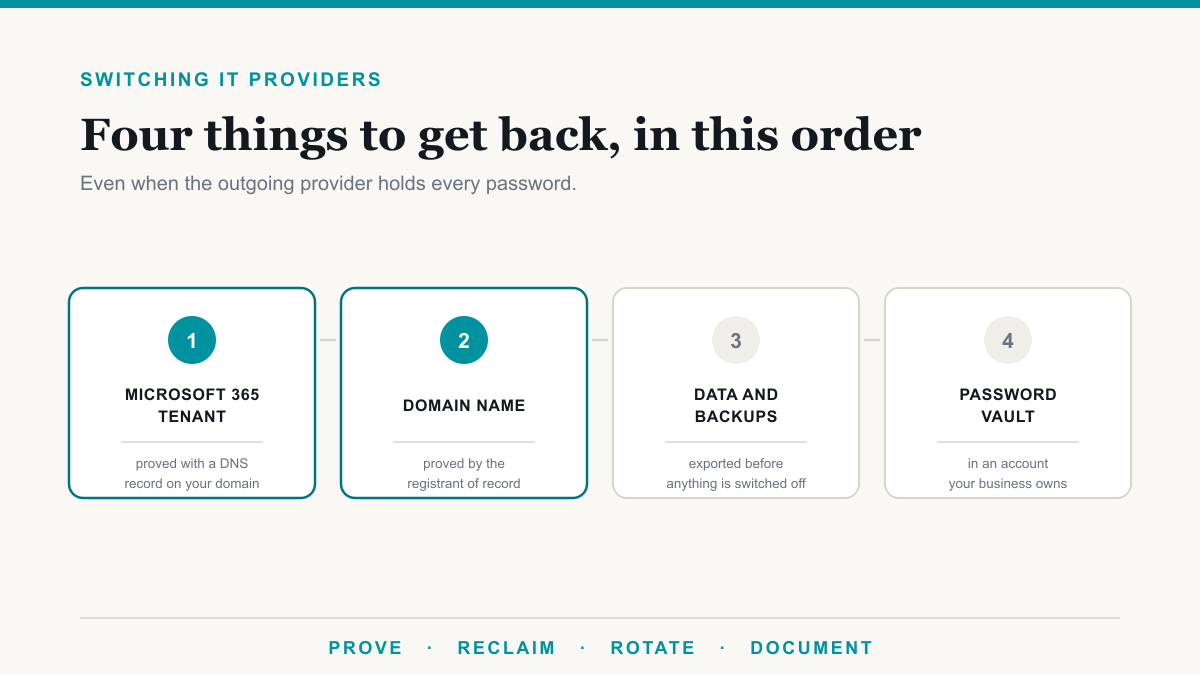
- Read the term and the exit. Technology law firm Scott & Scott LLP advised providers in 2022 to structure three-year terms, with roughly 20 percent and 25 percent premiums on one-year and month-to-month options, and described a cancellation notice window of usually 60 days. That is four-year-old guidance to providers, not a measurement of today's market, but it sketches what a term sheet may hold. If you are leaving an incumbent, our companion post on how to switch IT providers covers the handover.
Run those eight steps and the gap between two quotes usually resolves into named line items rather than a bare number: licensing, coverage hours, security tooling, or infrastructure.
Why do most IT providers not publish their pricing?
Four reasons, and they are mostly practical.
- Environments genuinely vary. Ten users with one server is a different job from ten users across three sites with a legacy application.
- The number is a sales tool. A published price invites comparison on price alone, before anyone explains what is inside it.
- Costs move. License and tooling prices change, and a public rate card has to be maintained or it quietly becomes wrong.
- Margins become easier to estimate. A public rate card lets a buyer do arithmetic that is otherwise private. For market context, Service Leadership, the benchmarking arm of ConnectWise, reported that 2024 marked a fifth consecutive year in which best-in-class technology solution providers cleared 19 percent adjusted EBITDA, a standard measure of operating profit, while revenue growth among managed service providers slowed to 7.1 percent.
We publish anyway, along with the volume schedule and the minimum, because a buyer is entitled to compare and it saves everybody a call that exists only to establish whether we are in your range.
Frequently asked questions
How much should managed IT cost per user per month in 2026?
Across five separately published 2026 pricing guides the quoted range runs from about $100 to $400 per user per month, with $150 to $200 cited repeatedly as typical for a growing company on a standard plan. Desert Lakes Solutions publishes three fixed bundles at $166, $241, and $271 per user per month, all of which include the Microsoft 365 license.
Is Microsoft 365 licensing included in managed IT pricing?
Sometimes, and most published prices do not say either way. It matters, because Microsoft 365 Business Premium lists at $22.00 per user per month and Microsoft 365 E5 lists at $60.00. A $271 seat with E5 inside it and a $271 seat with E5 billed separately are really $271 and $331. Ask which plan is included and on what billing term.
What is a typical managed IT monthly minimum?
Most providers have one and many do not publish it. Ours is $1,400 per month. Below roughly nine users on Trailhead or six users on Ridgeline you pay the floor rather than the per-user price, so a four-person office pays $1,400 rather than 4 times $166, which is $664.
Do managed IT providers give volume discounts?
Most do above about 25 seats, but very few publish the schedule. Ours steps up at set user counts on the managed services monthly fee: 4 percent at 25 users, 5.5 percent at 50, 10 percent at 100, 17 percent at 200, 23.5 percent at 300, and a custom quote above 300. The discount applies at the threshold, so 24 users pays full price and 25 users does not.
What does managed IT cost for a 50-person company?
On our Ridgeline bundle, 50 users times $241 is $12,050, less the 5.5 percent volume break at 50 users, which is $662.75, giving $11,387.25 per month. That is an effective $227.75 per user per month, rounded from $227.745. Servers, firewalls, switches, and project work are billed separately.
What is not included in a managed IT monthly price?
Usually these things: a one-time discovery and onboarding fee, which we scope and quote rather than publish, since the cost depends on what we are taking over: an all-new setup may have no onboarding fee, while discovery and cleanup work costs more; employee onboarding and offboarding, which we publish at $150 and $75 per employee; 24-hour SIEM monitoring if you want it; project work such as migrations and office moves, which we scope and quote per engagement; and hardware purchases. Managing your servers and network gear is inside our per-user price, not billed per device.
Where to start
If you want your own number rather than a range, the calculator on our pricing page takes a headcount and a tier and returns the monthly figure. If you are in the Phoenix metro, our page on managed IT in Phoenix puts these numbers against the local market. If you are holding a quote from someone else and want a second pair of eyes on it, book a discovery call and bring the proposal. Walking the checklist above against a live proposal shows you which lines explain the difference, whoever ends up doing the work.