How to Switch IT Providers, Even Without Passwords
Published August 6, 2026
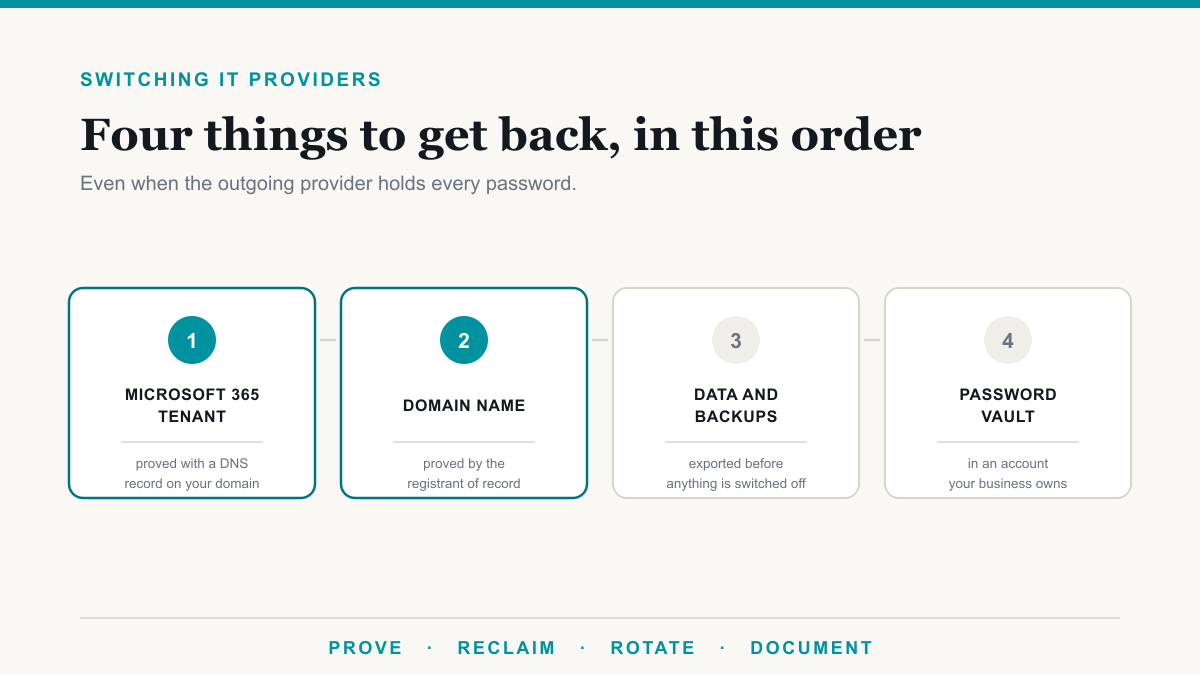
You can switch IT providers without losing access to your email, files, or systems, and you can usually recover control even when the outgoing provider holds every password. Three things are your company's to claim, as long as they were set up in your name: your Microsoft 365 tenant, your domain, and your data. Working in the right order is what keeps email and files running while control changes hands. There are three paths, and eight steps if you are locked out today. This is for the owner or office manager planning a normal move, or sitting at a desk right now with no admin credentials and a provider who stopped answering.
Can I switch IT providers without losing access to anything?
Yes, in almost every case. What matters are the accounts you own, not the services your provider rents you. Your Microsoft 365 tenant is your organization's directory, the master account that holds all your users and data. Your domain is registered to a Registered Name Holder, the person or business listed as its legal owner, who alone can approve a transfer. The provider holds the passwords. The registrar and Microsoft both answer to the business named on the account.
Which of the three paths you are on comes down to one question: does anyone at your company control an account with administrative rights today?
- You hold your own Global Administrator account. Run a planned transition and revoke their access on a date you pick.
- They hold the only admin account but are cooperating. Collect credentials, verify each one works before the contract ends, then rotate everything.
- They hold everything and are unresponsive, hostile, acquired, or out of business. Recoverable. The order of the steps matters more than how fast you move.
The same rule covers all three: do not cut off the provider before you can log in yourself. Terminating the contract first is how a routine switch becomes an outage.
What do I own, and what does my IT provider own?
Some of this is settled by how the accounts are structured, some by the contract you signed. Here is how it usually breaks down in 2026 for an office on Microsoft 365.
| Asset | Who normally owns it | How to check today |
|---|---|---|
| Your domain name | Yours, if your business is the Registered Name Holder | A WHOIS lookup, or your account at the registrar, the company you buy and renew the domain from. Read registrant name, organization, email. |
| Your Microsoft 365 tenant and its data | Yours | admin.microsoft.com. Does any account you control hold an admin role? |
| Microsoft 365 licenses | Bought direct, on your bill. Bought through their cloud solution provider agreement, on theirs. | Billing, then Your products. Also Settings, then Partner relationships. |
| Backups of your data | Contractual. The service is often theirs, the data is yours. | Your services agreement. Which product, whose tenant, what retention. |
| Their monitoring agent, remote tool, password vault | The provider | You do not keep the tooling. The credentials stored inside are yours to ask for, but only your contract compels them. |
| Firewall, switches, access points | Usually yours, if you bought the hardware | The invoice, and whose name the support contract is under. |
Documentation is contractual too. No general US law requires an outgoing IT provider to hand you passwords or data. Healthcare is the exception. Under 45 CFR 164.504(e)(2)(ii)(J), a HIPAA business associate contract must require the associate at termination to return or destroy all protected health information it still holds, if feasible, and where that is not feasible to keep the contract's protections in place over whatever it retains. Note the wording: return or destroy, so ask in writing which one they did.
My IT company will not give me my passwords. What do I do first?
Work these eight steps in order. Each one protects the step after it.
- Do not terminate the contract or stop paying yet. Ending it before you can log in gives away leverage and can shut off services they resell you. ICANN's Transfer Policy says nonpayment for a pending or future registration period is not valid grounds to deny a domain transfer.
- Inventory what you can see from outside. Run a WHOIS lookup, the free public record of who registered a domain, check the MX records to see where mail is delivered, and note the sign-in page staff use. It tells you which path you are on.
- Establish who the registrant of your domain is, because domain control is how you prove ownership to Microsoft.
- Test every account anyone might already have. Try admin.microsoft.com with the owner's account, the office manager's, and any old account nobody deleted. In Entra, Microsoft's identity service that holds your user accounts, the least privileged role that can still verify a domain is Domain Name Administrator.
- Preserve the data you can still reach. Anyone who can open their mailbox can export it, and SharePoint or OneDrive can sync a local copy.
- Send one written request with a specific list and a deadline. Email the firm's owner or principal, list what you want and the date you want it by, and cite the offboarding clause if you have one.
- Open the Microsoft route while you wait. If the directory is unmanaged, start the admin takeover wizard. If the tenant is managed and nobody you control is an admin, open a Microsoft support request. Start this before the deadline you gave the provider runs out.
- Rotate everything once your own access is confirmed working. Only then do you remove theirs.
Two things not to do under pressure. Do not reset the on-premises domain administrator password before you have listed the service accounts, the background logins that run scanners, backups, and line-of-business software, because they often run on that password, and an unmapped one fails quietly until somebody reports a broken scan or a backup that stopped. And do not cancel Microsoft 365 licenses before mailboxes are safe elsewhere.
How do I get Microsoft 365 admin access if my provider has it?
Which procedure applies depends on how your tenant was created.
If the directory is unmanaged, meaning it appeared when someone signed up for a service using an email address on your domain, Microsoft's guidance on admin takeover of an unmanaged directory names two procedures:
- Internal admin takeover assigns you the Global Administrator role of that directory, and no users, domains, or service plans move anywhere. Microsoft's published procedure runs three steps: verify your email address, create a new account for admin access, then verify domain ownership and become the admin. It requires some access to that directory.
- External admin takeover moves the domain into a directory you already manage and brings users, subscriptions, and license assignments with it. Microsoft says this is the route if you cannot access that directory at all. It is not supported for any service whose service plans include SharePoint, OneDrive, or Skype for Business. If the takeover is run with Microsoft's force option, the unmanaged directory the domain came from is deleted 10 days later.
Both prove ownership with a DNS TXT record, a short line of text you add at your registrar that Microsoft reads back to confirm you control the domain. Microsoft's custom domain documentation says to set its time to live to 3600 seconds, or 60 minutes, and warns that a wrong entry means waiting out that window before retrying. Propagation can be instantaneous or take a few days, and the troubleshooting advice is to wait at least an hour. A domain can be verified in only one Entra directory at a time.
If the tenant is managed and nobody you control is an admin, those wizards do not apply and Microsoft publishes no named self-service procedure. The route is a support request through the Microsoft 365 admin center, and expect to prove both domain ownership and business ownership. There is no published turnaround time. Microsoft also requires at least one subscription bought through Microsoft for support, so if you bought everything through the partner, you contact them.
How do I prove I own my domain and get it back?
Domain control proves ownership everywhere else. The rules sit in ICANN's Transfer Policy, which binds accredited registrars of generic top-level domains such as .com and .net. Country-code domains follow their own registry's rules.
One caveat before the detail. In March 2025 ICANN's policy council approved 47 recommended changes to this policy, including removing the Change of Registrant lock described below and replacing the emailed Form of Authorization with a Transfer Authorization Code the registrant requests. The ICANN Board has not adopted them and no implementation date has been published, so the provisions below are the ones in force today. Confirm your registrar's current steps before you start.
- Section I.A.1.1: the Registered Name Holder is the only party with authority to approve or deny a transfer, not the administrative contact and not whoever runs DNS.
- Sections II.A.1.1 and II.A.1.2: a Change of Registrant is a material change to the registrant name, organization, or email, and a Designated Agent is an individual or entity a registrant explicitly authorizes to approve one on its behalf.
- Section II.C: the registrar must get confirmation from both the New Registrant and the Prior Registrant, or their Designated Agents, and process it within one day.
- Section II.C.2: a 60-day inter-registrar transfer lock follows a Change of Registrant, though the registrar may let you opt out beforehand. Ask about that opt-out before the change rather than after.
- Sections I.A.3.9.1 and I.A.3.9.3: nonpayment for a pending or future registration period is not valid grounds to deny a transfer, and neither is Registrar Lock status, unless you had a reasonable opportunity to unlock it first.
- Sections I.A.3.4 and I.A.3.5: the losing registrar must send the transfer authorization within 24 hours, and 5 calendar days of silence counts as default approval of the transfer.
A registrar that ignores a transfer request does not block it indefinitely. If the account is in your provider's name, ask the registrar what documentation proves you own the business.
What should a proper handover produce?
A real handover is a list with an owner, an account number, and a login on every row. Ask for these seven categories by name:
- Identity and email: registrar login, DNS hosting, the Microsoft 365 or Google tenant with a confirmed Global Administrator account, single sign-on, and email filtering.
- Licensing: which subscriptions, how many seats, who they were bought through, the renewal date, and whether billing transfers.
- Backup: Microsoft 365 backup and server backup are two separate products with separate consoles. Get both, plus retention settings and the date of the last restore test.
- Network: firewall credentials and support contract number, switch and access point controllers, VPN configuration, wireless keys, and the ISP portal with your static IP addresses.
- Endpoints and servers: local administrator credentials; the antivirus or EDR console, which is the software that watches computers for attacker behavior; the server list with roles; and every service account with a note on what it runs.
- Applications and vendors: vendor portals, support contract numbers, escalation contacts, certificate authorities, card processing, and any camera or access control system.
- Documentation: network diagram, asset list, warranty dates, and the reasoning behind unusual configuration.
Log in with each credential yourself while the outgoing provider is still obligated to help. A wrong password is cheap to fix now and expensive later. Discovery produces this same inventory at the start of our managed IT engagements.
How long does it take to switch IT providers?
There is no credible published industry number for 2026. Some parts of the work do have a published clock.
With a known clock: the verification TXT record uses a 3600 second time to live, propagation runs from instantaneous to a few days, and a failed check needs at least an hour before a retry. A losing registrar has 24 hours to send the transfer authorization, and 5 calendar days of silence equals default approval. A Change of Registrant triggers a 60-day lock unless you opted out.
With no published clock: a Microsoft support case on a disputed managed tenant, and your notice period, which is whatever your agreement says. Vendor accounts have no published clock at all.
The incoming provider's onboarding is a separate stretch, and it is fair to ask for a number before you sign. Ours is published: most clients are fully onboarded within two to three weeks, and our help desk standard is a 15-minute response on critical issues, around the clock.
What should I change immediately once I have control back?
Regaining access and securing the environment are two different jobs. Work this list in week 1:
- Create emergency access accounts. Microsoft recommends two or more emergency access accounts, cloud only, on the .onmicrosoft.com domain, not federated or synchronized from on-premises systems. One listed reason: the person with the most recent Global Administrator access leaves. Validate them at least every 90 days, and whenever IT staff change.
- Reset every administrative credential and revoke active sessions. Changing a password does not end a session already signed in.
- Re-enroll multifactor authentication on admin accounts, and confirm recovery numbers and addresses point at your people.
- Remove the partner relationship. Open Settings, then Partner relationships, select the partner, choose Remove roles, then Yes. Microsoft's guidance on reviewing partner admin privileges warns that delegated admin privileges give you no control over how many Global Administrators a partner adds, that removing the role does not stop them purchasing on your behalf until they remove that in Partner Center, and that these privileges deserve a quarterly review.
- Audit conditional access policies, the rules that decide who can sign in and from where, and confirm the two new emergency accounts are excluded from anything that could lock them out.
- Remove the old provider's remote access tooling: monitoring agents, remote control software, VPN accounts, and local administrator accounts on servers and workstations. Leftover agents and local accounts keep working long after the relationship ends, so remove them by name from a written list rather than assuming they expired.
- Change every shared password. NIST SP 800-53 Rev. 5 control AC-2 item (k) calls for a process to change shared or group account authenticators when individuals are removed from the group, and item (l) for aligning account management with termination and transfer processes.
Two frameworks give you language for this. NIST SP 800-53 control PS-4, Personnel Termination, calls for disabling system access within a defined period, revoking the individual's credentials, and retrieving organizational property. It binds federal systems and is a reference for everyone else. CISA's voluntary Cybersecurity Performance Goals 2.0 include goal 3.D, Revoking Credentials for Departing Staff, which covers contractors and vendors and suggests disabling accounts inactive beyond a set period, using 30 days as an example. Its earlier numbering, goal 2.D, said it plainly: by the day of their departure.
If hardening after a takeover is work you would rather hand off, our security services cover it. The published rates are $30 per computer per month for managed detection and response, $12 per user for identity and access management, and $6 per user for security awareness training.
How do I make sure this never happens again?
Four things make the next switch a scheduling exercise:
- Own the tenant. Keep at least one Global Administrator account in your control at all times, plus the two emergency access accounts above. Microsoft calls the role highly privileged and says day-to-day work should run under a lesser role, so hold the account and sign in with it rarely.
- Own the domain. Registrar account in your business name, registrant email at an address you control and not tied to a single employee, auto renew on, and the renewal date in a calendar.
- Own the password vault. Your provider will use their own tooling. Keep the credentials that matter in a vault you own too.
- Put offboarding in writing. Specify what gets handed over, in what format, within how many days of termination, and who pays. NIST SP 800-53 control SA-9 puts responsibility on your organization to define oversight of external providers.
What are the red flags that this will be difficult?
Four signals worth watching, each with a response:
- The domain registrant email is at their domain. Start the Change of Registrant conversation with the registrar now, and ask about the 60-day lock opt-out first.
- All licensing was bought through their agreement. Move it before the billing ends, and buy at least one subscription directly to keep a Microsoft support case available.
- Backups live in their tenant under their retention policy. Ask in writing when your copy would be deleted, then stand up your own before that date.
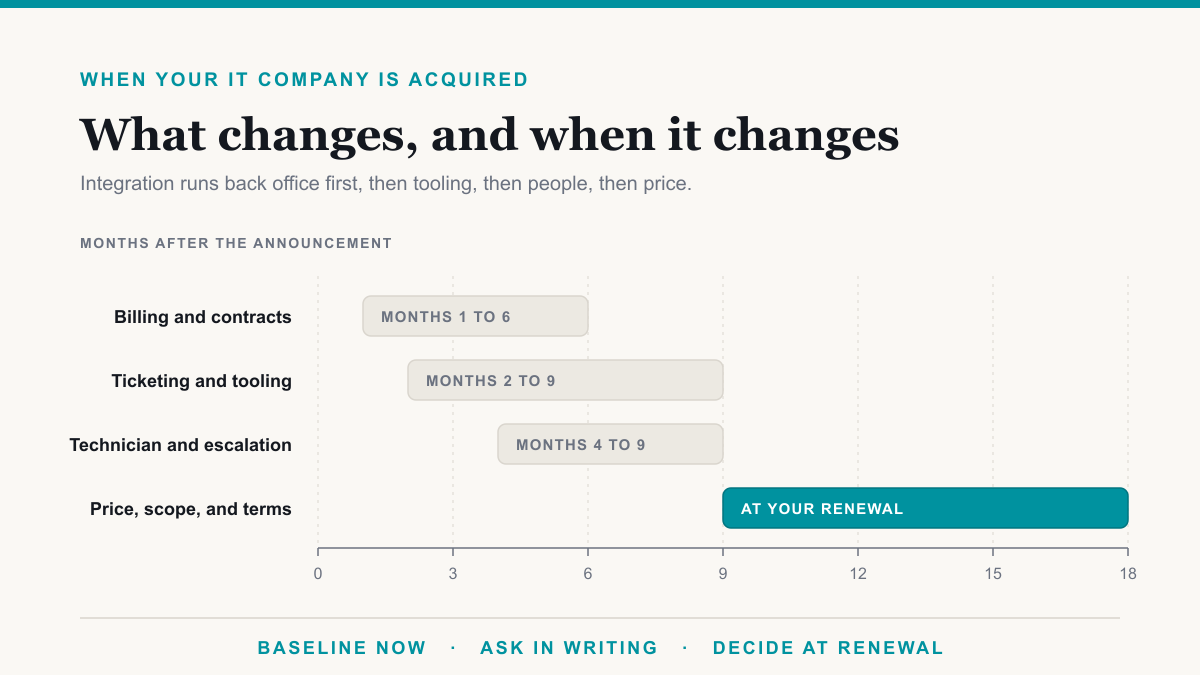
- The firm was acquired, or the one person who knew everything has left. Treat it as the no-credentials path even if nobody is being difficult, because nobody left there can answer questions about how the environment was built.
What does switching IT providers cost?
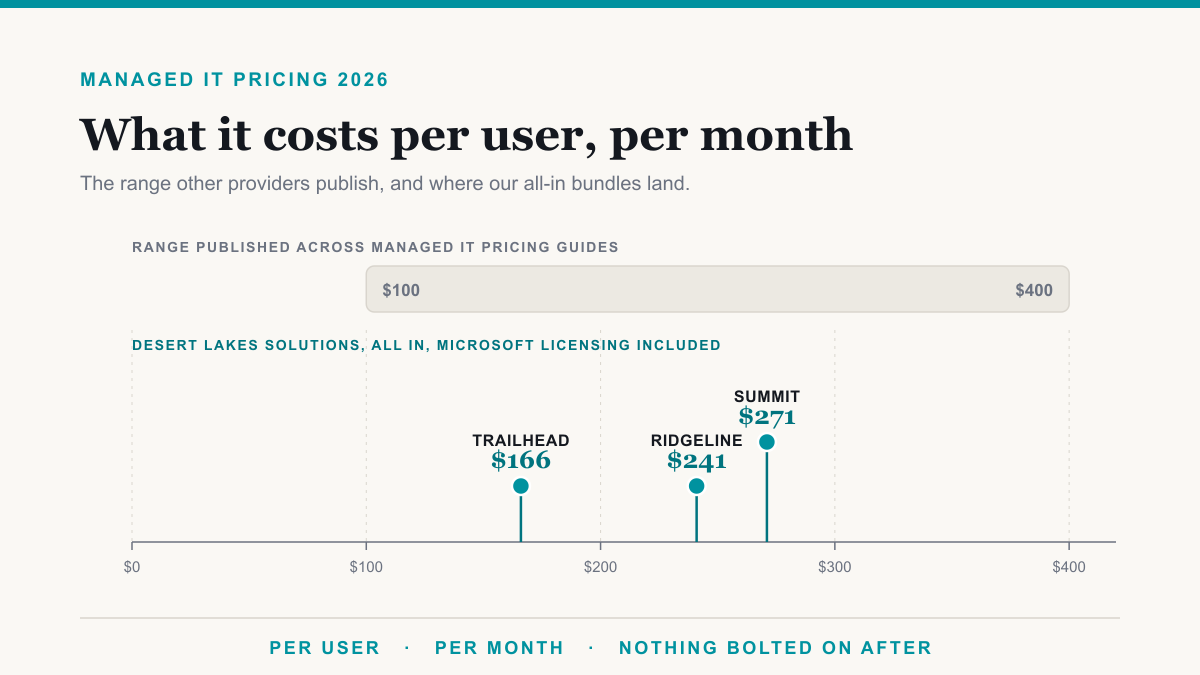
The switch has three cost components. Two are predictable. The first is discovery and onboarding, the one-time work of taking on your environment. We scope and quote that per engagement rather than publishing a rate, because it varies with what the audit finds. An all-new setup may have no onboarding fee, while discovery and cleanup work costs more, so ask any provider for their number in writing before you compare monthly rates. The second is the monthly service fee, priced per user per month, and our three bundles run $166 on Trailhead, $241 on Ridgeline, and $271 on Summit, all in with Microsoft licensing, against a $1,400 monthly minimum and volume discounts of 4 percent at 25 users, 5.5 percent at 50, and 10 percent at 100. A 20-person office on Ridgeline is 20 times $241, or $4,820 a month, with no volume break yet because the first one lands at 25 users. Managing your servers and network gear sits inside that per-user number rather than being billed per device, which is worth checking against any quote you compare it to. Employee onboarding and offboarding are separate line items, published at $150 and $75 per employee, charged when a staff member starts or leaves rather than when you change providers. To check a quote you already hold, we broke the arithmetic down in what managed IT should cost per user per month.
The third component is recovery work, and it is unpredictable. Rebuilding an undocumented environment or working a tenant ownership case with Microsoft is project work, scoped and quoted per engagement. That is the argument for fixing the four ownership items above now.
Frequently asked questions
Can my IT company legally hold my passwords hostage?
In general US practice, no law forces a departing IT provider to hand over passwords or documentation. That obligation is contractual. Even so, your registrar answers to the Registered Name Holder and Microsoft publishes takeover routes. Healthcare is the exception: 45 CFR 164.504 requires a business associate contract to return or destroy protected health information at termination if feasible, and to keep protecting whatever cannot be returned or destroyed.
How do I find out who owns my company's domain name?
Look the domain up at your registrar or through a public WHOIS lookup, the free record of who registered a domain, and read the registrant name, organization, and email. ICANN's Transfer Policy makes the Registered Name Holder the only party able to approve or deny a transfer. If privacy protection hides the details, ask the registrar to confirm the underlying registrant.
How do I get Microsoft 365 admin access if my IT provider has it?
For an unmanaged, self-service directory on your domain, Microsoft publishes two procedures: internal admin takeover, which makes you Global Administrator of it, and external admin takeover, which moves the domain plus its users, subscriptions, and licenses into a directory you manage. Both prove ownership with a DNS TXT record you add at your registrar. For a properly managed tenant where nobody you control is an admin, the route is a Microsoft support request, and expect to prove domain and business ownership.
How do I remove my old IT provider's access to Microsoft 365?
In the Microsoft 365 admin center, open Settings, then Partner relationships, select the partner, choose Remove roles, then Yes. Both sides get a confirmation email. Microsoft warns this does not remove the partner's ability to make purchases on your behalf, so ask them to remove that in Partner Center too.
Will my email go down when I switch IT providers?
A planned switch should not interrupt mail, because the mailboxes and tenant stay put and only administrative access changes. Mail is at risk in two situations: when licensing was bought through the outgoing provider's cloud solution provider agreement and that billing ends before you have your own, and when DNS records are edited during a domain move.
How long does it take to switch IT providers?
There is no credible published industry figure. The technical work has a clock: Microsoft says to set the verification TXT record to a 3600 second time to live, describes propagation as instantaneous to a few days, and says to wait at least an hour before retrying. Under the transfer rules in force today, a registrar has 24 hours to send the transfer authorization, and 5 calendar days of silence counts as default approval.
How much does it cost to switch IT providers?
Managed IT runs $166 per user per month on Trailhead, $241 on Ridgeline, and $271 on Summit, all in with Microsoft licensing, against a $1,400 monthly minimum and volume discounts of 4 percent at 25 users and 5.5 percent at 50. Discovery and onboarding, and any recovery work where nobody holds credentials, is scoped and quoted per engagement rather than published; an all-new setup may have no onboarding fee, while discovery and cleanup work costs more. Employee onboarding and offboarding are separate, published at $150 and $75 per employee when a staff member starts or leaves.
Where to start today
If you are planning a switch, run three checks today: confirm the domain registrant, confirm somebody at your company holds a Global Administrator account, and read your offboarding clause. If you are already locked out, start with the domain and open the Microsoft route in parallel. A takeover engagement at Desert Lakes Solutions starts with discovery: mapping what exists, proving what you own, restoring administrative control, then hardening what we find. If you are in the Phoenix metro, our page on managed IT in Phoenix covers the local detail and the questions worth asking any provider here. Book a discovery call to talk it through.