What Is MDR? Managed Detection and Response Explained
Published September 5, 2026
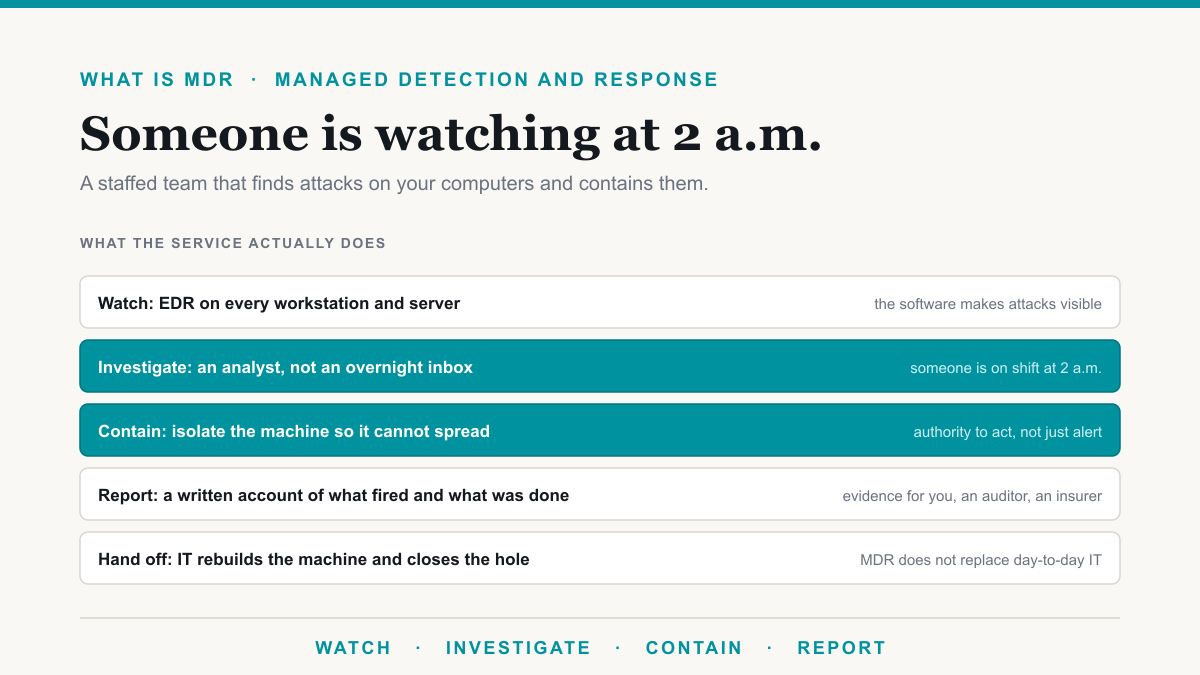
MDR is a managed detection and response service: a staffed security team watches your computers and servers around the clock, investigates anything suspicious, and isolates a machine when an attack is real. The outcome is that ransomware on one laptop stays on one laptop, and someone qualified is looking when the office is closed. This guide answers what is MDR in plain English for owners and office managers in Phoenix, Mesa, Gilbert, Chandler, and nearby Scottsdale who keep seeing the term on insurance forms and security quotes.
What is MDR, in plain English
Managed detection and response has two halves, and both have to be in place for the name to mean anything.
- Detection. Software on every workstation and server, usually called EDR (endpoint detection and response), records what programs do and raises an alert on unusual behavior.
- Response. A security analyst investigates that alert. If it is a real attack, they isolate the machine so it cannot spread, then tell you what happened and what they did.
That second half is the part that earns the fee. A dashboard that emails an empty inbox at 2 a.m. is monitoring in name only. MDR means a human is on shift and is allowed to contain the attack without waiting for you to pick up the phone. The NIST Cybersecurity Framework splits this work into Detect and Respond. MDR is how a small office covers those two functions without hiring a security team. Patching, firewalls, email filtering, and access rules still sit in cybersecurity and day-to-day managed IT.
MDR vs EDR: the software and the people
These two acronyms get stacked in quotes as if they meant the same thing.
| Antivirus | EDR | MDR | |
|---|---|---|---|
| What it is | Software that blocks known-bad files | Software that records behavior on each computer | Analysts plus that software, around the clock |
| Who watches | Nobody, it runs on its own | Whoever on your staff opens the console | Shift-staffed analysts at the vendor |
| What happens after hours | It blocks what it already knows | It logs, and maybe sends an email | Someone investigates and can isolate the machine |
| What you are paying for | A license | A license | A service with people and a process |
The software makes an attack visible. MDR makes that visibility useful at 11 p.m. on a Friday, when the office is empty. If a vendor sells "EDR with 24/7 monitoring" and the monitoring is an emailed alert, you have bought EDR twice. Desert Lakes deploys EDR through Microsoft Defender for Business on every workstation and server, then wraps a staffed MDR service around it. We name the EDR product because it is Microsoft's. We do not name the MDR platform. What matters is whether containment actually happens.
What managed detection and response covers, and what it does not
A legitimate MDR service typically covers:
- Workstations and servers. Every endpoint in scope has the detection software installed.
- Investigation. An analyst decides whether an alert is a false positive or an active attack.
- Containment. Isolating a machine, and disabling a compromised account when identity is in scope.
- A written account. What fired, what they did, and what you should do next, which is also evidence an auditor or insurer later asks for.
Ask whether Microsoft 365 sign-ins are in scope. Identity attacks, a stolen password with no malware on a laptop, are common, and endpoint-only coverage does not see them. Get that in the agreement.
MDR does not run your IT, and it does not replace backups, patching, or a firewall. After a machine is isolated at 3 a.m., someone still has to rebuild it and close the hole. That handoff belongs to your IT team or your managed IT company.
Who actually needs MDR
- You hold client or patient data. The HIPAA Security Rule does not name MDR. It does require covered entities to review system activity and to have incident-response procedures. A monitored detection service is one of the most direct ways a small practice can show both are actually happening.
- Your cyber insurance application asks about it. Many applications now ask whether every endpoint runs EDR and whether anyone monitors it around the clock. Answering no can mean a higher premium or a declined application. Answering yes when the monitoring is an unread mailbox can cause problems at claim time. Our compliance work deals with those questionnaires regularly.
- You cannot staff nights, weekends, and holidays. Around-the-clock coverage takes a bench of analysts. One internal technician cannot cover that. MDR is the subscription version of that bench.
Ransomware is the incident people picture because it encrypts files and can halt the office. CISA's StopRansomware hub is the federal starting point if it hits. MDR is the after-hours watching that aims to catch the intrusion while it is still one machine. If you want the comparison against staffing your own security operations center, that is in MDR vs SOC.
What MDR costs
Vendors usually price MDR per device or per user per month. Compare that fee against hiring even one security analyst, let alone the several needed for true 24/7 coverage.
We publish our numbers so you can compare without a demo. At Desert Lakes Solutions, MDR is included in Ridgeline at $241 per user per month and in Summit at $271. Trailhead, at $166 per user, does not include it. The published add-on is $30 per workstation per month, though we usually move a client up a tier rather than bolt it on. Microsoft 365 licensing is inside those per-user figures, and the monthly floor is $1,400. The full card is on pricing.
A ten-person office on Ridgeline lands around $2,410 a month, with MDR on every workstation, a 24-hour help desk, and the Microsoft license included. If another company already runs your IT, standalone security is quoted in writing; the add-on rates are the reference. Phoenix-area offices can see the local version on managed threat detection in Phoenix. Our standard response on a critical issue is 15 minutes, at any hour, with containment first and a written account afterward.
How to tell real MDR from an overnight inbox
- Who performs containment? Some services isolate a compromised machine themselves. Others only send you an alert and wait. An alert nobody reads at 2 a.m. is only a timestamp for the incident report.
- What is in scope? Endpoints only, or also Microsoft 365 accounts and sign-ins? Identity attacks do not always drop a file on a laptop.
- What are the response-time commitments, and what do they measure? First human action is a different promise from a ticket auto-reply. Ask which clock they are quoting.
- What happens after containment? Decide in advance who rebuilds the machine and who closes the hole, so the handoff is settled before the bad night rather than during it.
Frequently asked questions
What is MDR?
MDR, short for managed detection and response, is a subscription service where security analysts watch your computers and servers around the clock. They investigate alerts from endpoint detection software and isolate a machine when an attack is real, so it cannot spread. You are buying the people and the process on top of the tooling.
What does MDR stand for?
MDR stands for managed detection and response. Detection is the watching: software on each computer records activity, and analysts review anything that looks wrong. Response is the acting: isolating a compromised machine and telling you in writing what happened and what was done.
What is the difference between MDR and EDR?
EDR, endpoint detection and response, is software installed on each computer that records what programs do so suspicious behavior can be spotted. MDR is the service wrapped around that software: analysts who watch it at all hours and are authorized to contain a real attack. Without MDR, those logs often sit unread overnight.
How much does MDR cost?
Desert Lakes Solutions includes MDR in Ridgeline at $241 per user per month and in Summit at $271. On Trailhead at $166 per user, MDR is a published add-on at $30 per workstation per month, though we usually move a client up a tier. Standalone coverage is quoted in writing.
Do you need MDR?
Most do if they hold client or patient data, carry cyber insurance, or cannot staff a night-shift security analyst. Unwatched endpoint software will not investigate or contain an attack after hours. MDR is how a ten-to-fifty-person office gets that coverage without hiring a security team.
Is MDR the same as a SOC?
A SOC, or security operations center, is the team and tooling that monitor an environment. MDR is how most businesses buy that team by the month, from the vendor's own operations center. You rarely buy both separately. The longer comparison is in our MDR versus SOC Field Note.
What is MDR, and whether your office needs it
What is MDR, stripped of the brochure language: a staffed team that watches your computers around the clock and contains an attack when one gets through. For a Phoenix-metro practice or firm that cannot hire that team, the subscription is how you get the coverage insurers and auditors keep asking for, with software on the endpoint and a person who is awake when it fires.
If you would like to see what this would look like for your practice or firm, Desert Lakes Solutions offers a no-pressure discovery call to walk through your current setup, whether the monitoring you already pay for actually includes response, and where the easy wins are. Book a discovery call.