Microsoft Purview Licensing: What You Already Own
Published July 31, 2026
Most of what people want from Microsoft Purview is already included with Microsoft 365 Business Premium and E3, and the pieces that are not can now be added without moving your whole organization to E5. That matters because Purview licensing has a reputation for being impossible to pin down, and the confusion costs real money in both directions: some organizations pay for a plan they never use, while others assume they are protected by features they never had. This guide is for the owners and administrators of healthcare, legal, financial, and other regulated organizations who want a straight answer on Microsoft Purview licensing before anyone signs a quote.
If Purview itself is new to you, our plain-English overview of what Microsoft Purview is covers the toolbox first. This post is about who owns which tool.
The one rule that explains most of Purview licensing
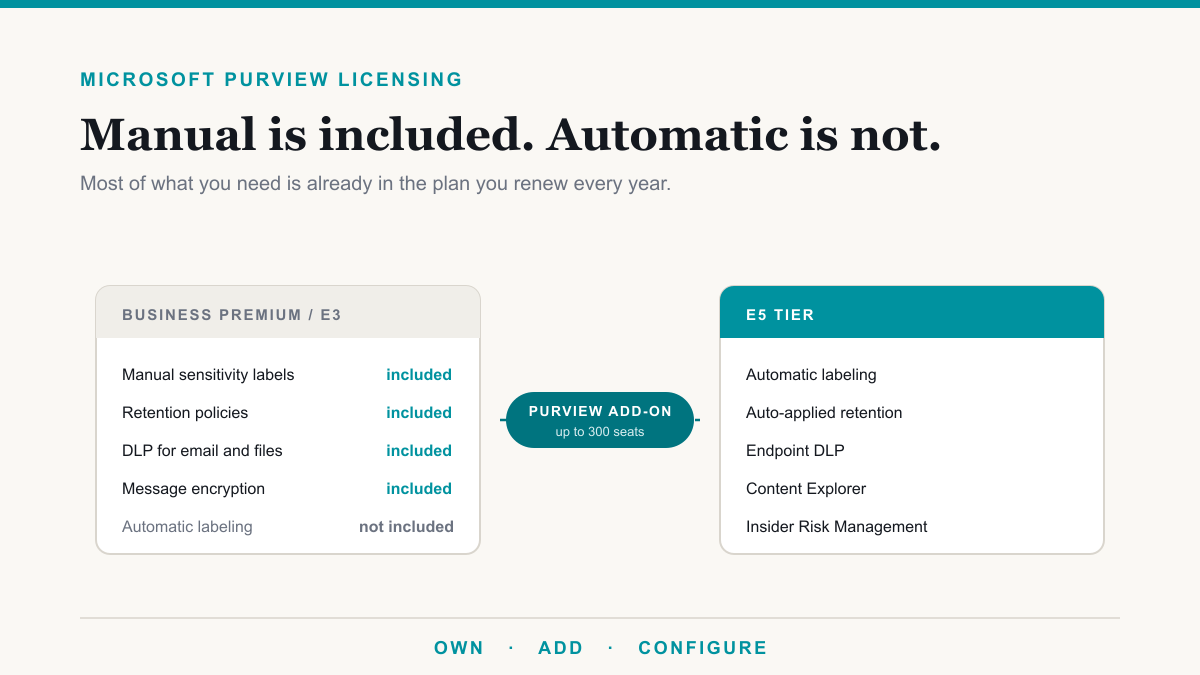
There is a pattern underneath all the plan tables, and once you see it, most of Purview licensing stops being mysterious. Manual is generally included. Automatic generally is not.
Business Premium and E3 give you the ability to create the rules and let people apply them. You can publish sensitivity labels and your staff can choose one. You can set a retention policy for a whole mailbox or site. You can build a data loss prevention rule that inspects email and files. What the higher tier buys is the machine doing it for you, plus the reporting that tells you what it found: labels applied automatically based on content, retention that attaches itself to the right documents, protection that follows data onto laptops, and the analytics that show you where sensitive information actually lives.
That distinction is not a marketing accident. The automated features are the ones that require Microsoft to scan and classify content continuously, and they are priced accordingly. It also means the honest first question is not "which plan should we buy" but "have we turned on what we already have."
What Microsoft Purview licensing includes with Business Premium
Here is the practical split, drawn from Microsoft's own service description. The first column is what a Business Premium or E3 organization can use today at no extra cost. The second is what sits behind E5 or a Purview add-on.
| Area | Included with Business Premium or E3 | Needs E5 or a Purview add-on |
|---|---|---|
| Sensitivity labels | Manual labeling by your staff | Automatic labeling based on content |
| Retention | Retention policies, plus labels people apply themselves | Auto-applied labels, records declaration, disposition review |
| Data loss prevention | Exchange, SharePoint, and OneDrive | Endpoint devices, Teams chat, browser and network |
| Finding sensitive data | Basic visibility only | Content Explorer and Activity Explorer |
| Email encryption | Purview Message Encryption | Advanced Message Encryption, with expiry and revoke |
| Auditing | Audit (Standard), 180 days of history | Audit (Premium), up to one year |
| Insider risk and communications | Not included | Insider Risk Management, Communication Compliance |
| Compliance Manager | Included | Additional premium assessment templates |
For a small practice or firm, that left column is more than it sounds like. It covers labeling confidential files, keeping records for the years you are required to keep them, stopping patient or client identifiers from leaving in email, and sending an encrypted message to someone on Gmail. Our posts on sensitivity labels, retention and data lifecycle, and sending encrypted email all describe work that a Business Premium tenant can do without buying anything. Microsoft publishes the full feature-by-feature detail in its Purview service description, which is the document to check before any renewal conversation.
The add-on that changed the math for small organizations
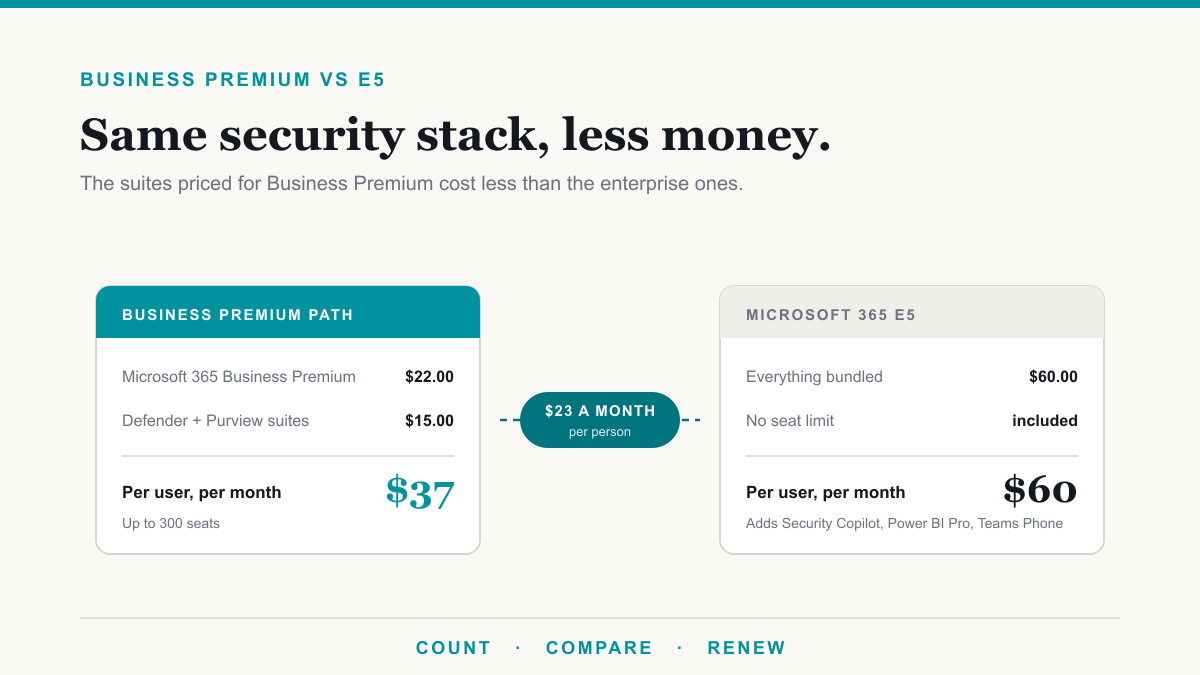
For years the answer to "we need the advanced Purview features" was "then you need E5," which for a thirty-person practice was a hard sell. That is no longer the only route. Microsoft now sells a Microsoft Purview Suite for Microsoft 365 Business Premium add-on, listed at $10.00 per user per month paid yearly, which requires a Business Premium base license and is capped at a maximum of 300 seats. A combined Defender and Purview bundle for Business Premium lists at $15.00 per user per month.
The comparison worth doing is simple. Business Premium lists at $22.00 per user per month paid yearly, so Business Premium plus the Purview add-on is about $32.00, against Microsoft 365 E5 at $60.00. Those are list prices as of this writing and your actual numbers will depend on your agreement, so treat them as the shape of the decision rather than a quote.
Two honest caveats. E5 buys a great deal more than Purview, including the enterprise security and telephony components, so this is not an apples-to-apples swap; it is only the cheaper path if Purview is genuinely what you are after. And the 300-seat cap is a real ceiling, which makes this an option for small and mid-sized organizations specifically. Microsoft lists the current terms on its Purview Suite for Business Premium page.
The setting worth checking before you buy anything
There is one item that catches a surprising number of organizations, and it costs nothing to fix. Audit logging is not enabled by default on the Business plans. Microsoft states plainly that auditing is not on by default for Business Basic, Business Standard, and Business Premium, and that an administrator has to turn it on manually. Enterprise plans behave differently, which is why the assumption travels so easily.
The consequence is quiet until it is not. Audit logs are what answer "who opened that file" after a suspected breach, and they are frequently the first thing an insurer, an auditor, or a breach investigator asks for. A log that was never switched on has nothing in it to search, and turning it on today does not create yesterday's records. Microsoft's guidance on turning auditing on or off includes the check, and it takes a few minutes. We walk through the whole topic, including what the log records and the standard-versus-premium split, in our guide to Microsoft Purview Audit. If you do nothing else after reading this, verify that one setting.
How to decide what you actually need
The way to keep this from turning into a feature-comparison exercise is to work backwards from obligation. Start with the rules you are genuinely subject to: HIPAA record-keeping, a client-confidentiality requirement, a cyber insurance questionnaire, a contract clause from a larger partner. Write down the two or three things you must be able to prove. Then ask which of those your current plan already covers, and buy only for the gap that is left.
In practice that ordering tends to produce a short list. A dental or medical practice usually needs encrypted email, sensible retention on patient records, a data loss prevention rule that catches identifiers leaving by email, and auditing switched on. All four are in Business Premium. A firm that has to demonstrate where its sensitive data lives, or that has a real insider-risk concern, is the one that benefits from the add-on, and our posts on finding sensitive data in Microsoft 365 and insider risk management describe what that upper tier actually does. The framework work itself is covered on our compliance page.
The trap to avoid is buying the license and calling it done. Purview features do nothing until someone configures them, and an unconfigured E5 tenant is not more compliant than a well-configured Business Premium one. The licensing question is real, but it is the second question.
Frequently asked questions
Does Microsoft 365 Business Premium include Microsoft Purview?
Yes, partly. Business Premium includes manual sensitivity labels, retention policies and manually applied retention labels, data loss prevention for Exchange, SharePoint and OneDrive, message encryption, Audit (Standard), and Compliance Manager. The automated and investigative features are not included.
What is the simplest way to understand Microsoft Purview licensing?
Manual is usually included, automatic usually is not. Business Premium and E3 let you create the rules and let people apply labels themselves. Automatic labeling, auto-applied retention, endpoint data loss prevention, and the analytics that show you where sensitive data sits generally require E5 or a Purview add-on.
Do we have to buy E5 to get the advanced Purview features?
No. Microsoft sells a Microsoft Purview Suite for Business Premium add-on at $10.00 per user per month paid yearly, which requires a Business Premium base license and is capped at 300 seats. For organizations under that cap, it is a much smaller step than moving everyone to E5.
Is audit logging on by default in Microsoft 365?
Not for the Business plans. Microsoft documents that auditing is not enabled by default for Business Basic, Business Standard, and Business Premium, and must be turned on manually. It is worth verifying, because an audit log that was never switched on cannot be searched after an incident.
What does Microsoft Purview cost for a growing company?
The everyday features cost nothing extra if you already have Business Premium or E3, because they are part of the plan. If you need the advanced set, the Purview Suite for Business Premium add-on lists at $10.00 per user per month paid yearly, and a combined Defender and Purview bundle lists at $15.00.
Which Purview features require Microsoft 365 E5?
Automatic sensitivity labeling, auto-applied retention labels, records declaration and disposition review, endpoint and Teams data loss prevention, Content Explorer and Activity Explorer, Insider Risk Management, Communication Compliance, and Audit (Premium). Most are also available through the Purview add-ons.
Where should we start if we are not sure what we own?
Start with your obligation rather than the feature list. Write down the one or two rules you are actually required to meet, check whether your current plan already covers them, then confirm auditing is on. Many organizations find they own more than they have switched on.
Getting Microsoft Purview licensing right
If the reason you are pricing Purview is an upcoming Copilot rollout, start there: Purview is the governance layer that decides what Copilot can see, and the licensing decision falls out of that plan. If the reason is an audit, our compliance services map the Purview features to the controls being asked for.
Microsoft Purview licensing is easier to reason about once you stop reading it as a feature grid and start reading it as a line: your plan probably covers the everyday protection work, the automation and the investigation tools sit a tier up, and small organizations now have a $10 route to that tier instead of a jump to E5. The cheapest move available to most businesses is still the same one, which is to find out what is already sitting unused in the plan they renew every year. If you would like help working out what your Microsoft 365 licensing already covers and what is genuinely worth adding, Desert Lakes Solutions offers a no-pressure discovery call to go through it with you. Book a discovery call whenever it suits.