Microsoft 365 Business Premium vs E5: The Real Cost
Published August 3, 2026, updated October 18, 2026
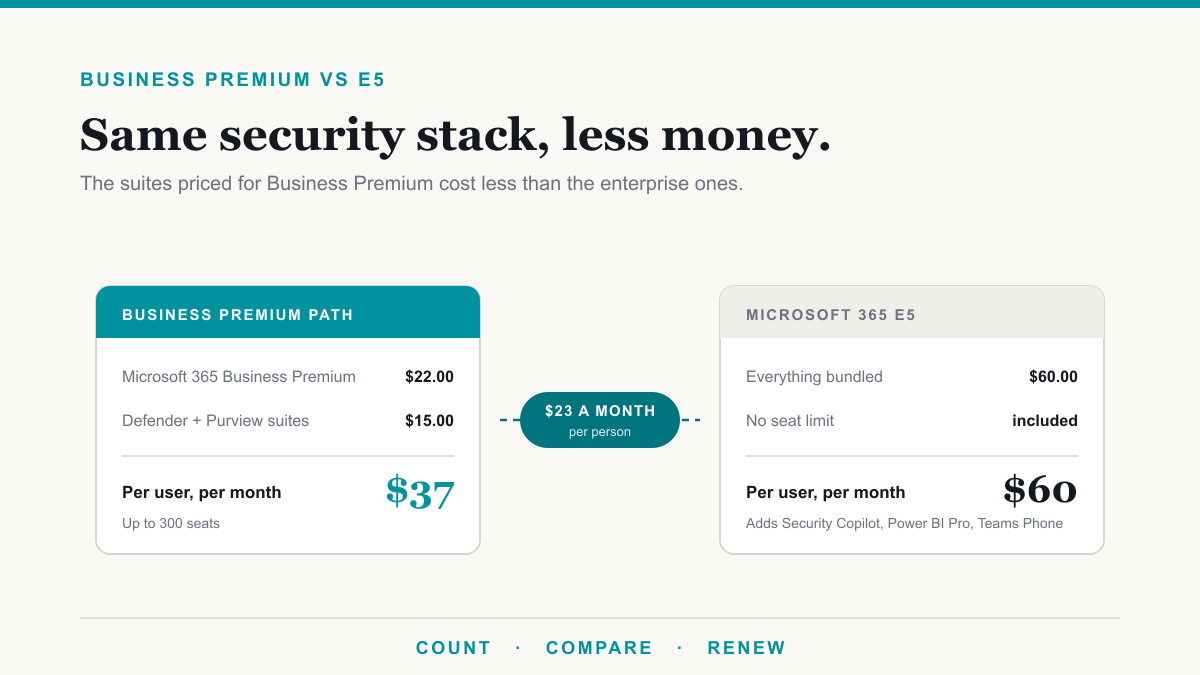
Under 300 seats, Microsoft 365 Business Premium plus both of its security and compliance suites costs $37.00 per user per month, against $60.00 for Microsoft 365 E5, for a feature set that is close to identical for most businesses. That is a difference of $23.00 per person every month, and at 200 people it is roughly $55,000 a year that can go somewhere more useful than a licensing line. This post is for the owners and administrators of healthcare, legal, financial, and professional-services organizations who are staring at a renewal quote and trying to work out whether the jump to E5 is genuinely necessary.
The reason the Microsoft 365 Business Premium vs E5 question is worth revisiting right now is that the arithmetic changed, and most of the comparisons you will find online are still running the old numbers.
Microsoft 365 E5 price in 2026, and the plans around it
Microsoft 365 E5 costs $60.00 per user per month on an annual commitment, which is $720 per user per year, or $51.45 a month for the version without Teams. Microsoft raised it from $57.00 on July 1, 2026. Here is where E5 sits against the plans on either side of it, using Microsoft's published US list prices as checked on October 18, 2026.
| Plan | Per user, per month | Per user, per year | Notes |
|---|---|---|---|
| Microsoft 365 Business Basic | $7.00 | $84 | Web and mobile apps only. Business plans share a 300-seat cap. |
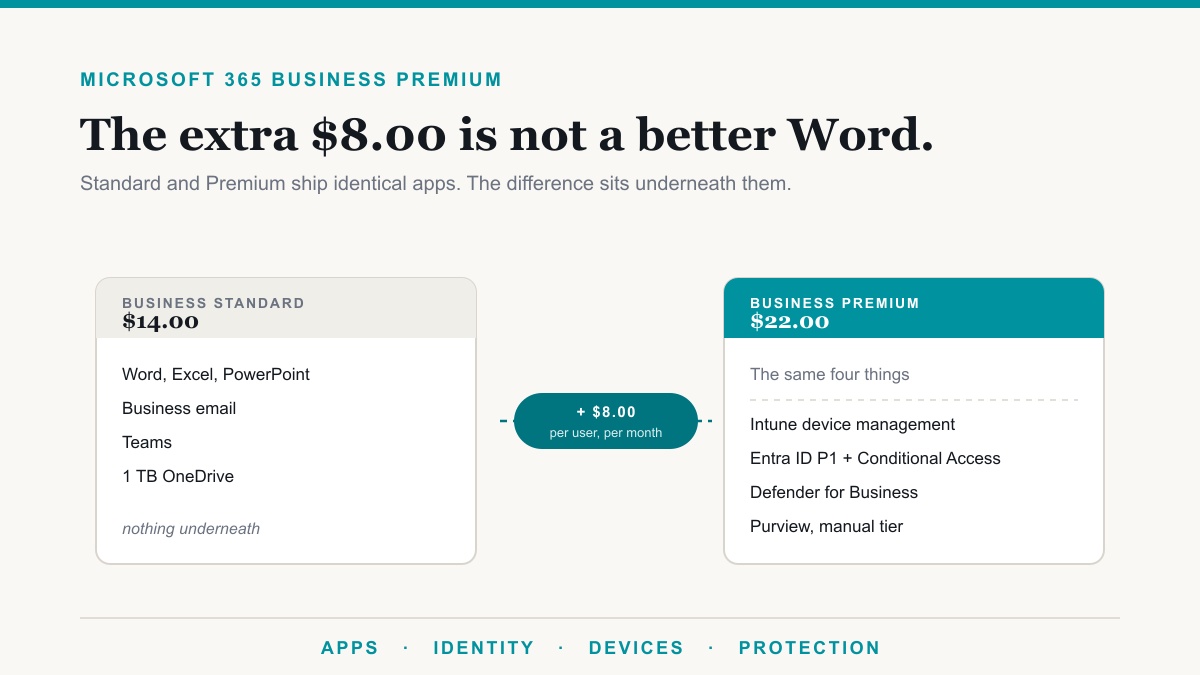
| Microsoft 365 Business Standard | $14.00 | $168 | Desktop apps, no Intune or Defender for Business. |
| Microsoft 365 Business Premium | $22.00 | $264 | Takes the $15 Defender and Purview Suites for Business Premium. |
| Microsoft 365 E3 | $39.00 | $468 | Base plan for the $12 enterprise Defender and Purview Suites. |
| Microsoft 365 E5 | $60.00 | $720 | $51.45 without Teams. Was $57.00 before July 1, 2026. |
| Microsoft 365 E7 | $99.00 | $1,188 | E5 plus Copilot, Agent 365, and Entra Suite. $90.45 without Teams. |
To price a mix for your own headcount, the Microsoft 365 licensing calculator does the arithmetic in your browser. If Copilot is part of the conversation, our guide to Microsoft 365 E7 covers the $99 plan that bundles E5 with Copilot, and when it costs more than buying the pieces.
Free Microsoft 365 tenant check. We will look at your Defender, Purview, and license state, tell you what is switched off or paid for and unused, and send it in writing. No charge and no sales call required to get the findings. Request the check.
What changed, and why most Business Premium vs E5 comparisons are wrong
For years the advanced security and compliance capability in Microsoft 365 was sold as two add-ons called E5 Security and E5 Compliance. Microsoft has since renamed them the Microsoft Defender Suite and the Microsoft Purview Suite, and both list at $12.00 per user per month.
Here is the part that trips people up. Those two enterprise suites do not attach to Business Premium. Microsoft's own security suites pricing page lists the prerequisite for each as Microsoft 365 E3, or Office 365 E3 combined with Enterprise Mobility and Security E3. Business Premium is not on that list. Licensing specialists at Schneider IT Management reported the change in 2025, and it has quietly invalidated a lot of published guidance since.
What Microsoft did instead was give Business Premium its own editions, and they cost less:
- Defender Suite for Business Premium, $10.00 per user per month. The same five products as the enterprise version: Entra ID P2, Defender for Endpoint Plan 2, Defender for Office 365 Plan 2, Defender for Identity, and Defender for Cloud Apps.
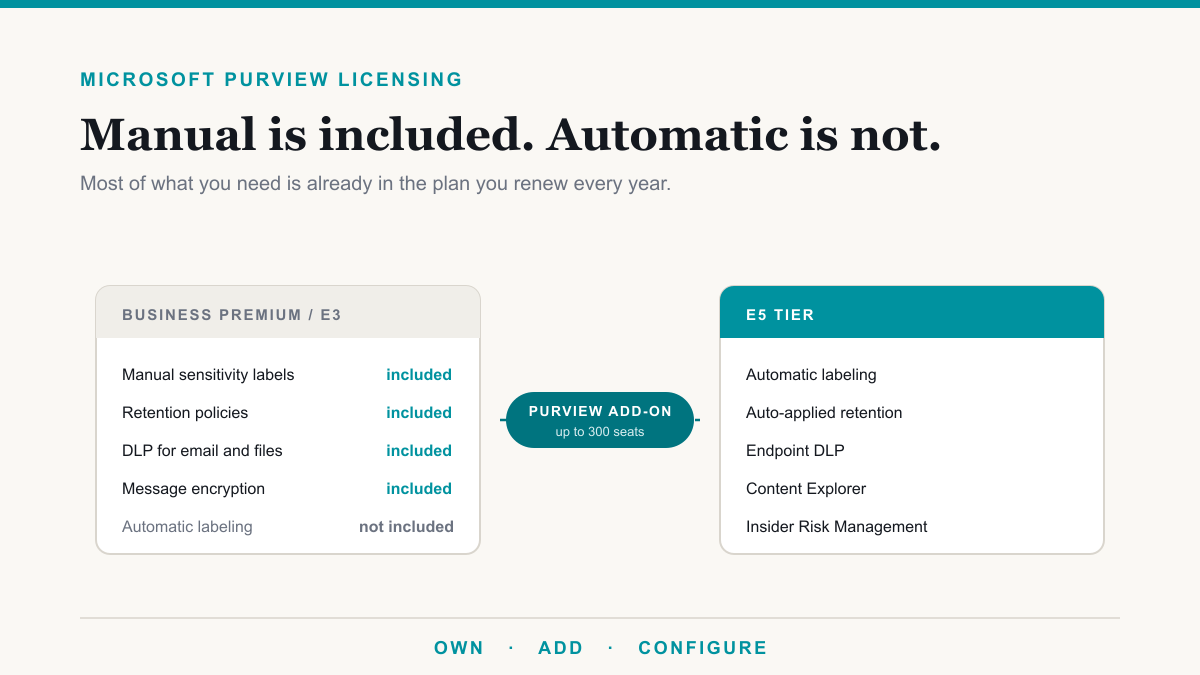
- Purview Suite for Business Premium, $10.00 per user per month. Automatic labeling, data loss prevention across apps and devices, records management, insider risk analytics, eDiscovery Premium, and Audit Premium.
- Defender and Purview Suites for Business Premium, $15.00 per user per month. Both of the above on one line, which Microsoft lists on its business add-on pricing page.
All three require a Business Premium base license and are capped at 300 seats. So the honest comparison is $22.00 plus $15.00, which is $37.00. Not $22.00 plus $12.00 plus $12.00, which is the $46.00 figure you will still see in most licensing blogs and quite a few vendor quotes.
Microsoft 365 Business Premium vs E5, line by line
These are Microsoft published list prices in US dollars, per user per month, on an annual commitment billed annually. Paying monthly on an annual term runs about five percent higher, and nonprofit, government, and education pricing all differ.
| Business Premium path | Microsoft 365 E5 | |
|---|---|---|
| Base plan | $22.00 | $60.00 |
| Full Defender stack | add $10.00 | included |
| Advanced Purview compliance | add $10.00 | included |
| Both suites together | add $15.00 | included |
| Total with the full stack | $37.00 | $60.00 |
| Seat limit | 300 | none |
| Power BI Pro | add $14.00 | included |
| Teams Phone | add $10.00 | included |
| Security Copilot, Endpoint Privilege Management, Cloud PKI | not available | included |
| Windows edition rights | Windows 11 Business | Windows Enterprise E3 |
Worth noting for anyone being steered toward E3 as the middle ground: E3 lists at $39.00, the Defender Suite takes it to $51.00, and adding the Purview Suite as well takes it to $63.00, which is more than E5. If you genuinely need both suites and you are over 300 seats, E5 is the cheaper answer. Under 300 seats, Business Premium is cheaper than either.
What E5 actually buys that Business Premium plus the suites does not
The gap is real, it is just narrower than the price difference suggests. Microsoft's July 2026 packaging update added several things to E5 that have no Business Premium equivalent at any price:
- Microsoft Security Copilot. The assistant that summarizes incidents and helps an analyst work through an investigation. Useful if you have someone whose job is running investigations, and largely idle if you do not.
- Intune Endpoint Privilege Management. Lets standard users run specific approved tasks that need admin rights, without handing them a local administrator account.
- Microsoft Cloud PKI. Certificate infrastructure as a service, which matters most if you run your own certificate authority today.
- Power BI Pro and Teams Phone. The two most commonly forgotten items in this comparison, and often the ones that flip the decision.
- Windows Enterprise edition rights rather than Windows 11 Business, plus no seat cap.
That last pair is where the math quietly turns over. Power BI Pro is $14.00 and Teams Phone is $10.00. If most of your people need both, the Business Premium path lands at $61.00 and E5 at $60.00 becomes the cheaper option. Remember that viewing a shared Power BI report needs a license too, not just publishing one, so the count is usually larger than people first assume.
The 300-seat limit is the real ceiling, not the price
Microsoft's service description sets the Business family limit plainly: a maximum of 300 users, and the footnote makes clear that the cap applies across Business Basic, Business Standard, Business Premium, and Apps for business combined, not 300 of each. If you have 250 Business Premium licenses, you have 50 Business seats left in total.
The good news is that hitting the cap is not a migration event. Microsoft explicitly supports combining Business, Enterprise, and standalone plans in one tenant, so the normal answer at seat 301 is to keep the 300 Business Premium licenses you already have and put everyone after that on E3 or E5 alongside them. That stays cheaper than converting the whole organization, at the cost of administering two license types, and it is worth deciding deliberately rather than discovering at renewal.
Working out where your organization actually lands
The answer depends on your seat count, how much of the security stack you will genuinely operate, and whether you have a compliance obligation someone can point at in writing. Buying detection nobody watches is the most expensive kind of shelfware, because it also needs configuring before it does anything.
Two free tools on this site will do the arithmetic with your numbers in it. The Microsoft 365 licensing calculator prices Business Premium, E3, and E5 against the capabilities you pick, and buys a suite instead of the individual parts whenever the suite is cheaper. The Microsoft 365 license decision tree asks five questions and returns a license mix for the whole organization, including which staff should not be on a full knowledge-worker plan at all, with the reasoning printed underneath. Both run in your browser, neither asks for an email address, and both carry the date the prices were last checked against Microsoft's published pricing.
If compliance is what is driving the conversation, our guide to Microsoft Purview licensing covers what Business Premium and E3 already include before you add anything, and our compliance page covers what HIPAA, PCI, and SOC 2 ask of you in practice.
Frequently asked questions
How much is Microsoft 365 Business Premium vs E5?
Business Premium lists at $22.00 per user per month on an annual commitment and E5 lists at $60.00. Adding the full security and compliance stack to Business Premium costs $15.00 more through the combined Defender and Purview Suites for Business Premium, bringing it to $37.00 against $60.00 for E5.
How much does a Microsoft 365 E5 license cost?
Microsoft 365 E5 lists at $60.00 per user per month on an annual commitment, which is $720 per user per year. The version without Teams is $51.45. Microsoft raised E5 from $57.00 on July 1, 2026, and nonprofit, government, and negotiated enterprise pricing all differ from list.
Can I add the Defender Suite and Purview Suite to Business Premium?
Yes, but not the enterprise versions. The $12.00 Microsoft Defender Suite and $12.00 Microsoft Purview Suite require Microsoft 365 E3, or Office 365 E3 with EMS E3. Business Premium has its own editions at $10.00 each, or $15.00 for both, each capped at 300 seats.
Why do most comparisons say Business Premium plus both suites is $46?
Because they use the enterprise suite prices of $12.00 each, which no longer attach to Business Premium. Microsoft removed Business Premium as an eligible base plan for those suites during 2025 and replaced them with cheaper Business Premium editions, and a lot of published guidance has not caught up.
When is Microsoft 365 E5 actually worth it?
When you are over 300 seats, when you need Microsoft Security Copilot, Intune Endpoint Privilege Management, or Microsoft Cloud PKI, or when a lot of people need Power BI Pro and Teams Phone. Those two add-ons alone are $24.00 per user, which is what closes the gap.
What is the 300-user limit on Microsoft 365 Business Premium?
Microsoft caps Business Basic, Business Standard, Business Premium, and Apps for business at 300 provisioned licenses per tenant, combined rather than 300 of each. Once you need seat 301, you keep the 300 you have and license the rest on E3 or E5 in the same tenant.
Do we have to move everybody to E5 once we pass 300 users?
No. Microsoft supports combining Business, Enterprise, and standalone plans in a single tenant, so the usual answer is to keep your 300 Business Premium licenses and put the overflow on E3 or E5. It is cheaper than converting everyone, at the cost of running two license types.
Is Business Premium plus the suites really the same as E5?
Close, not identical. You get the same five Defender products and the same advanced Purview capabilities. What you do not get is Security Copilot, Endpoint Privilege Management, Cloud PKI, Windows Enterprise edition rights, Power BI Pro, or Teams Phone, all of which are bundled into E5.
Getting Microsoft 365 Business Premium vs E5 right for your business
For most organizations under 300 seats, the Microsoft 365 Business Premium vs E5 question now has a clearer answer than it did a year ago: Business Premium with the suites it is entitled to gets you almost all of the way for $37.00 rather than $60.00, and the cases where E5 genuinely wins are specific enough to name. The one thing worth avoiding is accepting a quote built on the old suite prices, because that version of the comparison makes Business Premium look $9.00 more expensive than it is.
Most of the Premium versus E5 questions we get are really about one of two things: rolling out Microsoft 365 Copilot without exposing data it should not see, or passing a compliance review that wants E5-class controls proven. Deciding which of those you are solving usually settles the license.
If you would like a second opinion on what you are paying for and what you are actually using, Desert Lakes Solutions offers a no-pressure discovery call to go through your current licensing and your renewal date together. Book a discovery call whenever it suits.