Managed IT · Phoenix, AZ
Managed IT Services in Phoenix, AZ
Help desk, servers, network, Microsoft 365, and security for Phoenix businesses, with engineers on-site across the Valley. Plans run $166, $241, or $271 per user per month with a $1,400 minimum, and every plan includes on-site visits.
On-site across the Phoenix metro. Most clients fully onboarded in two to three weeks.

US-based engineers
In-house, US-based team
15-minute response
A real person on critical issues, 24/7
Transparent pricing
Published rates, written quotes
Security-first
Built in from day one
Managed IT in the Phoenix metro costs $166, $241, or $271 per user per month at Desert Lakes Solutions, depending on how much security sits on top of day-to-day support. The Microsoft 365 license is inside each of those figures, the monthly floor is $1,400, and the standard response on a critical issue is 15 minutes, at any hour. We publish those numbers because a buyer comparing providers in 2026 should be able to tell from a web page whether a company fits the budget, without booking a call first.
We are based in the Valley, so businesses across the Phoenix metro get engineers on-site, from Phoenix and Scottsdale out through Mesa, Tempe, Chandler, Gilbert, Glendale, Peoria, Paradise Valley, and Surprise. Businesses elsewhere in Arizona get the same services delivered remotely, with on-site visits scheduled when a job needs hands.
The rest of this page is the detail behind that: what a plan covers, a checklist you can run against any provider here, how onboarding works, the Arizona rules that apply to your data, what Phoenix summers do to equipment, and the full cost picture with the arithmetic shown. Jump to the evaluation checklist or straight to what it costs.
What does managed IT include for a Phoenix office?
Managed IT means one company takes ongoing responsibility for your technology for a fixed monthly fee, instead of you calling someone when something breaks. In practice that is a help desk your staff can reach, monitoring and patching (keeping software updated) on every workstation, security tooling with a team watching what it reports on the security tiers, administration of your Microsoft 365 tenant (your company account and everything in it), workstation backups that get tested, and someone who plans the hardware refresh before the hardware fails. Servers, firewalls, switches, and Wi-Fi are managed too, inside the per-user price. If the model is new to you, our guide to what a managed service provider is covers the vocabulary, and the managed IT overview covers the full service catalog.
For a Phoenix office specifically, three things tend to matter more than the feature list. Whether a person can physically get to your office, and how fast. Whether the provider knows the Arizona rules that apply to your customer data, not just the federal ones. And whether the price is a number or a conversation. Those three run through the rest of this page.
What does managed IT cost in Phoenix?
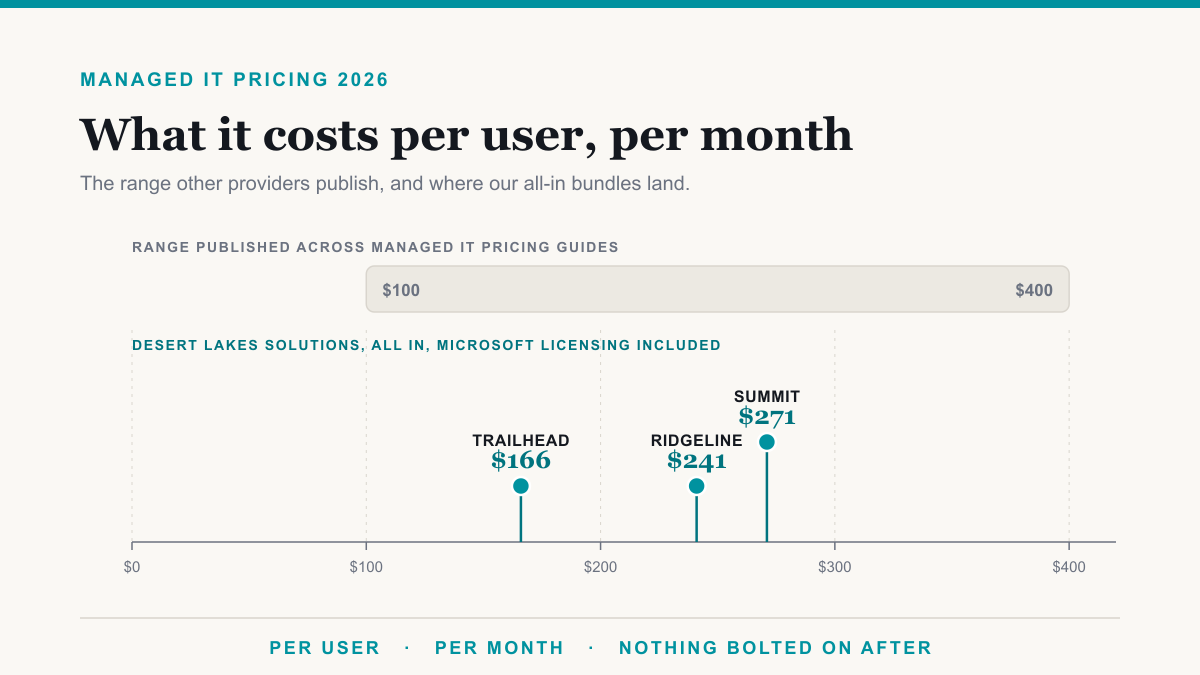
Three fixed bundles, priced per user per month on the assumption of one computer per person, with the Microsoft 365 license inside the price:
- Trailhead, $166 per user per month. Essential IT. Managed help desk from 7am to 7pm on weekdays, endpoint protection, patching, workstation backup, and file-level offsite backup for servers, with Microsoft 365 Business Premium included in the price. Server and network device management are included too.
- Ridgeline, $241 per user per month. Business Security. Everything in Trailhead, plus a help desk staffed 24 hours every day, managed detection and response, an onsite backup appliance that recovers a failed server far faster than restoring files over the internet, security awareness training, and identity and access management. This is where most offices land.
- Summit, $271 per user per month. Full-Stack IT. Everything in Ridgeline, plus Microsoft 365 E5, a 24/7 security operations center (analysts watching alerts at 3 a.m.), cloud security monitoring, and virtual CIO advisory (the technology planning role you would otherwise hire for), included up to 6 hours a month.
Every plan includes on-site visits: 1 a month on Trailhead, 3 on Ridgeline, and 5 on Summit, each up to 3 hours. Unused visits do not carry over to the next month, and extra on-site time is quoted.
The three figures are fixed bundle prices rather than the sum of their parts, so the step between tiers is not the same as the price of what the tier adds. The monthly floor is $1,400. Below 9 users on the entry bundle you pay the floor rather than the per-user figure, which is worth knowing before you compare anything. Volume discounts come off the managed monthly and step at set headcounts: 4 percent at 25 users, 10 percent at 100, continuing upward, with a custom agreement above 300 users. The full schedule and a calculator that applies it live on our pricing page.
A worked example. A 12-person Phoenix office on Ridgeline: 12 times $241 is $2,892 a month. That clears the $1,400 floor and sits under the 25-user discount threshold, so no adjustment lands in either direction. If that office runs a server, a firewall, and a couple of switches, the figure does not move: managing them is already in the price.
A second one, where the discount bites. A 30-person office on Trailhead: 30 times $166 is $4,980. The 4 percent break at 25 users removes $199.20, leaving $4,780.80 a month, an effective $159.36 per user.
Managing your servers, firewalls, switches, and access points is inside the per-user price. We do not bill per device for it. What sits outside the monthly figure is short: discovery and onboarding, the one-time work of taking your environment on, which we scope and quote rather than publish because it varies with what the audit finds (an all-new setup may have no onboarding fee, and discovery and cleanup work costs more); 24-hour SIEM monitoring if you want it, at $130 per server, $100 per firewall, $50 per switch, and $35 per access point per month; employee onboarding at $150 and offboarding at $75, charged when someone starts or leaves rather than as a per-head fee for switching; hardware purchases; and project work such as a cloud migration, an office move, or a network redesign, which we scope and quote per engagement.
For how these figures compare against the wider 2026 market, and how to normalize a quote you are already holding, see our breakdown of managed IT cost per user per month. To model your own team against the cost of hiring, the IT cost calculator does that math. Or tell us your headcount and we will send a written quote.
What is covered, line by line
Ten things a managed IT plan covers. Some sit inside the per-user price, some start at a particular bundle, and some are quoted per server or per appliance. The notes say which, and the cost section above shows the figures.
- Help desk for your whole team, with a 15-minute standard response on critical issues at any hour (the help desk itself is staffed 7am to 7pm on weekdays on Trailhead, and 24 hours every day on Ridgeline and Summit)
- On-site engineers across the Valley when a job needs hands on the hardware
- Microsoft 365 administration (the license is included in the per-user price)
- Endpoint protection and patching (keeping software updated) on every workstation
- Managed detection and response, a staffed team watching your computers around the clock (included on Ridgeline and Summit, or $30 per workstation per month added to Trailhead)
- Server, firewall, switch, and wireless management (included in every bundle, not billed per device)
- Backups that are verified by restoring them, not just scheduled and forgotten (every bundle backs up workstations and servers; Ridgeline and Summit add an onsite appliance, which is the difference between recovering a failed server in hours and recovering it over the internet)
- Employee onboarding and offboarding run the same documented way every time (charged per person when someone starts or leaves: onboarding $150, offboarding $75)
- The monitoring, logging, access control, and documentation that HIPAA, PCI DSS (card payments), CMMC (defense contracts), and SOC 2 (an audit report customers ask for) evidence is built from (the access control and around-the-clock monitoring pieces start on Ridgeline; framework readiness itself is scoped and quoted after a gap assessment)
- A written technology plan and budget, so a hardware refresh gets budgeted ahead of time (virtual CIO advisory, on Summit)
Why Phoenix companies switch to us
- The invoice has something new on it every month.
- Tickets sit for days before anyone answers.
- Nobody has looked after the systems in years.
- The person who handled IT has left.
How does onboarding a new client work?
Four stages, two to three weeks for most offices, and no day where your team is without support. A complicated environment can take 30 to 60 days.
-
01
Scope
A 30-minute call to get the real shape of your environment: headcount, computers per person, servers, firewalls, what you run in Microsoft 365, and what is prompting the change. You get a written quote from that, at published rates.
-
02
Document
Before we change anything, we inventory the workstations, servers, network gear, tenant settings, licenses, and vendor accounts, and we write it down. Most of the bad surprises in an IT transition come from something nobody knew was there.
-
03
Cut over
Monitoring, security software, backups, and sign-in controls go up alongside your current setup, then we switch. The goal is that your team notices the help desk number changing and little else.
-
04
Run it
Patching, monitoring, help desk, and backup verification on an ongoing cadence, plus a regular review of what broke, what is aging out, and what next year needs to budget for.
What onboarding covers
- A set process for adding and removing employees
- Network fixes and improvements
- Microsoft 365 licensing cleanup
- Single sign-on
- Defender and Intune security policies
- Email: SPF and DMARC, quarantine management, legitimate senders let through, spam and phishing blocked
How do you evaluate a managed IT provider in Phoenix?
10 questions worth asking every provider you are considering, ours included. They are ordered roughly by how much they move a decision, and asking all 10 of each provider is what makes the quotes comparable.
-
01
Ask whether the Microsoft 365 license is inside the per-user price, and which plan
Microsoft lists Business Premium at $22.00 per user per month paid yearly and E5 at $60.00, a $38.00 gap per seat before anyone does an hour of work. Two quotes at the same headline number are not the same deal if one includes the license and the other does not. Ours include it, Business Premium on the first two bundles and E5 on the third.
-
02
Ask what the monthly minimum is
A floor decides the price for a small office more than the per-user rate does. Ask for the figure in writing, and ask at what headcount you stop paying the floor and start paying per user. Ours is $1,400 a month, and the entry bundle clears it at 9 people.
-
03
Ask what the response commitment measures
A response time can mean a first human reply, an engineer starting work, or a resolution, and those are very different promises. Ask which one is being quoted, what counts as critical, and whether the clock runs overnight and on weekends. Ours is a 15-minute standard response on critical issues at any hour, and it measures a real person replying rather than a resolution. What counts as critical is defined in the agreement before you sign.
-
04
Ask where the engineers are and what the drive time to your address is
A provider can be excellent and still be four states away. If your business needs someone physically present for a network cutover, meaning the day you switch from the old setup to the new one, or for a dead server, ask for a real drive time to your suite, not a service-area map. Buckeye to Queen Creek is a long way across one county.
-
05
Ask what is not in the monthly price
Get the exclusions in writing before you compare anything. Ask specifically about the one-time discovery and onboarding fee, whether servers and network devices are billed per item or included, whether employee onboarding and offboarding are charged per person, hardware purchases, and project work such as a cloud migration or an office move. Ours includes server and network device management in the bundle. We publish ours, and we quote projects per engagement instead of an hourly rate.
-
06
Ask when the last test restore was, and to see the result
Backup software reporting success is not the same as a restore that worked. Ask how often restores are tested, what was restored most recently, and how long a full recovery took. If they do not have it to hand, it is fair to ask them to go find out.
-
07
Ask who owns your Microsoft 365 tenant, your domain, and your documentation
You want the answer to be that you own all three, in writing, before you sign. Ask what you would be handed on the way out and how long it would take. Your Microsoft 365 tenant, your domain, and your documentation are yours with us, in writing.
-
08
Ask whether they know the Arizona notification rules, not just the federal ones
Arizona sets its own deadline and its own list of who has to be told, including the director of the Arizona Department of Homeland Security once a breach requires notifying more than 1,000 individuals. The section below covers what the statute says, so you can check an answer against it.
-
09
Ask what the one-time onboarding fee is, and what work it covers
This is the biggest number most buyers leave out of a comparison. Ask for it in writing alongside the monthly, and ask what it actually pays for: the audit, the documentation, the migration itself, or all three. We scope and quote ours per engagement rather than publishing a rate. An all-new setup may have no onboarding fee, and discovery and cleanup work costs more.
-
10
Ask for the onboarding plan in weeks, with what happens in each
The risky part of any transition is the cutover, so ask what happens on that day specifically. Ask what gets documented before anything changes, what gets stood up in parallel, and what day your team notices a difference. Most of our clients are fully onboarded within two to three weeks.
Two more things to look for. Whether pricing appears anywhere on the provider website, so you can compare before you book a call. And whether there is a written offboarding process. Our walkthrough of how to switch IT providers covers the handover in the order it has to happen, and in-house versus managed IT runs the comparison against hiring instead.
Where do you work on-site in the Phoenix metro?
The Phoenix metropolitan statistical area, as the federal Office of Management and Budget defines it, is Maricopa County plus Pinal County. Maricopa alone covers 9,224 square miles and contains 24 cities and towns. That is why drive times vary so much across the Valley.
Most work happens remotely because that is faster for the person waiting. When it needs hands, whether that is a switch replacement in Deer Valley, a suite buildout in Chandler, or a server that will not start in Glendale, an engineer drives.
If you supply the aerospace and defense sector, one thing is worth flagging. The Greater Phoenix Economic Council, a regional economic development nonprofit, puts aerospace employment here at 1.91 times the national average. Small suppliers anywhere in that chain usually find CMMC and NIST SP 800-171 written into a contract eventually, and both are federal security requirements that flow down from the prime contractor. That is compliance work we do.
On-site across the Phoenix metro
- Phoenix
- Scottsdale
- Mesa
- Tempe
- Chandler
- Gilbert
- Glendale
- Peoria
- Paradise Valley
- Surprise
Also regularly on-site in Avondale, Goodyear, Buckeye, Queen Creek, Fountain Hills, Litchfield Park, Apache Junction, Cave Creek, Sun City, and Tolleson. If your suite is somewhere not listed here, ask us about drive time.
Outside the Valley? Businesses in Tucson, Flagstaff, Yuma, and the rest of Arizona run on the same services delivered remotely, and we support clients nationwide the same way.
Running a dental or medical practice? Clinical systems and HIPAA change the shape of the work, so we cover that separately on our Phoenix dental IT page and across our industry pages.
More on pricing, switching, and how managed IT works
Managed IT
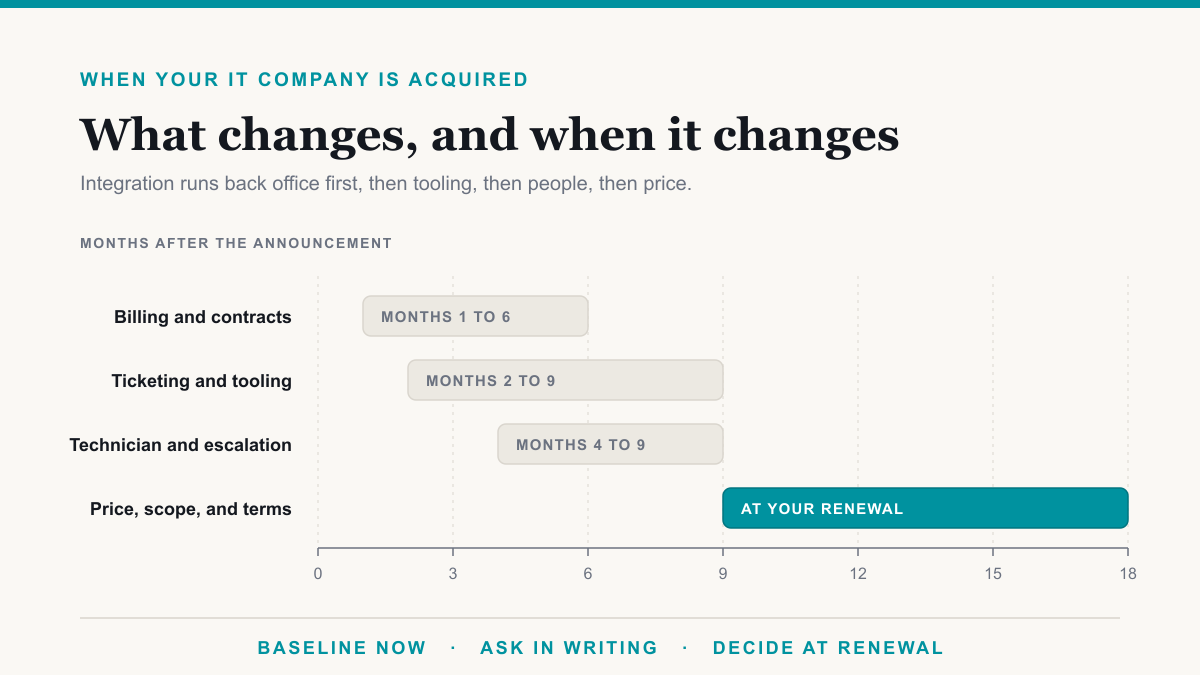
Your IT Company Was Acquired by Private Equity. Should You Leave?
Your IT company was acquired by private equity. What changes, what to ask this week, the warning signs in the first year, and when leaving is the right call.
Aug 10, 2026
Managed IT
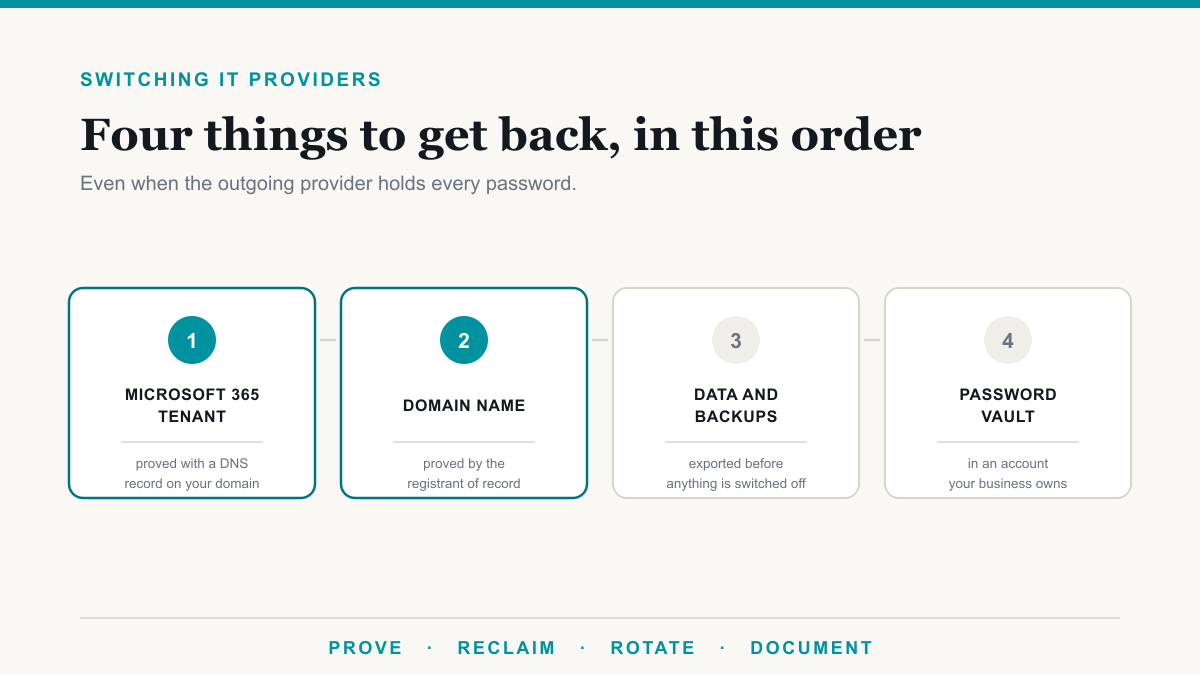
How to Switch IT Providers, Even Without Passwords
Switch IT providers without losing access, plus the recovery steps for when the outgoing provider holds every password to your domain and Microsoft 365.
Aug 6, 2026
Managed IT
How Much Should Managed IT Cost Per User Per Month in 2026?
Managed IT runs $100 to $400 per user per month in 2026. Here are real published prices, what each tier buys, and how to normalize any quote you are holding.
Aug 6, 2026
Frequently asked questions
What Phoenix owners and office managers ask before they pick a provider.
How much does managed IT cost for a Phoenix office?
Desert Lakes Solutions publishes three per-user bundles: $166 per user per month for essential IT, $241 for the business security tier, and $271 for the full stack. The Microsoft 365 license is included in each. The monthly floor is $1,400, so a small office pays the floor rather than the per-user figure until it reaches 9 people on the entry bundle. A 12-person office on the Ridgeline tier is $2,892 a month before servers and network gear. You get a written quote after a 30-minute scoping call.
What size Phoenix business is too small for managed IT?
None, but the math changes under about 9 people on the entry bundle. Our monthly minimum is $1,400, so a 5-person office pays $1,400 rather than 5 times $166, which would be $830. That is a real per-user cost of $280 at 5 people, and it is worth knowing before you compare quotes. The floor covers the fixed work in running any environment: securing the Microsoft 365 tenant, verifying backups, testing patches, and keeping the critical-issue path open at any hour.
Can an engineer come to my office in Tempe or Chandler?
Yes. We are based in the Valley and cover Phoenix, Scottsdale, Mesa, Tempe, Chandler, Gilbert, Glendale, Peoria, Paradise Valley, and Surprise on-site, along with the surrounding communities. Most issues are solved remotely and faster that way, but network cutovers, dead hardware, new-suite wiring, and anything that needs someone standing in front of a rack get a person on-site.
Do you work outside the Phoenix metro?
Yes. Businesses elsewhere in Arizona, from Tucson to Flagstaff to Yuma, get the same services and the same 15-minute standard response delivered remotely, with on-site visits scheduled when a job needs hands. We are based in Phoenix and serve clients well beyond it, including nationwide remotely.
How do I compare two or three managed IT quotes fairly?
Normalize them before you look at the totals. Ask each provider the same four questions: is the Microsoft 365 license inside the per-user price and which plan, what is the monthly minimum, what is billed separately from the monthly figure, and what does the response time measure. Those four answers move a quote more than the headline rate does. The checklist on this page has 10 questions in that shape, and our per-user cost breakdown works through the arithmetic.
How long does Arizona give a business to report a data breach?
A.R.S. 18-552 requires notification within 45 days after the determination that a breach occurred, and the clock starts at that determination rather than at the incident. If the breach requires notifying more than 1,000 individuals, the business must also notify the three largest nationwide consumer reporting agencies, the Arizona Attorney General, and the director of the Arizona Department of Homeland Security, in writing. There is no employee-count or revenue floor in the statute. HIPAA covered entities and businesses complying with Gramm-Leach-Bliley follow their own federal rules instead. This is a plain-language summary, not legal advice.
Does Phoenix heat damage business IT equipment?
It is an operating constraint you can measure. ASHRAE, the engineering body that sets data-center environmental standards, recommends a server inlet air temperature of 64.4 to 80.6 degrees Fahrenheit, measured at the front of the server where it draws air in, not at a thermostat on the wall. Sky Harbor recorded 122 days at or above 100 degrees in 2025 and 143 days in 2024, so a server closet with no dedicated cooling can sit well outside that range for months. Put a temperature sensor in the closet and look at the number before you assume it is fine.
Do you only work with regulated industries?
No. We support ordinary businesses across the Valley: professional services firms, contractors, nonprofits, distributors, and retail operations with no compliance obligation at all. The security work looks similar either way, because the same controls that satisfy an auditor are the ones that keep a 20-person company out of trouble. When a framework does apply, whether that is HIPAA, PCI DSS for card payments, CMMC for defense contracts, or SOC 2, we handle the evidence and documentation side of it too.
What does Arizona law require if your business has a data breach?
Arizona has its own breach notification statute, and it applies to your Phoenix business whether or not any federal rule does. Here is what A.R.S. 18-552 and A.R.S. 18-551 say.
- It applies to your size of business. The statute covers any person that conducts business in Arizona and owns, maintains, or licenses unencrypted and unredacted computerized personal information. Section 18-551 defines person broadly enough to include partnerships, associations, and any other commercial entity. There is no employee-count floor and no revenue floor, so a two-person shop is covered on the same terms as a large one.
- The deadline is 45 days, and it runs from the determination, not the incident. Notification is required within 45 days after the determination that a breach occurred. The statute separately expects a prompt investigation to reach that determination, so a slow investigation does not buy a longer runway.
- Notifying more than 1,000 individuals adds three more recipients. If a breach requires notifying more than 1,000 individuals, the business must also notify the three largest nationwide consumer reporting agencies, the Arizona Attorney General, and the director of the Arizona Department of Homeland Security, in writing. Check whether the breach checklist you are working from names that last one, because it is specific to Arizona.
- Personal information is broader than Social Security numbers. Alongside the usual elements, the definition covers a user name or email address combined with a password or a security question and answer that allows access to an online account. A compromised customer login list can trigger the statute on its own.
- Encryption sits inside the definition of a breach. The statute defines a breach around unencrypted and unredacted data, so properly encrypted information falls outside it. That is the most practical reason to encrypt what you store.
On penalties: A.R.S. 18-552(L) lets the Arizona Attorney General impose a civil penalty not to exceed the lesser of $10,000 per affected individual or the total economic loss sustained by affected individuals, with a maximum of $500,000 from a breach or a series of related breaches. Reporting to the AG is done through a notification form the Arizona Attorney General publishes, and submissions are confidential under A.R.S. 44-1525 and exempt from Arizona public records disclosure with limited exceptions, so filing is not the same as publishing.
Two carve-outs matter. Businesses complying with the notification requirements of the federal Gramm-Leach-Bliley Act (GLBA), which governs financial institutions, and HIPAA covered entities along with their business associates, are outside 18-552 and follow their federal rules instead. Separately, notification is not required if the business, an independent third-party forensic auditor, or a law enforcement agency determines after a reasonable investigation that the breach has not resulted in and is not reasonably likely to result in substantial economic loss to affected individuals. That determination has to rest on a documented investigation.
There is a second Arizona statute worth knowing if you keep paper. A.R.S. 44-7601 prohibits knowingly discarding records containing personal identifying information without redacting or destroying the information first, with civil penalties of up to $500 for a first violation, $1,000 for a second, and $5,000 for a third or later one, per violation. It applies only to paper records and paper documents, and GLBA, HIPAA, and Fair Credit Reporting Act entities are excluded. Written disposal procedures that everyone follows, shredding or redacting before anything goes in the bin, are what the statute asks for.
What we do about all of it: encryption on the data that would otherwise put you inside the definition, logging and monitoring so a determination can be made from evidence rather than guesswork, an incident response plan that names who calls whom on day one, and the documentation an investigation needs. That work sits in our compliance services and our security services. This section is a plain-language summary of the statutes for planning purposes and is not legal advice.
How do Phoenix heat and monsoon season affect your IT?
There is a published temperature threshold to check your server closet against, and a season with a fixed calendar. Both are things you can measure.
The number to check your server closet against
ASHRAE, the engineering body that sets data-center environmental standards, recommends a server inlet air temperature of 64.4 to 80.6 degrees Fahrenheit, measured at the inlet, meaning the front of the server where it draws air in, rather than at a thermostat across the room. The measurement point matters: the inlet usually reads several degrees warmer than the room.
Set against Phoenix summers, that matters. At Sky Harbor in 2025 there were 122 days at or above 100 degrees and 37 days at or above 110. In 2024 the counts were 143 days at or above 100 and 70 at or above 110. Either year is enough to push an unconditioned closet outside the ASHRAE range for months.
Monsoon season and continuity
The National Weather Service uses a fixed monsoon season of June 15 through September 30, which is 108 days. NWS Phoenix documented what that looked like in the metro in 2024: on August 22, multiple downbursts across the Phoenix area produced downed power lines, uprooted trees, and structural damage, and a large dust storm in the East Valley cut visibility to a quarter of a mile at times.
Separately, the Arizona Corporation Commission reported that APS and SRP both exceeded their own 2025 peak demand forecasts during extreme heat, with APS peaking at 8,631 MW on August 7, 2025 against a forecast of 8,491 MW, and SRP at 8,542 MW on August 6 against a forecast of 8,436 MW. Those are demand records. Nobody publishes outage frequency for this metro, so we are not claiming one.
The practical response is the same either way: an uninterruptible power supply (UPS) sized to shut things down cleanly, a temperature sensor in the closet that alerts, backups that live somewhere other than the building, and a recovery plan somebody has rehearsed. That is the substance of our disaster recovery work.
Tell us your headcount and we will send a number
How many people, how many computers each, whether you have servers or a firewall on-site, and where in the Valley you are. A 30-minute call is enough to scope it, and you get a written quote at published rates plus an onboarding plan that does not put your team on hold.
Call (855) 737-9500 / (480) 573-3349
Email [email protected]
15-minute response on critical issues, 24/7. Onboarding in two to three weeks.