Microsoft Licensing Renewals: Best Practices for 2026
Published February 9, 2024, updated July 15, 2026
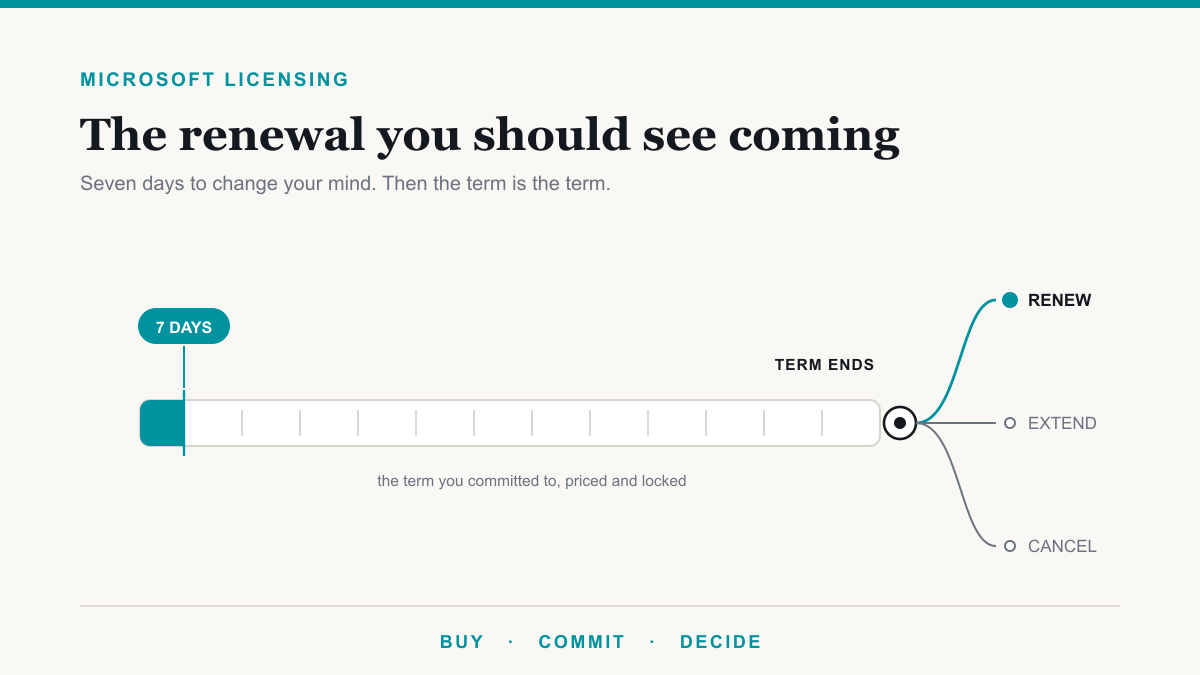
Microsoft licensing renewals run on whatever term you committed to, usually monthly or annual, and they renew themselves automatically unless someone acts before the term ends. The detail that catches most businesses out is smaller than the renewal itself: you get seven calendar days after each purchase or renewal to change your mind, and once that window closes you owe the rest of the term whether or not anyone uses the licenses. This guide is for the owner or office administrator who signs off on the Microsoft bill and would rather not be surprised by it. It covers what actually changed in 2026, what the seven-day rule really means, and the handful of decisions worth making before your next renewal date.
The licensing model your business is probably actually on
A lot of licensing advice still splits the world into volume licensing, retail boxes, and subscriptions. For a business under about 500 seats, that framing is mostly obsolete. Microsoft's Enterprise Agreement is positioned at 500 or more users or devices, and the Open License program retired on January 1, 2022. What is left for nearly every small and mid-sized business is the Cloud Solution Provider channel, where you buy Microsoft 365 through an IT partner rather than from Microsoft directly.
Inside that channel, Microsoft runs what it calls new commerce, which is simply the current set of rules for how these subscriptions get bought, changed, and cancelled. Two words inside those rules sound identical but are not. Your term is how long you have committed. Your billing plan is how often you pay. You can commit for a year and still pay monthly, and those are different decisions with different prices attached.
Your two real choices: monthly or annual
| Term | Commitment | Best for |
|---|---|---|
| Monthly | One month at a time | Seasonal staff, a team whose size you genuinely cannot predict, a business in flux |
| Annual | Twelve months | Most businesses, most of the time. Lower per-seat price and a locked rate for the year |
| Three-year | Thirty-six months | Enterprise plans only (Microsoft 365 E3, E5, and Teams Enterprise), with a 100-seat minimum. Not offered on the Business plans most small offices run |
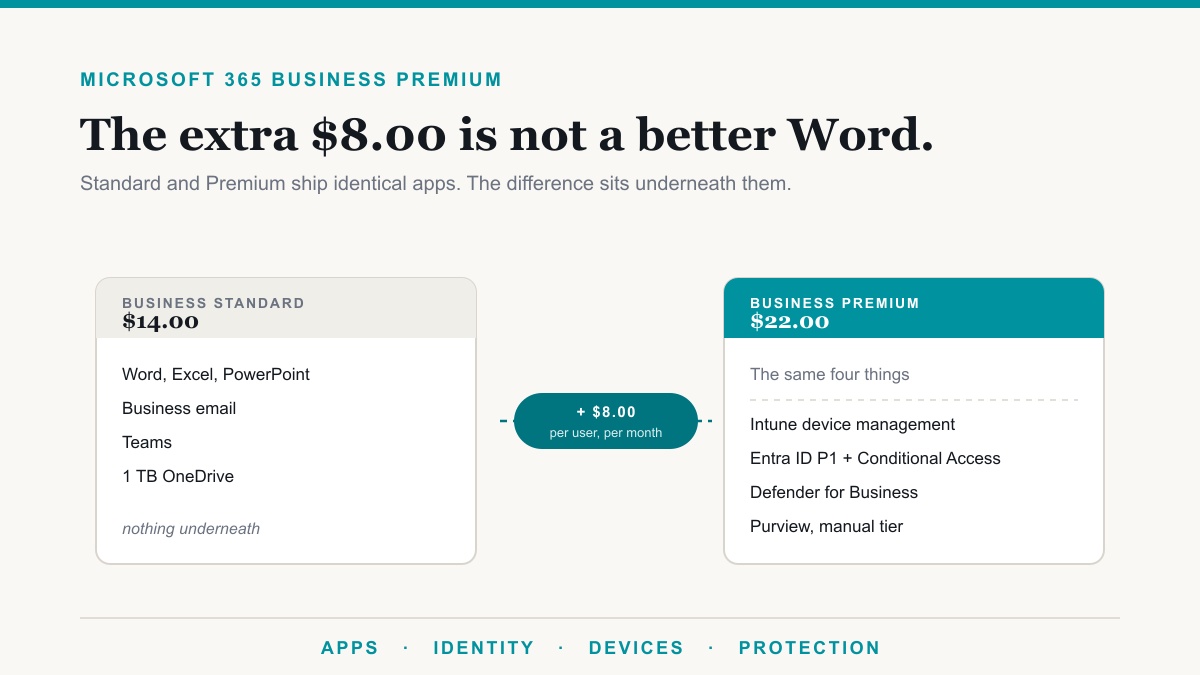
Monthly flexibility is not free, and Microsoft prints the price of it right on the product page. Microsoft 365 Business Premium is $22.00 per user per month on an annual subscription and $26.40 month to month. That is 20 percent, and the same ratio holds across the Business family: Business Standard is $14.00 annually and $16.80 monthly. It came through the July 2026 price changes unchanged.
There is a second, smaller charge that often gets confused with that one. Committing for a year but paying in monthly instalments, rather than paying for the year upfront, carries its own modest uplift. That one is about payment timing, not commitment length, and it is worth separating in your head: the 20 percent buys you the right to leave, the smaller one just spreads the cost.
The practical shape that works for most offices: put the stable core of your staff on an annual term, and keep a small number of monthly seats as a buffer for people you might add. You get the lower rate on the bulk of it without betting the whole subscription on a headcount forecast.
The seven days that decide every Microsoft licensing renewal
This is the most useful thing to know about Microsoft renewals. After any purchase or renewal, there is a seven calendar day cancellation window. Cancel inside the first 24 hours and the refund is full. From day two through day seven it is prorated, meaning you get back only the unused portion. After that, the subscription cannot be cancelled at all, and the full term is owed even if the business stops using it entirely. The window is the same seven days whatever the term length, and it reopens each time the subscription renews.
The same seven days govern seat reductions, with a wrinkle that costs businesses real money. Seats can be added at any time, but removed only within seven days of when those particular seats were added. That clock attaches to each batch, not to the subscription. If you add ten seats in month four, you have seven days to reduce those ten, and then they are yours for the rest of the term.
One piece of honesty you will not get from a licensing brochure: those seven days describe what your partner can do in Microsoft's system, not a button you press yourself. If you buy Microsoft 365 through an IT company, your ability to unwind a purchase runs through them and through your agreement with them. Which is exactly why the week after a renewal is the week to raise anything that looks wrong, and why a partner who reviews your seat count before the renewal rather than after is worth having. Reviewing that count is part of the ongoing work on our managed IT services page, not a favor.
What changed on May 4, 2026: the free grace period is mostly gone
This is the change almost nobody has caught up with, and it quietly inverts the old advice. It used to be that if a subscription was not renewed, service continued for a short free grace period while everyone sorted it out. As of May 4, 2026, that free grace period is discontinued for most current subscriptions. Older subscriptions that fall outside the new rules keep their 30-day grace period, which is worth confirming rather than assuming.
There are now three things that can happen at the end of a term. The subscription renews. It is explicitly cancelled at expiration, and the service stops. Or it moves onto a paid extended service term, which bills monthly at the current monthly rate plus a three percent uplift, or a twenty-three percent uplift for products that have no monthly plan.
Here is the part that surprises people. Switching auto-renew off is no longer the same as stopping the bill. An eligible subscription set not to renew, without an explicit instruction to cancel at term end, gets converted onto that paid extended service term with auto-renew switched back on. In other words, the instinctive move, flipping auto-renew off and dealing with it later, can now land you on a more expensive footing than the annual term you were trying to leave. An extended service term can be cancelled at any time with a prorated refund, but its seat count, term, and billing plan are frozen while you are on it.
If you take one operational habit from this article, make it this one: decide your renewal outcome deliberately and in writing before the term ends, rather than letting a toggle decide it for you.
What the July 2026 price increase actually did
Microsoft raised Microsoft 365 prices effective July 1, 2026, and the shape of the increase is more interesting than the fact of it.
| Plan | Was | Now |
|---|---|---|
| Microsoft 365 Business Basic | $6.00 | $7.00 |
| Microsoft 365 Apps for business | $8.25 | $10.00 |
| Microsoft 365 Business Standard | $12.50 | $14.00 |
| Microsoft 365 Business Premium | $22.00 | $22.00 |
| Microsoft 365 E3 | $36.00 | $39.00 |
| Microsoft 365 E5 | $57.00 | $60.00 |
Business Premium did not move. Everything around it did. Business Standard rose twelve percent and Apps for business rose over twenty, which means the gap between Standard and Premium narrowed to eight dollars a seat. That matters because Premium is the plan that carries the security and compliance tooling a regulated business needs: device management, advanced threat protection, and the data governance features we walk through in our guide to what Microsoft Purview is. If you priced Premium a year ago and decided the jump was too far, the arithmetic has changed underneath you without you doing anything.
Timing matters too. Microsoft's own FAQ is clear that existing customers see the new prices at their first renewal after July 1, 2026, not immediately, and that multi-year commitments continue at their agreed pricing until they renew. Which brings up the quiet advantage of a term commitment: price changes during a term do not affect an existing subscription. You are locked at the price you bought at until renewal. The exception worth knowing is that upgrading or converting a term mid-flight re-prices you at current rates, so a mid-term change is not free even when it looks like a small one.
On Copilot, the promotional pricing became permanent on July 1, 2026, with Business Standard and Business Premium now sold in Copilot-inclusive versions. If that is on your list, the decisions worth making first are about data access and permissions rather than licenses, which is the ground our Copilot page covers.
Best practices for a renewal that does not surprise you
- Know your renewal date before it knows you. Everything in this article is easy ninety days out and expensive seven days late. Ask for your dates in writing if you do not have them.
- Reconcile seats against people, not against last year. The most common waste we find is licenses still assigned to staff who left. Those seats cannot be removed mid-term, so the only moment to catch them is before the renewal processes.
- Right-size at the renewal, because that is the door. Seat count, plan, term, and billing frequency can all be changed effective at term end. That is the one clean moment to fix any of them.
- Decide the outcome explicitly. Renew, cancel, or extend. Since May 2026, not deciding is itself a decision, and usually a pricier one.
- Check whether the plan still fits. Prices moved unevenly in July 2026, so the plan comparison you did last year may no longer hold.
- Audit what the plan already includes before adding anything. The renewal is also the moment to notice you are paying for capabilities nobody switched on. Our guide to Microsoft Purview licensing walks through which data protection and compliance features come with Business Premium and E3, and which genuinely need a higher tier.
- Budget the renewal, not the month. An annual term is an annual commitment. It belongs in the budget as one, whatever the billing plan says.
What about perpetual Office and volume licensing?
Perpetual Office still exists. Office 2024 and Office LTSC 2024 are bought once and owned outright, and they genuinely never renew. But the common claim that perpetual licenses therefore need no attention does not survive contact with the lifecycle. Office LTSC 2024 gets five years of updates and then stops cold on October 9, 2029, with none of the paid extension period older Office versions used to get. Owning something forever and running something that still receives security updates are different things, and for a regulated business it is usually the second one an auditor asks about. There is a nearer deadline worth checking too: Office LTSC 2021, Project LTSC 2021, and Visio LTSC 2021 reach end of support on October 13, 2026. If any of those are still on machines in your office, that is this quarter's problem, and it connects directly to the framework work on our compliance page.
Frequently asked questions
How often do you renew Microsoft licensing?
Most businesses buy Microsoft 365 on a subscription with a monthly or annual term, and it renews automatically at the end of that term unless someone acts first. Three-year terms exist but only on the enterprise plans, with a 100-seat minimum. Perpetual software like Office LTSC is bought once and never renews, but it does reach an end-of-support date.
Can I cancel a Microsoft 365 subscription after I buy it?
There is a seven calendar day window after each purchase or renewal. Cancel within the first 24 hours and the refund is full; from day two through day seven it is prorated. After seven days the subscription cannot be cancelled and the full term is owed, whether or not anyone uses it.
Can I remove Microsoft 365 licenses in the middle of a term?
You can add seats at any time, but you can only remove them within seven days of when those specific seats were added. That clock attaches to each batch. Add ten seats in month four and you have seven days to reduce those ten, not until the term ends.
What happens if I let my Microsoft 365 subscription lapse?
For most current subscriptions the free grace period ended on May 4, 2026. An affected subscription that is not renewed must either be cancelled at term end, which stops the service, or moved to a paid extended service term billed monthly at the current monthly rate plus an uplift. Turning off auto-renew alone no longer stops the billing.
Did Microsoft 365 prices go up in 2026?
Yes, on July 1, 2026, though not evenly. Business Basic went from $6 to $7 and Business Standard from $12.50 to $14, while Microsoft 365 Business Premium held flat at $22. Existing customers see the new prices at their first renewal after July 1, 2026, not immediately.
Is a monthly or annual Microsoft 365 term better?
Annual costs about 20 percent less per seat and locks your price for the year, but commits you for twelve months. Business Premium, for example, is $22.00 annually against $26.40 month to month. Monthly earns that premium only when headcount is genuinely uncertain, so most stable businesses are better off annual with a small monthly buffer for growth.
Does Microsoft still sell perpetual Office licenses?
Yes. Office 2024 and Office LTSC 2024 are bought once and owned outright. They never renew, but they are not maintenance-free: Office LTSC 2024 reaches end of support on October 9, 2029, with no extended support after that, so the security clock still runs.
Getting your Microsoft licensing renewals under control
Microsoft licensing renewals reward exactly one habit: knowing your dates and deciding on purpose. The terms are not unfair, but they are unforgiving of drift. Seven days to undo a purchase, no way to shed seats after that, no free grace period since May 2026, and a price list that moved in July in ways that quietly rewarded some plans over others. None of that is hard to manage. It is only hard to manage late.
If you would like someone to map your renewal dates, reconcile your seats against the people actually using them, and tell you plainly whether your current plan is still the right one, Desert Lakes Solutions offers a no-pressure discovery call. Book a discovery call.