Firewall for Dental Practices: What You Actually Need
Published August 17, 2026
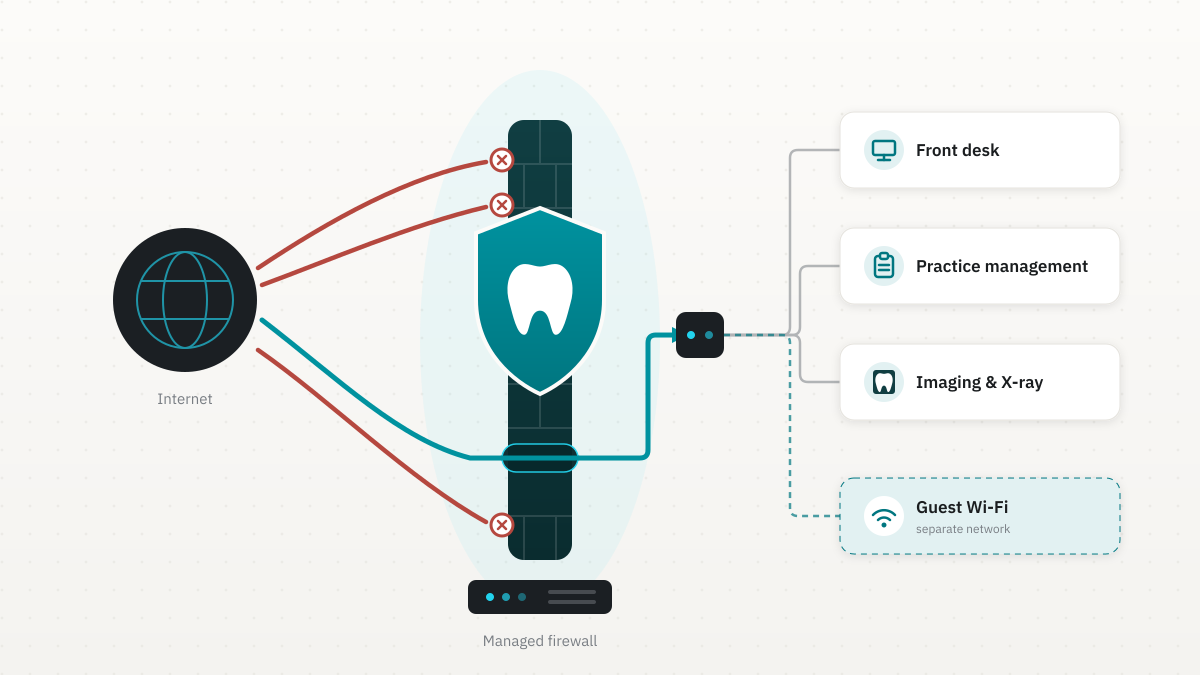
A firewall for dental practices is a professionally managed next-generation firewall, a FortiGate-class appliance in the offices we support, sitting between the internet and every system that holds charts, imaging, and payments. That device is how you keep the schedule running when the rest of the internet is noisy, how you put real technical safeguards behind a HIPAA risk analysis, and how you answer the firewall question on a cyber insurance form without guessing. This guide is for practice owners and office managers who are deciding whether the ISP router is enough, what a dental-sized firewall costs, and what "best" actually means in a 5 to 15 operatory office.
Does HIPAA require a firewall?
The Security Rule never says the word firewall. What it does require, in 45 C.F.R. 164.312, are technical safeguards: access control so the right people open the right records, audit controls that record who did, integrity protections, and transmission security when patient data leaves the building. HHS states those outcomes on its HIPAA Security Rule page. It does not name a product.
NIST's implementation guide for the Security Rule, SP 800-66 Revision 2, treats network protection, including boundary controls and segmentation, as how you keep electronic protected health information off the wrong network and off unencrypted paths. In a dental suite that work lands on a next-generation firewall: it separates guest Wi-Fi from Dentrix, Eaglesoft, or Open Dental, encrypts the after-hours VPN, and keeps the logs an investigator would ask to see.
A firewall does not make you HIPAA compliant by itself. The risk analysis still has to be written down, which our HIPAA compliance for dental practices post covers in full. Skipping the firewall and hoping the ISP router plus a locked server closet will satisfy 164.312 is the gap we see most often, and it is hard to defend if something goes wrong.
One status note, because some vendors already sell "the new HIPAA firewall mandate." In January 2025 HHS published a proposed Security Rule update that would make more cybersecurity controls mandatory. It is still a proposal. The comment period closed in March 2025, and as of mid-2026 HHS has a working final-action target around July 2027. Until a final rule is published, the current Security Rule is what you answer to.
Is the ISP router enough?
The device your internet company left in the closet is built for a house. It gets the office online. It usually cannot do the four jobs a dental network actually has:
- Segment guest traffic. Phones in the waiting room should not see the computers that run the practice. Consumer gear rarely gives you a real, isolated guest network.
- Keep an audit trail. HIPAA's audit-control requirement needs logs you can retain and search. Carrier routers rotate tiny logs or none at all.
- Encrypt remote access. Doctors checking charts after hours, or imaging going to a lab, need a VPN with unique users and multi-factor authentication, not a port forwarded to the server.
- Inspect what is inside the traffic. A next-generation firewall looks at the contents, not just the destination, which is how ransomware and malicious sites get stopped before they hit an operatory PC.
If the practice is a single room with no remote access and no patient Wi-Fi, you can limp along for a while. The day you add a second location, a cloud backup, a patient portal, or a hygienist working from home, the carrier box is the constraint. Replacing it with a business-class firewall is ordinary security hygiene, not an emergency.
What a dental office firewall actually does
In a dental building the firewall does practice-specific work a generic guide usually skips.
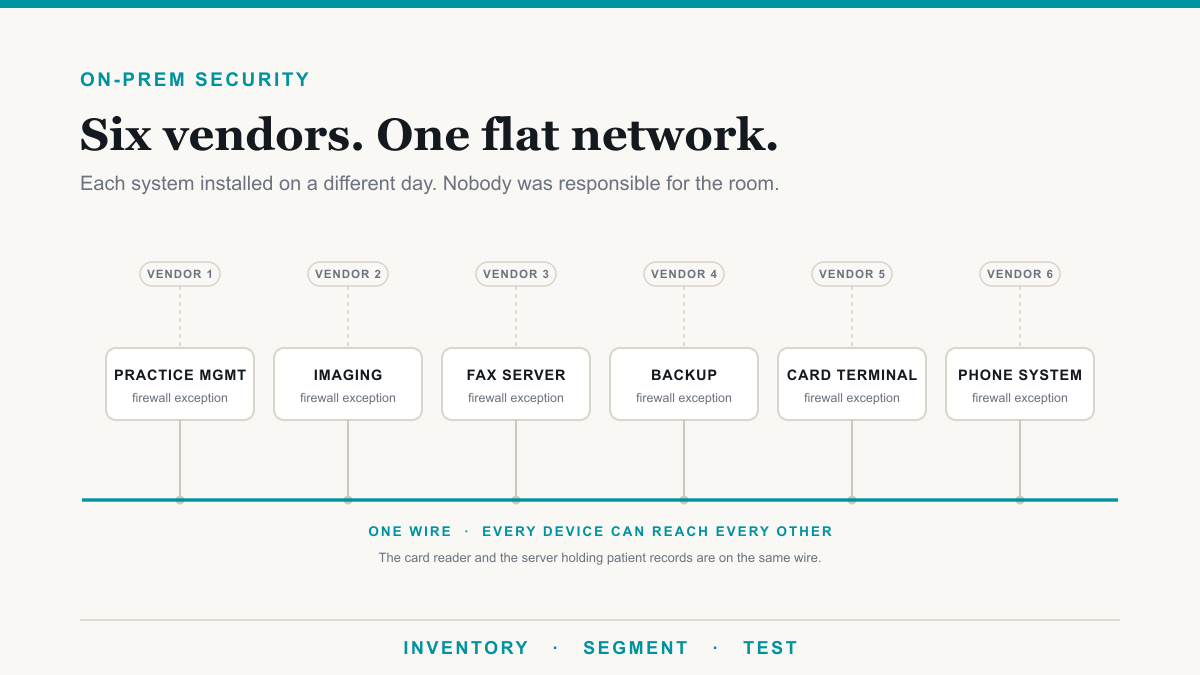
Practice management and imaging stay on the private side. Open Dental, Dentrix, and Eaglesoft, plus the sensors and servers that hold X-rays and CBCT, should live on a network patients and guests cannot reach. The firewall is what enforces that split. Waiting-room Wi-Fi goes out to the internet and nowhere else.
Labs and specialists get a path that is not email. Large image files often move over a site-to-site VPN to a lab or a specialist office. That tunnel is a firewall job. Sending the same files as an unencrypted attachment is the workaround that creates the HIPAA problem.
After-hours access is named and logged. A doctor reviewing charts from home should come in through a VPN on the firewall, with their own login and MFA, not through a shared remote-desktop port left open "just in case." When someone leaves the practice, you disable that login the same day.
The log is part of the HIPAA folder. Allowed and blocked connections, VPN sessions, and admin changes on the firewall are the network half of the audit trail. They will not replace application logs inside Dentrix, but they are what you produce when the question is "who could have reached the server from outside."
None of that requires an enterprise operations center. It requires a next-generation firewall that is sized for a small office, configured for this floor plan, and watched. That is ordinary dental IT support, not a special project.
What it costs for a 5 to 15 operatory practice
A dental-sized next-generation firewall has the same three cost layers as any firewall built for a practice this size. We publish the Fortinet version in detail on Fortinet firewall cost for dental practices. For a typical 5 to 15 chair office:
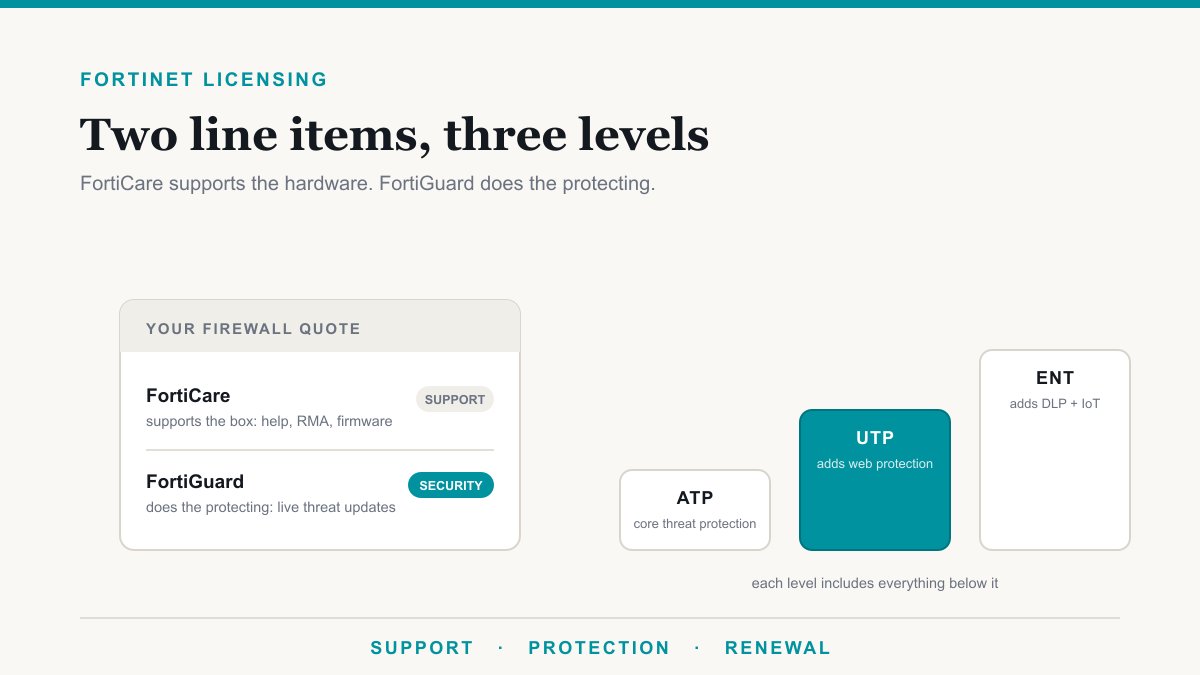
- Hardware plus first-year security licenses: commonly in the low-to-mid thousands of dollars for a desktop FortiGate in the class that fits a small practice (the 40F and 60F range often lands around $1,100 to $2,100 bundled). Exact quotes move with model, bundle, and promotions.
- Annual security subscription after year one: a few hundred dollars to roughly a thousand, depending on the FortiGuard (or equivalent) bundle. The hardware keeps routing if this lapses. The inspection that stops new threats does not stay current.
- Setup and management: staff time, or a provider. At Desert Lakes Solutions it is included in every managed IT plan, which covers configuration, firmware, monitoring, and response.
Over three years the box is the smaller line. The subscription and the person watching alerts are what make the purchase worth making. A 5 chair office and a 15 chair office often use the same class of appliance; internet speed moves the model more than chair count. We size that on a call rather than selling the largest unit on the shelf.
Best firewall for a dental office: named options, one recommendation
Sophos, WatchGuard, SonicWall, and Fortinet all sell next-generation firewalls a dental office can run. Naming a brand is only half the decision. Someone still has to configure it on Tuesday.
| Platform | Where it tends to fit | What to watch |
|---|---|---|
| Fortinet FortiGate | What we deploy: strong inspection for the price, VPNs, and logging that a HIPAA folder can use | Needs real setup. An unmaintained FortiGate is an expensive router. |
| Sophos | Offices that already live in the Sophos endpoint world | Confirm the firewall and the endpoint are actually talking, not just both licensed. |
| WatchGuard | Practices that want a simpler cloud console | Size the subscription so the inspection you paid for is switched on. |
| SonicWall | Still common in older dental networks | Firmware and subscription age. A five-year-old unit with a lapsed license is the usual finding. |
The best firewall for a dental office is the one someone will still be managing a year from now. We standardize on FortiGate because we can size it, license it, and watch it as one service. If you already have a current WatchGuard or Sophos that is configured well, replacing it for brand reasons is wasted money. Replacing a carrier router, or a SonicWall that has not had a firmware update since the last tenant, is not.
Cyber insurance asks about this too
Renewal questionnaires now treat a maintained business-grade firewall as a baseline, next to MFA, tested backups, and endpoint detection. A consumer router is a weak answer and can mean a higher premium, a narrower policy, or a decline. The controls are the same ones that help a HIPAA risk analysis. Our field note on cyber insurance requirements lists what carriers typically want; the firewall is one line on that list, not a separate project.
Frequently asked questions
Does HIPAA require a firewall for a dental office?
The Security Rule never uses the word firewall. It does require access control, transmission security, and audit controls for electronic patient data. In a typical office those safeguards are carried by a business-class firewall that segments networks, encrypts remote access, and keeps logs. A written risk analysis still has to show you thought about it.
Is the ISP router enough for a dental practice?
No. The box your internet company left is built for a house. It usually cannot separate waiting-room Wi-Fi from charts, keep a usable log for an audit, or run a proper VPN for after-hours access and lab imaging. It will get you online. It will not do the network job a practice needs.
What does a dental office firewall cost?
For a 5 to 15 operatory practice, plan on hardware plus first-year security licenses in the low-to-mid thousands, an annual subscription of a few hundred to about a thousand dollars, and either staff time or a provider. At Desert Lakes Solutions firewall management is included in the monthly plan, and a full install with switch and Wi-Fi starts at $9,500. Budget all three layers, not just the box.
What is the best firewall for a dental office?
The best one is a next-generation firewall that is sized to your chairs and internet speed, then actually configured and watched. Sophos, WatchGuard, SonicWall, and Fortinet all sell that class of device. We deploy FortiGate because we know the platform and can manage it as part of dental IT support, not because the others cannot do the job.
Who should manage the dental office firewall?
Someone who will still be updating firmware, reviewing alerts, and changing rules in month eighteen. If a staff member has those hours and knows the product, self-managing can work. Most practices do not. A managed appliance folds setup, updates, and monitoring into one monthly cost so the device does not quietly become a router.
Does a firewall help with cyber insurance?
Usually yes. Applications now ask what sits at your network edge and whether it is maintained. A consumer router is a weak answer. A business-class firewall with a current subscription and someone watching it is the answer underwriters expect, alongside MFA, backups, and endpoint protection.
Getting a firewall for dental practices without overbuying
A firewall for dental practices is a managed next-generation appliance, sized to the office, with guest Wi-Fi, VPN, and logs that a HIPAA folder and an insurance form can both use. The ISP router does not do that job. The cost sits mostly in the subscription and the management, not the sticker. If you want this sized for your chairs and your internet, Desert Lakes Solutions offers a no-pressure discovery call to walk the suite and quote a FortiGate that fits. Book a discovery call and we will take it from there.