Microsoft Purview Insider Risk Management, Explained
Published July 5, 2026
Microsoft Purview Insider Risk Management is the part of Microsoft 365 that helps you spot and respond to risky data activity by your own people, whether that is a departing employee quietly downloading files or an honest mistake that exposes sensitive information, with privacy safeguards built in so it protects the business without turning into employee surveillance. It is a compliance tool for a real and awkward problem: most data does not leave a company through a dramatic hack, it leaves through the people who already have legitimate access. This guide explains what it does, the privacy protections that make it defensible, the licensing you need, and how it differs from the other Purview tools, written for the owner or operator weighing whether it belongs in their environment.
The problem it solves
Insider risk is not mainly about villains. It is a spectrum. At one end is genuine bad intent: the salesperson who resigns on Friday and spends Thursday night bulk-downloading the client list. At the other end is the well-meaning employee who drops a spreadsheet of sensitive data into a personal drive to finish at home. In between sits everything from confidentiality slips to policy violations. Insider Risk Management, or IRM, exists to notice those situations forming and give you a chance to act before they become a breach, a lawsuit, or a compliance failure. Microsoft describes it as a way to detect, investigate, and act on both malicious and inadvertent activity, and that "inadvertent" half is the part people underestimate.
Is this employee surveillance? No, and the design matters
This is the first question every thoughtful leader asks, so let us answer it directly, because the answer is what makes the tool usable. IRM is explicitly built with privacy by design, and there are four protections worth knowing:
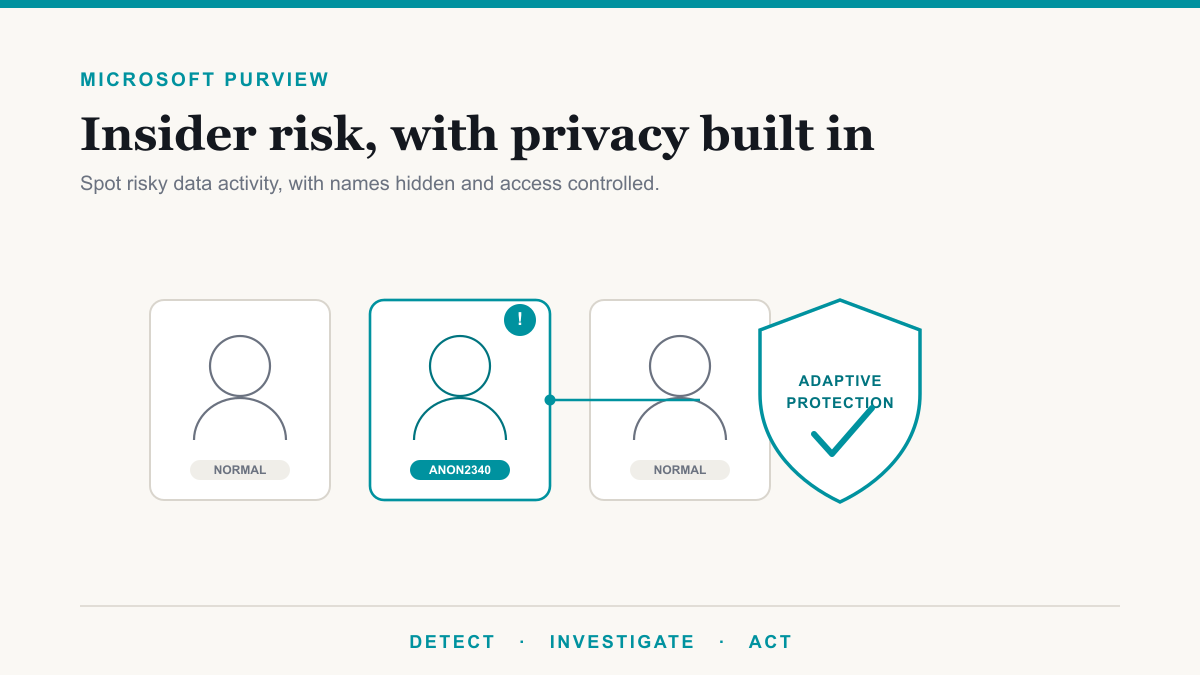
- Pseudonymization by default. Investigators do not see "John Smith." They see a generated code like ANON2340. The tool surfaces risky activity without putting a name and a face on it until there is a justified reason to.
- Role-based access. Only people you explicitly assign can see insider risk cases, and you can separate the people who configure policies from the people who investigate alerts, so no single person holds the whole picture.
- Administrators opt in, they are not opted in. By default even a global administrator has no access to Insider Risk Management. Someone has to be deliberately granted the role.
- Audit logs and dual authorization. All activity is logged, and the most sensitive capability, detailed forensic evidence, is turned off by default and requires two-person authorization to enable.
Put together, this is the difference between a tool that watches your data and a tool that watches your people. IRM is designed to be the former. Used well, it is something you can explain to your team plainly: we protect sensitive information, we do it with names hidden and access controlled, and we only ever look closer when the data itself is at risk.
How it works, in three steps
The flow is detect, investigate, act. IRM correlates signals from across Microsoft 365, such as file activity in SharePoint and OneDrive, email, and device actions, and scores them for risk. Rather than reacting to a single click, it looks at behavior over a window, roughly the 90 days before and 30 days after a triggering event, so it can tell the difference between someone's normal Tuesday and a genuine change in pattern. When something crosses a threshold it raises an alert for a reviewer, who can investigate the pseudonymized case and, if warranted, escalate it, loop in HR or legal, or trigger a response.
The scenarios it covers
You do not build IRM from scratch. It ships with policy templates for the common situations, and each policy you create starts from one of them. The main ones include:
- Data theft by departing users. The classic case: unusual data movement by someone who has given notice. This one typically connects to your HR system so it knows who is leaving.
- Data leaks. Sensitive information being shared or moved in risky ways, including versions focused on your priority users or on users already flagged as risky.
- Security policy violations. Activity that breaks your security rules, such as disabling protections or misusing access.
- Patient data misuse. A healthcare-specific template aimed at protecting patient records, which pairs naturally with the work on our compliance and healthcare pages.
- Risky AI and browser usage. Newer templates that watch for sensitive data going into AI tools or leaving through the browser, which matters more every quarter as teams adopt tools like Microsoft 365 Copilot.
Insider Risk Management versus DLP
IRM is often confused with Data Loss Prevention, and they are genuinely complementary rather than competing. The clean way to see the difference:
| Data Loss Prevention (DLP) | Insider Risk Management (IRM) | |
|---|---|---|
| When it acts | At the moment data moves | Over a window of behavior (about 90 days before, 30 after) |
| What it does | Blocks or flags a specific action, like emailing a file outside the company | Correlates many signals into a risk picture of a situation building |
| Best at | Stopping a known bad action in real time | Noticing a pattern that no single action would reveal |
They also work together directly: a high-severity DLP alert can be the very thing that brings a user into IRM's risk scoring. Think of DLP as the gate at the door and IRM as the awareness that someone has been circling the building. Both draw on the same underlying classification that sensitivity labels provide, and all three are pieces of the broader Microsoft Purview toolset.
The smart part: Adaptive Protection
One capability is worth calling out because it is genuinely clever. Adaptive Protection uses the risk levels IRM calculates, elevated, moderate, or minor, to automatically tighten or relax other controls per person. A user flagged as high risk can have stricter DLP rules and tougher sign-in requirements applied to them, while everyone else keeps working normally with no friction. Instead of locking down the whole company because a few people might be risky, the strict controls follow the actual risk. It is security that adjusts itself, which is exactly what a busy business wants.
What it costs: the licensing reality
Here is the honest licensing picture, because it trips people up. Insider Risk Management is not included in Microsoft 365 Business Premium, the plan a lot of smaller organizations run. It comes with Microsoft 365 E5, with the Microsoft Purview Suite (what used to be called E5 Compliance), or through a standalone Insider Risk Management add-on for E5-tier plans. So if IRM sounds right for you and you are on Business Premium, the practical question is whether the data you are protecting justifies the step up to E5 or the add-on. That is a real cost conversation, and it is one worth having deliberately rather than discovering the gap mid-project. Matching the licensing to the handful of protections you actually need is the same principle that governs the rest of Purview, and it is exactly the kind of thing we help sort out on a call.
Frequently asked questions
Is Microsoft Purview Insider Risk Management the same as employee monitoring?
No. It is built with privacy by design. User names are pseudonymized by default, so investigators see a code like ANON2340 rather than a person, access is role-based, and even a global administrator has no access to it unless deliberately granted. It is designed to surface risky data activity, not to watch employees.
What is the difference between Insider Risk Management and DLP?
Data Loss Prevention acts at the moment data moves, blocking or flagging a specific action like emailing a file outside the company. Insider Risk Management looks at patterns of behavior over time, roughly the 90 days before and 30 days after a triggering event, to spot a risky situation building. DLP is the gate; IRM is the pattern.
What license do I need for Insider Risk Management, and is it in Business Premium?
It is not included in Microsoft 365 Business Premium. Insider Risk Management comes with Microsoft 365 E5, the Microsoft Purview Suite (formerly E5 Compliance), or the standalone Insider Risk Management add-on for E5-tier plans. If you are on Business Premium and want it, the path is an upgrade or the add-on.
What policy templates does Insider Risk Management include?
Built-in templates cover data theft by departing users, general data leaks, data leaks by priority or risky users, security policy violations, and healthcare patient data misuse, with newer templates for risky AI and browser usage. Each policy you create starts from one of these templates, so you turn on the scenarios that fit your business.
How does Insider Risk Management protect employee privacy?
Four ways: user names are pseudonymized by default, access is role-based so only assigned people see cases, administrators must explicitly opt in rather than having access automatically, and all activity is audit-logged. The people who set up policies can be kept separate from the people who investigate alerts, and detailed forensic evidence is off by default and requires dual authorization to enable.
How does it detect data theft by a departing employee?
The departing-user template watches for the classic pattern: someone who has given notice suddenly downloading, copying, or sharing unusual volumes of company data before they leave. It typically connects to your HR system to know who is leaving, then scores the risk of their data activity in the window around their departure so you can act before the files walk out the door.
Deciding if Insider Risk Management is right for you
Microsoft Purview Insider Risk Management earns its place when you hold data that would genuinely hurt to lose to a departing employee or a careless moment, and when you want to catch those situations early without becoming the kind of workplace that surveils its people. The privacy-by-design safeguards are what make it defensible, the templates make it practical, and the licensing is the one thing to plan for up front. If you want help deciding whether it fits, what it would take to turn on responsibly, and whether your current plan covers it, Desert Lakes Solutions is glad to walk through it with you on a no-pressure call. Get in touch here whenever you are ready.