Microsoft Purview Retention and Data Lifecycle
Published July 8, 2026
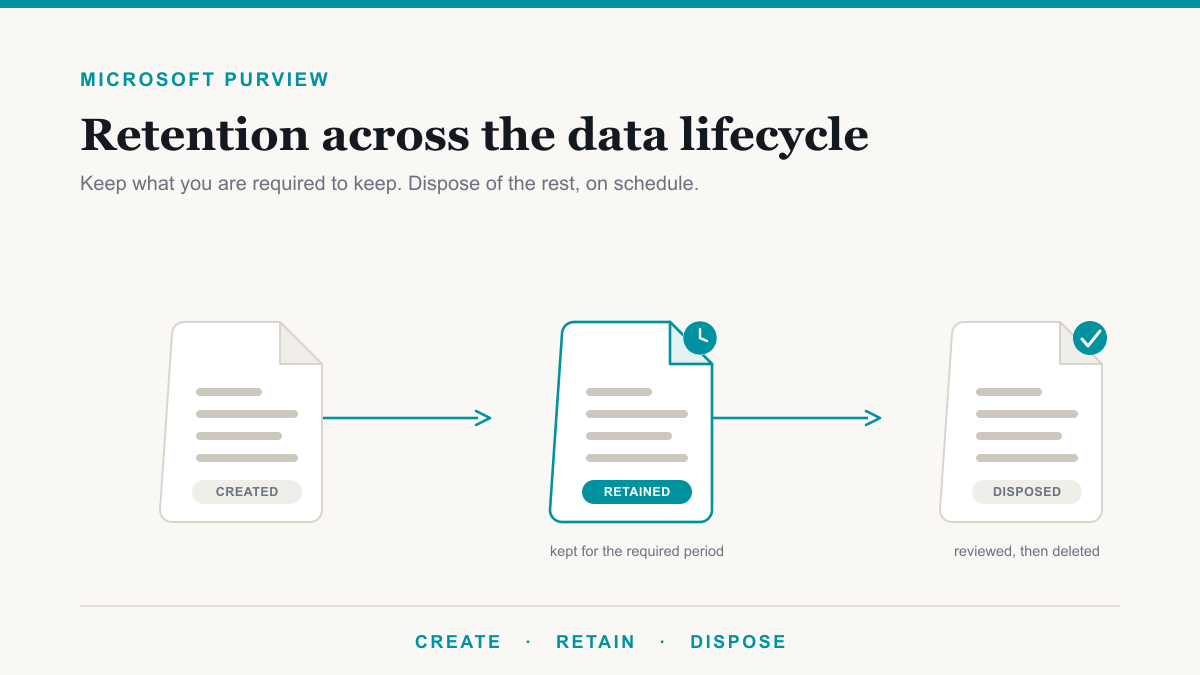
Microsoft Purview retention is how you tell Microsoft 365 what to keep, for how long, and when to delete it, using one set of rules instead of leaving it to each person's habits. It is the part of Purview that handles the full life of your business information, from the day a document is created to the day it is safely disposed of. This guide is for the owners and administrators of healthcare, legal, financial, and other regulated organizations that have to keep certain records for years and clear out others on a schedule, and who would rather have Microsoft 365 enforce that quietly than chase it in a spreadsheet. It explains Microsoft Purview retention in plain language: retention policies versus labels, what happens when rules overlap, records management, and the licensing you actually need.
Keep what you must, delete what you should not
Data lifecycle management is a plain idea behind a technical name: keep the information you are required to keep, and get rid of the information you have no reason to hold on to. Both halves matter. Keeping everything forever is a quiet liability, since every old file is one more thing to store, to search in a lawsuit, and to lose in a breach. Deleting too soon is worse, because it can mean failing an audit or breaking a records law. Microsoft Purview retention is the tool that handles both sides on a schedule you set once.
Inside Purview, this lives in two related areas. Data Lifecycle Management is the everyday version: broad rules that retain and delete content across email, documents, and Teams. Records Management is the formal version for high-value items that need legal or regulatory record-keeping, with extra controls and proof. Most organizations start with the first and grow into the second. If Purview itself is new to you, our overview of what Microsoft Purview is maps out the whole toolbox first.
Retention policies vs retention labels
Purview gives you two ways to apply retention, and the difference is mostly about scope. A retention policy sets one rule for an entire location, such as everything in a mailbox or a SharePoint site, and applies it automatically. A retention label sets a rule for an individual item, a single document, email, or folder, and can be applied by a person or by rules. The two are not either-or. Microsoft designed them to work together, and most real setups use a broad policy for the baseline and labels for the exceptions.
One quick clarification, because the names cause confusion: retention labels are not the same as sensitivity labels. Sensitivity labels are about protecting a file, through encryption and access. Retention labels are about how long to keep it. Here is how the two retention methods compare:
| Retention policy | Retention label | |
|---|---|---|
| Applies to | A whole location (a mailbox, a site, all of OneDrive) | An individual item (a document, an email, a folder) |
| How it is applied | Automatically across the location | By a person, or automatically by rules |
| Travels with the file if moved | No | Yes, within your Microsoft 365 tenant |
| Can declare a formal record | No | Yes |
| Review before deletion | No | Yes, with a disposition review |
| Best for | A blanket rule, like "keep this site seven years" | Different rules for different item types, like tax records vs press releases |
Both methods can retain and then delete, retain only, or delete only. The practical rule of thumb: reach for a policy when the same rule fits a whole location, and a label when different items in the same place need different timelines. Microsoft's documentation on retention policies and labels covers every workload in detail.
What happens when two rules overlap
The most common worry is understandable: if a document is covered by more than one rule, could the wrong one win and delete something you needed? The reassuring answer is no, because Purview settles conflicts with two simple principles. Retention always wins over deletion, so if any rule says keep it, the item is not permanently deleted while that rule is in effect. And the longest retention period wins, so if one rule says keep for three years and another says keep for seven, the item is kept for the full seven years and then deleted.
That design is deliberate. It means you can layer a strict rule on top of a loose one without fear of the loose one quietly erasing protected content. The system errs on the side of keeping data until every rule that wants it gone agrees. For most organizations that is exactly the safe behavior you want from a compliance tool.
Records management and proof you disposed of data properly
For the documents that carry legal or regulatory weight, Purview adds a stricter layer called records management. A retention label can declare an item a record, which locks it against editing or deletion for its retention period, even by the person who owns it. When a record finally reaches the end of its life, a disposition review can require a human to sign off before anything is deleted, and Purview keeps proof of disposition showing the item was cleared on schedule and by whom. That paper trail is often the difference between a smooth audit and a scramble.
There is one more control worth knowing for finance and legal teams. Preservation Lock makes a retention policy tamper-proof: once it is on, no one, not even a global administrator, can turn it off, delete it, or make it less strict. That is what lets Purview satisfy immutability rules like the SEC's 17a-4. These records features tie directly into the framework work on our compliance page.
What Microsoft Purview retention costs
The honest licensing answer is that the basics are probably already in your plan, and the advanced features are not. Creating retention policies and manually applying retention labels are included with Microsoft 365 Business Premium and E3, which covers a large share of what a small or mid-sized organization actually needs. The higher-end capabilities, auto-applying labels based on content, disposition review, declaring records, event-based retention, and adaptive scopes, generally require Microsoft 365 E5 or a Purview add-on such as the Microsoft Purview Suite.
The trap runs both ways. Some organizations pay for E5 and never turn on the features that justify it, while others assume they have automation they do not and set nothing up at all. The sensible move is to match the licensing to the handful of retention rules you are genuinely required to run, then expand. Microsoft lays out the feature-by-feature breakdown in its Purview service description, and it is worth confirming what you own before buying anything.
Where to start with Microsoft Purview retention
You do not build a full records program on day one. A sensible first pass is three moves. Decide the one or two data types you are legally required to keep, such as patient records, client files, or financial documents. Set a single retention policy for the place they live, retaining them for the required period and then deleting or reviewing them. And confirm what your Microsoft 365 licensing already includes so you are working with what you own. From there you can add item-level labels, auto-apply rules, and disposition reviews as your obligations grow.
Done this way, retention becomes a quiet background system that keeps you audit-ready and clears out the clutter you should not be hoarding, without asking your team to think about it. Rushed the other way, with dozens of strict rules switched on overnight, it becomes noise that people work around. The goal is the calm version.
Frequently asked questions
What is the difference between a retention policy and a retention label?
A retention policy applies one rule to an entire location, like a mailbox or a SharePoint site, and runs automatically. A retention label applies to individual items, a document or an email, can be added by a person or by rules, travels with the file, and can declare something a formal record.
Does Microsoft Purview retention come with Business Premium?
Partly. The basics, retention policies and manually applied retention labels, are included with Microsoft 365 Business Premium and E3. The advanced pieces, like auto-applying labels, disposition review, and declaring records, generally require E5 or a Purview add-on. Many organizations already own the basics.
If two retention rules conflict, what happens to my data?
Nothing is lost by accident. Purview follows two simple rules: retention always wins over deletion, and the longest retention period wins. If one rule says keep for seven years and another says delete after three, the item is kept for the full seven years, then deleted.
What is a disposition review?
A disposition review is a checkpoint before data is permanently deleted. When an item reaches the end of its retention period, a reviewer you choose is notified and can approve the deletion, extend it, or place a hold. It leaves proof the item was disposed of properly, and it requires E5 or a Purview add-on.
Can Purview retention help us meet HIPAA record-keeping rules?
Yes. HIPAA requires certain compliance documentation to be kept for six years, and many states set their own medical-record retention periods on top of that. Purview retention lets you enforce those timelines automatically across Microsoft 365 rather than tracking them by hand.
Where should we start with Purview retention?
Start small. Decide the one or two data types you are legally required to keep, such as financial or patient records, set a single retention policy for where they live, and confirm what your Microsoft 365 licensing already includes. You can add labels and records management later.
Getting your data lifecycle right
Retention matters more once Microsoft 365 Copilot is in the tenant, because everything you kept is something the assistant can surface. Getting retention and labels right is most of the compliance groundwork for an AI rollout.
Microsoft Purview retention is one of those tools that pays off quietly: set the right rules once, and your organization keeps what it must, disposes of what it should not keep, and can prove both to an auditor or insurer without a fire drill. The hard part is usually not the technology, it is deciding what your real retention obligations are and matching them to the licensing you already own. If you would like help sorting out what to keep, what to let go, and what your Microsoft 365 plan already covers, Desert Lakes Solutions offers a no-pressure discovery call to walk through it with you. Book a discovery call whenever you are ready.