Tesla Fleet Telemetry Server Setup, Step by Step
Published July 29, 2026
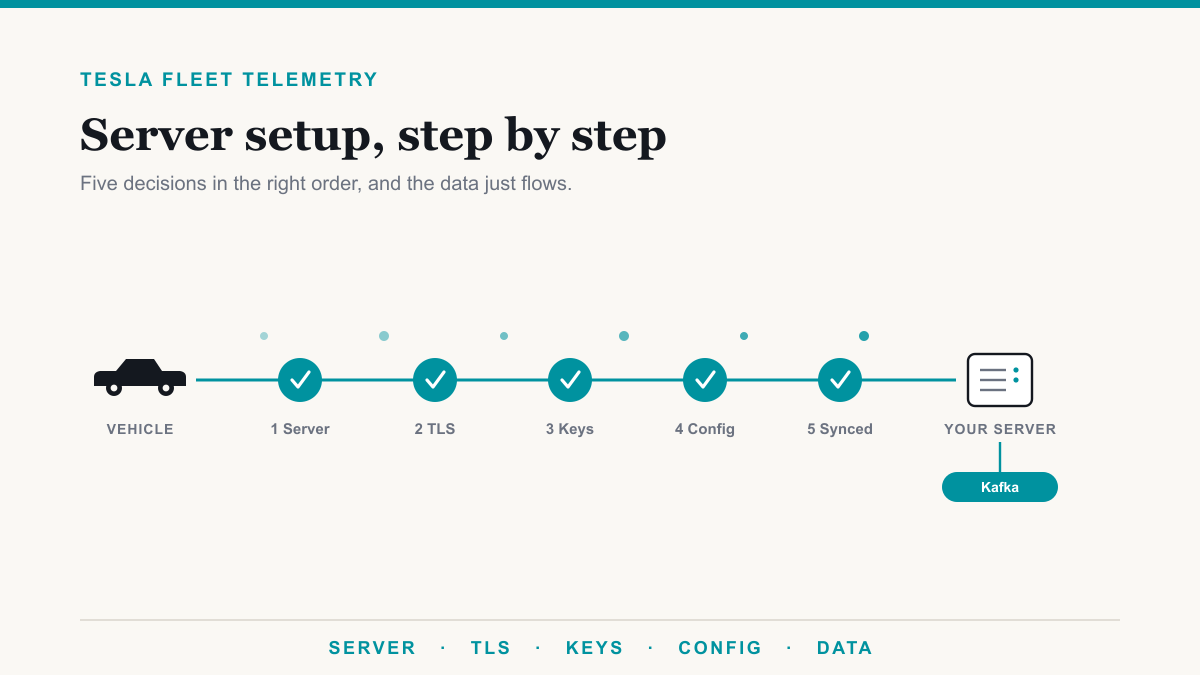
Setting up a Tesla Fleet Telemetry server comes down to five things done in the right order: run Tesla's open-source fleet-telemetry server, put it on a public hostname where TLS terminates at the server itself, pair your virtual key with each vehicle, push a signed per-vehicle configuration and confirm it syncs, and give the data somewhere to land, usually a Kafka topic. This guide is for the developer or fleet platform team doing that Tesla Fleet Telemetry server setup for the first time. Done right, you get near real time vehicle data pushed to you for a fraction of what polling costs. Done in the wrong order, you get a server that looks finished and receives nothing, which is a well-worn path we see teams walk. Here is the order that works.
Before you start: what the setup actually requires
Gather these first, because the middle of the build is the wrong time to discover one is missing:
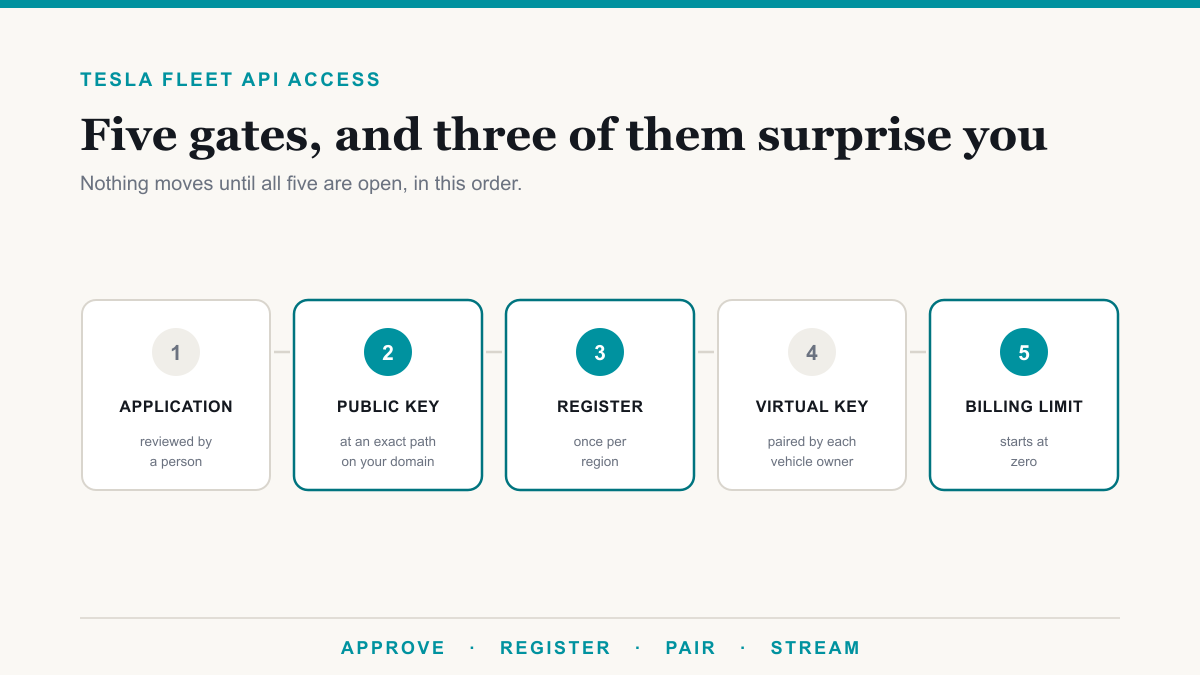
- A Tesla developer application. You need an app registered on Tesla's developer portal with Fleet API access and the telemetry scopes approved. Everything else hangs off this, and if you are not through that process yet, start with getting Tesla Fleet API access.
- A public hostname you control. The vehicles connect out to your server by name. Pick this hostname like it is permanent, for reasons covered below.
- A publicly trusted TLS certificate for that hostname. The cars validate it, and a self-signed certificate will be rejected no matter how happy your browser is with it.
- Somewhere for the data to land. The server is a receiver, not a database. Most builds hand the stream to Kafka.
- Vehicles on new enough firmware. Most need 2024.26 or later; the exact minimums are in the FAQ below.
Step 1: Run Tesla's fleet-telemetry server, not your own listener
Tesla publishes the fleet-telemetry server as open source, and it is the only thing the vehicles will talk to. The cars authenticate with TLS client certificates, send their data as protobuf messages, and expect the server to acknowledge each record. That handshake is not something you can approximate with a websocket service you write yourself, and trying is the single most common way this project stalls. Run Tesla's server as shipped, in a container or on a small VM, and build your platform downstream of it.
Configuration is one JSON file: the hostname, the TLS certificate and key, and the dispatcher where records get published. Keep it boring. The interesting work belongs on the other side of the dispatcher.
Step 2: Terminate TLS at the server, and choose the hostname carefully
Two infrastructure decisions in this step decide whether the fleet ever streams.
First, the mutual TLS session from the car has to terminate on the fleet-telemetry server itself. If a reverse proxy, application load balancer, API gateway, or nginx site in front of it decrypts the connection, the client certificate never reaches the server intact and the vehicles cannot connect. If your network standards require a load balancer, keep it at Layer 4 so the raw TCP passes through untouched. There is no Layer 7 option here.
Second, the hostname is not a detail. It gets baked into the signed configuration you push to every vehicle, so changing it later means re-pushing a new signed config to every VIN in the fleet. Choose a name you can commit to, on a domain you control, and treat the server as permanent infrastructure rather than something you will tidy up and move later.
Step 3: Decide where the data lands, usually Kafka
The server publishes every record it accepts to a dispatcher, and Kafka is the one to default to: it is the best supported backend and the one most fleet and telematics platforms already know how to consume. The server can also publish to alternatives such as Kinesis or MQTT if your stack demands it.
You do not have to run a Kafka cluster to use the Kafka dispatcher. Azure Event Hubs speaks the Kafka protocol as a managed service, so the server can publish to it with no cluster to build or patch. That combination, Tesla's server on a small public VM publishing to a managed Kafka endpoint, is the shortest reliable path from vehicles to your platform. If the platform consuming the data lives inside your own data center, we wrote up the relay pattern for that in getting Tesla telemetry into an on-prem platform.
Step 4: Pair your virtual key with each vehicle
The vehicles will not accept telemetry instructions from your application until it is trusted, and that trust is a virtual key paired to each car. Pairing happens once per vehicle through a link the owner or driver approves in the Tesla app. For a fleet, that means a small rollout exercise: send the pairing link, track which VINs have accepted it, and chase the stragglers. It is administrative work rather than engineering, and it is worth doing completely, because a vehicle without the key will silently ignore everything in the next step.
Step 5: Push a signed config to each VIN and confirm it syncs
Telling a car where to stream is a per-vehicle operation. You build a telemetry configuration naming your hostname, the signals you want, and how often you want them, and you send it to each VIN as a signed command through Tesla's vehicle-command proxy. The proxy signs the config with your private key, and the car verifies that signature before accepting it.
Then verify, per vehicle, that the config reports as synced. This is the step teams skip, and it is the difference between configured and told-but-ignored. A config that never syncs usually traces back to a missing virtual key, a car that is asleep, or firmware below the minimum. Read the config back, confirm the synced flag, and put that check in your monitoring permanently rather than treating it as a setup chore, because a fleet drifts: cars get added, keys get missed, firmware lags.
Step 6: Watch the data arrive, and know what it costs
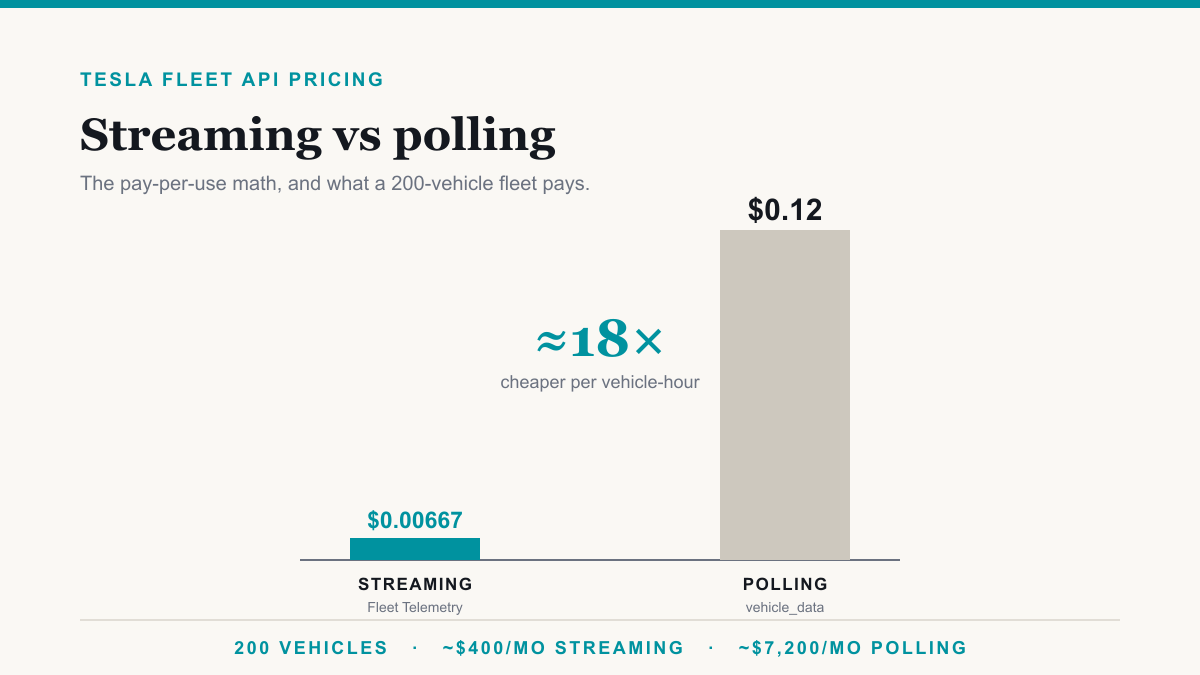
With the server up, TLS clean, keys paired, and configs synced, records start appearing on your Kafka topic within moments of the vehicles waking. Budget-wise, streaming is the cheap path: Tesla bills telemetry at roughly $0.00667 per vehicle per hour of data, against roughly $0.12 per vehicle-hour to poll the same signals from the REST API, about an eighteen-fold difference. We broke the full math down, including what a 200-vehicle fleet pays either way, in Tesla Fleet API pricing: streaming vs polling.
If you reach this step and the topic stays empty, do not start guessing. The failure is almost always one of five specific breaks, and we published the checklist as its own guide: why your Tesla Fleet Telemetry server isn't receiving data. Walk it in order and you will find the link that snapped.
Frequently asked questions
What do I need before setting up a Tesla Fleet Telemetry server?
A Tesla developer application with Fleet API access, a public hostname you control, a publicly trusted TLS certificate for it, somewhere for the data to land such as a Kafka topic, and vehicles on new enough firmware. Each vehicle also needs your virtual key paired before it will accept a telemetry config.
Can the Tesla fleet-telemetry server run behind a load balancer or reverse proxy?
Only if that layer passes the raw TCP through untouched. The vehicles use mutual TLS, so the connection must reach the fleet-telemetry server with the client certificate intact. A Layer 7 proxy that terminates TLS breaks the certificate check. Use Layer 4 passthrough at most, or expose the server directly.
Does Tesla Fleet Telemetry require Kafka?
No, but Kafka is the dispatcher Tesla's server supports best, and it is the one most fleet platforms consume. The server can also publish to other backends such as Kinesis or MQTT. If you do not want to run a Kafka cluster, Azure Event Hubs exposes a Kafka-compatible endpoint as a managed service.
Can I change the telemetry server hostname later?
Yes, but it is expensive to do casually. The hostname is baked into the signed configuration pushed to each vehicle, so moving the server means re-pushing a new signed config to every VIN in the fleet. Choose a hostname you can keep, and treat it as permanent infrastructure.
Which Tesla vehicles can stream Fleet Telemetry?
Most vehicles need firmware 2024.26 or later. Applications still on the legacy certificate signing process need 2023.20.6 or later, and older Model S and Model X with Intel Atom computers need 2025.20 or later. Tesla adjusts the minimums over time, so check the current list against the models in your fleet.
How much does Tesla Fleet Telemetry cost to run?
Tesla bills streaming at roughly $0.00667 per vehicle per hour of data, which works out to about eighteen times cheaper than polling the same signals from the REST API. On top of Tesla's usage fees you run the server itself, which is a small VM or container plus wherever the data lands.
Getting your Tesla Fleet Telemetry server setup finished
A working Tesla Fleet Telemetry server setup is five deliberate moves: Tesla's server, TLS terminating on it, virtual keys paired, signed configs confirmed synced, and a dispatcher your platform can drink from. None of the individual steps is hard, but the order matters, several of the failure modes are silent, and Tesla documents the minimums, not the road. If you would rather hand the whole thing to a team that has already built it, that is work we do: we stand up the server, wire the feed to your platform, and hand you Tesla fleet data as a managed feed or dashboards. Book a discovery call and tell us where your build stands.