HIPAA Compliant AI for Medical Practices: Copilot or a Private Server?
Published September 4, 2026

HIPAA compliant AI for medical practices is achievable today, and for most practices it means Microsoft 365 Copilot deployed with the right data governance rather than a private AI server in a back room. The outcome a practice actually wants is plain: staff get an assistant that drafts notes, answers questions from your own records, and handles routine front-desk work, without a single piece of protected health information reaching a public chatbot or falling outside a business associate agreement. This guide is for medical, dental, legal, and finance practice owners and office managers in Phoenix and nearby Scottsdale, Tempe, Mesa, and Chandler who have been pitched an on-premises AI box and want to know what they genuinely need.
The short version: the safety comes from how the system is configured and governed, not from where the hardware sits. A cloud tool set up carelessly leaks data. A private server set up carelessly leaks data too. The work is the same either way, and it is work a local managed IT team does.
What HIPAA compliant AI actually means
There is no product you can buy with a "HIPAA certified" sticker that makes you compliant on its own. HIPAA compliance is how your practice runs a system: who can sign in, what the tool is allowed to see, what gets logged, how it is backed up, and whether the vendor has signed a business associate agreement covering any access to patient data. The HIPAA Security Rule expects access to electronic protected health information to be limited to the people and systems that need it. An AI assistant that can read your files makes that rule matter more, not less, because it becomes the fastest way in the building to find anything.
Microsoft 365 Copilot fits this well for one reason: it works inside the tenant you already own. It answers from your own SharePoint, OneDrive, Teams, and Outlook, it honors the permissions each user already has, and Microsoft states it does not use your business data to train its foundation models, as covered in Microsoft's Copilot data protection documentation. Microsoft will also sign a business associate agreement for Microsoft 365, which is what lets you use it with patient data in the first place. None of that is automatic. It has to be turned on and governed correctly, and that is the difference between a safe rollout and a data-leak headline.
Copilot or a private AI server: how the options compare
Practices shopping for private AI usually land on one of three paths. A governed Microsoft 365 Copilot rollout, an on-premises private AI server, or turning Copilot on yourself with no cleanup first. Here is how they compare on the things that decide the outcome. If you are evaluating a specific appliance, we walk through what to ask for in what it takes to put a private AI server in a Phoenix office.
| DLS governed Copilot | On-prem private AI server | DIY Copilot, no cleanup | |
|---|---|---|---|
| Upfront cost | $22,500 flat, published | Quoted after a demo, plus electrician, rack, and cooling | Low, licenses only |
| Monthly cost | $99 per agent, plus about $30 per user for licenses | Power and support, quoted | About $30 per user for licenses |
| Compliance evidence you can hand an auditor | Produced as part of the work | A "ready" product claim, the evidence is on you | None unless you do the governance |
| Local support | Phoenix, on site when needed | Vendor is out of state | None |
| Data leaves the building | No, stays in your Microsoft 365 tenant | No, stays on the box | No, stays in your tenant |
| Time to running | Weeks | After the room is built and the box ships | Same day, and risky |
The DIY column is the one that gets practices in trouble. Copilot is easy to switch on, and the moment you do, it can surface anything a staff member already has access to. In an office where folders have been over-shared for years, that means confident answers pulled from files people were never supposed to open. Fixing that first is the whole job, and it is covered in how SharePoint oversharing turns into a Copilot problem.
What it costs, published in full
We publish the price because a regulated practice should be able to compare options without sitting through a sales demo to learn a number. A HIPAA-ready Copilot deployment from Desert Lakes Solutions has two parts.
One-time assessment and implementation: $22,500 flat. This covers both the readiness work and the build:
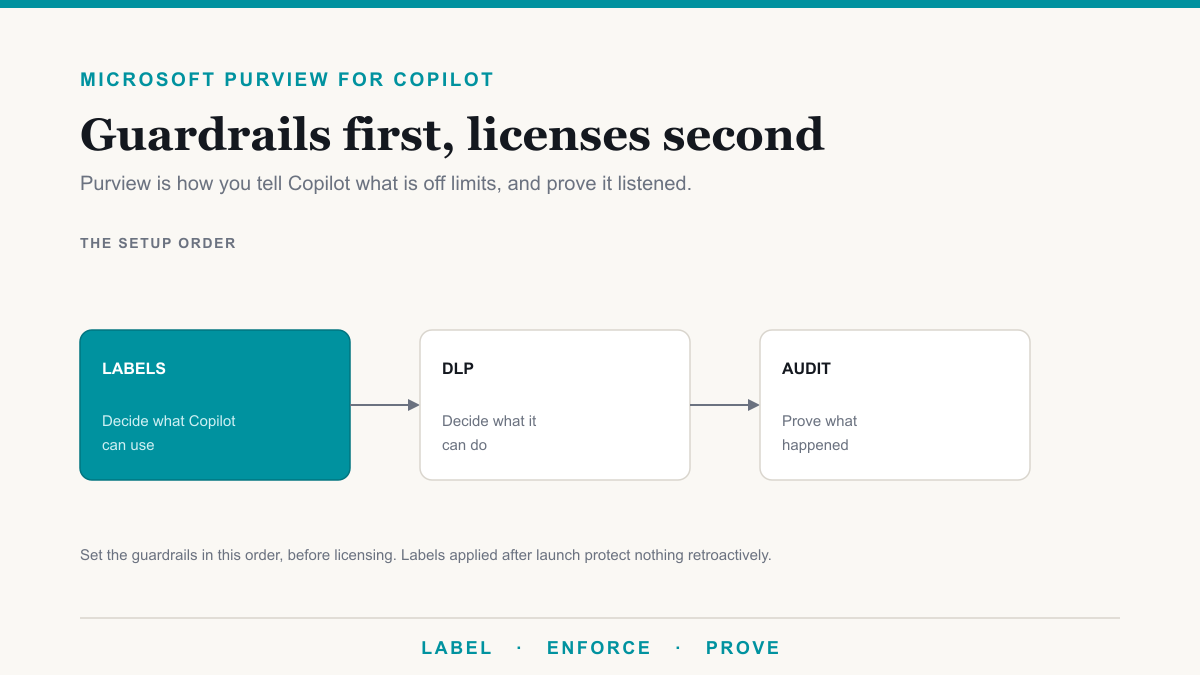
- Data readiness assessment. We inventory where your protected health information actually lives across SharePoint, OneDrive, Teams, and Exchange, audit every over-permissioned folder and stale external share, plan your Microsoft Purview labels and data loss prevention rules against your HIPAA obligations, review sign-in and Conditional Access, and confirm the Microsoft business associate agreement is in place. You get a written report, a remediation roadmap, and a clear go or no-go.
- Implementation. We fix the oversharing the assessment found, turn on the Purview guardrails, enable Copilot behind them, and build your first agents in Copilot Studio for your real workflows: patient intake, records summaries, quoting, and ticket triage. Staff get trained before they touch it.
Ongoing managed AI support: $99 per active agent, per month. This covers continuous governance monitoring so new oversharing is caught before Copilot can expose it, maintenance and tuning of each agent as the practice changes, security and feature updates, adoption reporting, and a help desk for AI questions. Pricing follows the agents rather than the seats, because the point of the agents is to take work off your staff, and the price should track the work being done, not the headcount you are trying to free up.
Microsoft 365 Copilot licenses are billed separately by Microsoft, at about $30 per user per month on top of your existing Microsoft 365. That is Microsoft's cost, not ours, and we are clear about it so the numbers above are the whole picture on our side.
How we make it HIPAA, SOC 2, and PCI ready
The value is not a compliant product. It is a configured, governed environment plus the evidence to prove it, framework by framework.
- HIPAA. We deploy Copilot under Microsoft's business associate agreement with the access controls, data loss prevention, and audit logging that let you use it with protected health information without breaking the Security Rule. Microsoft documents its side in the HIPAA and HITECH compliance offering. We make your deployment compliant and show you where the controls live.
- SOC 2. Microsoft 365 and Copilot run on infrastructure with a SOC 2 Type II attestation. We configure your tenant in line with those controls and hand you the evidence for your own SOC 2 work, the same evidence-gathering our compliance services run for other frameworks.
- PCI. For a practice that handles card payments, governance keeps cardholder data labeled and walled off from Copilot's reach, and Copilot honors those boundaries. The goal is to keep card data out of scope for the AI, not to call an AI tool "PCI compliant."
This is ordinary governance done properly, and it is the part a shipped appliance leaves entirely to you. If you want the background on the Copilot data-protection piece specifically, we cover it in securing Microsoft 365 Copilot.
When a private on-premises server is the right call
Sometimes it is. If your data genuinely cannot touch the cloud, because of a contract term, a specific regulator, or a security posture that requires an air gap, then a private on-premises model is the honest answer, and we build and manage those too. The trade-offs, the power and cooling a real server needs, and the questions to put in a vendor quote are in our medical IT work and the appliance guide linked above. For the large majority of Phoenix medical and dental practices, though, the requirement is "keep patient data private and prove it," not "keep it physically in this room," and governed Copilot meets that at a fraction of the cost and the effort.
Why practices choose the governed route
- Staff get hours back on notes, intake, and front-desk questions without new hires.
- Patient data stays inside your own Microsoft 365 tenant and never trains an outside model.
- You get audit-ready evidence, not a vendor's marketing claim.
- One predictable price you can see before you commit.
- Local hands in Phoenix when something needs a person, not a support ticket to another state.
Frequently asked questions
Is Microsoft 365 Copilot HIPAA compliant?
Copilot can be used in a HIPAA compliant way when it is covered by Microsoft's business associate agreement and deployed with proper access controls, data loss prevention, and audit logging. Compliance is a property of your configured environment and how your practice runs it, not a certification stamped on the product itself.
Do we need a private AI server to keep patient data safe?
Usually no. Microsoft 365 Copilot keeps your data inside your own Microsoft 365 tenant, honors the permissions you already have, and does not use your content to train Microsoft's foundation models. A private on-premises server is worth its cost mainly when your data legally cannot touch the cloud at all.
What does a HIPAA-ready Copilot setup cost?
Desert Lakes Solutions charges a flat $22,500 for the one-time data readiness assessment and implementation, then $99 per active agent per month for ongoing governance and support. Microsoft 365 Copilot licenses are separate, at about $30 per user per month billed by Microsoft.
Will Copilot expose files staff should not see?
Only if the permissions are already loose. Copilot surfaces whatever a user can already open on their own, so the readiness assessment finds and fixes over-shared folders and stale access before Copilot goes live. That cleanup is the work that makes the deployment safe for patient data.
Can the same setup help with SOC 2 or PCI?
Yes. The same governance work supports SOC 2 by aligning your tenant with Microsoft's attested controls and producing evidence for your audit, and it keeps cardholder data labeled and walled off from Copilot for PCI. One assessment covers the frameworks a regulated practice usually carries.
HIPAA compliant AI for medical practices, done in the open
HIPAA compliant AI for medical practices comes down to governance and evidence, and both are things you can see and price before you sign. For most Phoenix practices that means a governed Microsoft 365 Copilot rollout, with a private on-premises server held in reserve for the rare case that truly needs it. If you would like to see what this would look like for your practice, Desert Lakes Solutions offers a no-pressure discovery call to walk through your current Microsoft 365 setup, where the data-governance gaps are, and which path fits. Book a discovery call.