Managed IT · Tempe, AZ
Managed IT services and IT support for Tempe businesses
A help desk that answers, computers and Microsoft 365 that stay patched, and a written price before you commit. Our engineers work out of Phoenix and drive to Tempe when a job needs hands. Plans run $166, $241, or $271 per user per month with a $1,400 minimum.
How to choose an IT company in Tempe →
Already have a provider? Tell us what is not working. No pitch. Most clients fully onboarded in two to three weeks.

-
Kayla Rathkey
2 reviews
Very fast and amazing excellent service!!!
Response from the owner
Thanks Kayla! Glad we could the new dentist office setup quickly.
-
Luna Chernykh
1 review
Great service! Fast response, professional team, and very helpful. Highly recommend
Response from the owner
Thanks, Luna. Really glad the team was easy to work with.
-
Diana Gomez
Local Guide · 14 reviews · 4 photos
Very Good IT service, reliable and responsive. Clear communication
Response from the owner
Thanks, Diana. Clear communication on IT issues is the goal, so that’s good to hear.
-
Leo Ortiz
1 review
Excellent Customer service, Very Prompt and Professional.
Response from the owner
Thanks, Leo. Appreciate that.
US-based engineers
In-house, US-based team
15-minute response
A real person on critical issues, 24/7
Transparent pricing
Published rates, written quotes
Security-first
Built in from day one
Desert Lakes Solutions prices managed IT services for Tempe businesses in advance: $166, $241, or $271 per user per month. The Microsoft 365 license is inside each figure, the monthly floor is $1,400, and a critical issue gets a human reply in 15 minutes at any hour. The numbers are public so you can judge the fit before anyone books a call.
Tempe mixes Arizona State University, small offices around Mill Avenue, and professional suites, retail, and light industrial space along the Loop 101, Loop 202, and I-10 corridors. Many offices in that mix are small enough that one overworked IT person or a pile of vendors is the whole IT department.
Most IT support a Tempe office needs is remote and quick: a password reset, a laptop that will not join Wi-Fi, a mailbox that stopped syncing. Below are what a plan includes, the first 90 days, and a provider checklist. Jump to the checklist or straight to what it costs.
What do managed IT services in Tempe include?
Managed IT means one company takes ongoing responsibility for your technology for a fixed monthly fee, instead of you calling someone when something breaks. That is a help desk your staff can reach, monitoring and patching, a Microsoft 365 tenant (your company account and everything in it) that someone administers, backups that get tested, and a plan for the hardware refresh before the hardware fails.
If the model is new to you, our guide to what a managed service provider is covers the vocabulary, and the managed IT overview lists the full service catalog.
What do managed IT services cost in Tempe?
There are three fixed bundles, priced per user per month on the assumption of one computer per person:
- Trailhead, $166 per user per month. Essential IT. Managed help desk from 7am to 7pm on weekdays, endpoint protection, patching, workstation backup, and file-level offsite backup for servers, with Microsoft 365 Business Premium included in the price. Server and network device management are included too.
- Ridgeline, $241 per user per month. Business Security. Everything in Trailhead, plus a help desk staffed 24 hours every day, managed detection and response, an onsite backup appliance that recovers a failed server far faster than restoring files over the internet, security awareness training, and identity and access management. This is where most offices land.
- Summit, $271 per user per month. Full-Stack IT. Everything in Ridgeline, plus Microsoft 365 E5, a 24/7 security operations center (analysts watching alerts at 3 a.m.), cloud security monitoring, and virtual CIO advisory (the technology planning role you would otherwise hire for), included up to 6 hours a month.
On-site visits are part of every plan: 1 a month on Trailhead, 3 on Ridgeline, and 5 on Summit, each up to 3 hours. Unused visits do not carry over, and extra on-site time is quoted.
The floor is $1,400 a month. Under 9 users on the entry bundle you pay the floor, not the per-user rate. Volume discounts start at 4 percent for 25 users and step up from there, with a custom agreement above 300 users. The full schedule and a live calculator are on our pricing page.
Example one. A 15-person Tempe firm on Ridgeline: 15 times $241 is $3,615 a month. That is above the floor and below the 25-user discount line, so nothing adjusts. If the office also runs a server, a firewall, and a few switches, the number stays the same.
Example two, with a discount. A 30-person office on Trailhead: 30 times $166 is $4,980. The 4 percent break takes off $199.20, leaving $4,780.80, or $159.36 per user.
Outside the monthly figure: discovery and onboarding, which we quote per engagement because it depends on what the audit finds; 24-hour SIEM monitoring if you want it, at $130 per server, $100 per firewall, $50 per switch, and $35 per access point per month; employee onboarding at $150 and offboarding at $75; hardware; and projects such as a cloud migration or an office move.
For the wider market, see managed IT cost per user per month, or run the IT cost calculator.
What is covered, line by line
Ten things a managed IT plan covers. Some sit inside the per-user price, some start at a particular bundle, and some are quoted separately. The notes say which.
- Help desk for your whole team, with a 15-minute standard response on critical issues at any hour (the help desk itself is staffed 7am to 7pm on weekdays on Trailhead, and 24 hours every day on Ridgeline and Summit)
- On-site engineers when a job needs hands on the hardware (dispatched from our Phoenix office)
- Microsoft 365 administration (the license is included in the per-user price)
- Endpoint protection and patching (keeping software updated) on every workstation
- Managed detection and response, a staffed team watching your computers around the clock (included on Ridgeline and Summit, or $30 per workstation per month added to Trailhead)
- Server, firewall, switch, and wireless management (included in every bundle, not billed per device)
- Backups that are verified by restoring them, not just scheduled and forgotten (every bundle backs up workstations and servers; Ridgeline and Summit add an onsite appliance, which is the difference between recovering a failed server in hours and recovering it over the internet)
- Employee onboarding and offboarding run the same documented way every time (charged per person when someone starts or leaves: onboarding $150, offboarding $75)
- The monitoring, logging, access control, and documentation that HIPAA, PCI DSS (card payments), CMMC (defense contracts), and SOC 2 (an audit report customers ask for) evidence is built from (the access control and around-the-clock monitoring pieces start on Ridgeline; framework readiness itself is scoped and quoted after a gap assessment)
- A written technology plan and budget, so a hardware refresh gets budgeted ahead of time (virtual CIO advisory, on Summit)
Why Tempe companies move to outsourced IT
When Tempe owners ask about outsourced IT, it usually starts from one of four problems. None of them is exotic, and all of them get worse the longer they sit.
-
The invoice has something new on it every month
A Tempe office that signed a low rate and then watched lines appear for servers, switches, and after-hours calls is comparing a real total against a quoted one. A fixed per-user figure with the license inside ends that argument.
-
Tickets sit while the office waits
A part-time IT person is fine until two things break in the same week. A suite near Mill Avenue or along the Rio Salado corridor has the same problem as any other: the one person who knows the setup is busy, away, or not answering.
-
Nobody has looked after the systems in years
The firewall still runs its shipped settings, the switches are unpatched, and nobody can say when a backup was last tested.
-
The person who handled IT has left
The passwords are in someone else's head and the admin account belongs to an email address nobody monitors. We start by getting that written down and back under your control.
IT support in Tempe: what the first 90 days look like
Most offices are fully onboarded in two to three weeks, and there is no day where your team is without support. A complicated environment can take 30 to 60 days.
-
01
Days 1 to 21: take it on
The onboarding window for most offices. We inventory every workstation, server, firewall, switch, license, and vendor login and write it down before anything changes. Monitoring, security software, and backups go in next to what you already run.
-
02
Days 22 to 60: fix what the inventory found
Every audit turns up a short list of things nobody chose: stale accounts, an unused license, an old firewall rule, a backup that was never tested. We work through it in order of risk and show you the first test restore.
-
03
Days 61 to 90: settle into a rhythm
Patching, monitoring, and help desk work run on a schedule, and you get your first review of what broke, what is aging out, and what to budget for.
What onboarding covers
- A set process for adding and removing employees
- Network fixes and improvements
- Microsoft 365 licensing cleanup
- Single sign-on
- Defender and Intune security policies
- Email: SPF and DMARC, quarantine management, legitimate senders let through, spam and phishing blocked
How do you choose an IT company in Tempe?
8 questions worth putting to every IT company you are weighing in Tempe, ours included. Asking all 8 of each provider is what makes the quotes comparable.
-
01
Is the Microsoft 365 license inside the per-user price, and which plan?
Two quotes at the same headline number are not the same deal if one bills the license on top. Ask for the plan by name. Ours include it: Business Premium on the first two bundles and E5 on the third.
-
02
What is the monthly minimum?
For a small Tempe office the floor decides the price more than the per-user rate does. Ask for it in writing, and ask at what headcount you start paying per user. Ours is $1,400 a month, and the entry bundle clears it at 9 people.
-
03
What does the response commitment actually measure?
A response time can mean a first human reply, an engineer starting work, or a resolution. Ask which one is promised and whether the clock runs overnight. Ours is a 15-minute standard response on critical issues at any hour, measured as a real person replying, with critical defined in the agreement before you sign.
-
04
Where are the engineers, and what is the drive to your suite?
Ask for a real drive time to your address, not a service-area map. Ours work from Phoenix, so a Tempe visit is a drive on I-10 or US-60, slower at rush hour.
-
05
What is not in the monthly price?
Get the exclusions in writing: the one-time onboarding fee, per-device charges for servers and network gear, per-person onboarding and offboarding charges, hardware, and projects like a cloud migration or an office move. Ours includes server and network device management in the bundle, and projects are quoted per engagement instead of by the hour.
-
06
When was the last test restore, and can you see the result?
A backup that reports success is not the same as a restore that worked. Ask what was restored most recently and how long a full recovery took.
-
07
Who owns your Microsoft 365 tenant, domain, and documentation?
The answer should be you, in writing, before you sign. With us all three are yours.
-
08
What is the one-time onboarding fee, and what does it pay for?
Ask for it alongside the monthly figure, and ask whether it covers the audit, the documentation, the migration, or all three. We scope and quote ours per engagement. An all-new setup may have no onboarding fee, and discovery and cleanup work costs more.
More on this: how to switch IT providers and in-house versus managed IT.
Getting from Central Avenue to your Tempe office
Our office is in Phoenix on Central Avenue. Tempe is a drive from there, not a walk, and at rush hour the I-10 and US-60 approaches can slow it considerably. We plan Tempe visits around that and tell you the arrival window in advance.
Very little IT work needs the drive. Password resets, mailbox problems, patching, and most printer and Wi-Fi faults are fixed remotely, usually faster than anyone could arrive. When a job needs hands, such as a dead server, a switch replacement, or wiring for a new suite near downtown Tempe, an engineer comes out.
Tempe borders Phoenix, Scottsdale, Mesa, and Chandler, so a single trip often covers a neighboring office as well. For Arizona breach-notification rules and what summer heat does to a server closet, see our Phoenix managed IT page, which covers both in detail.
On-site in Tempe and its neighbors
- Tempe
- Phoenix
- Scottsdale
- Mesa
- Chandler
- Guadalupe
- Gilbert
- Paradise Valley
- Glendale
- Peoria
Businesses elsewhere in Arizona and nationwide get the same services remotely, with a visit scheduled when the job needs hands.
Also in Tempe: dental IT and cybersecurity.
Managed IT in neighboring cities: Phoenix, Scottsdale, Mesa, Gilbert, and Chandler.
More on pricing, switching, and how managed IT works
Managed IT
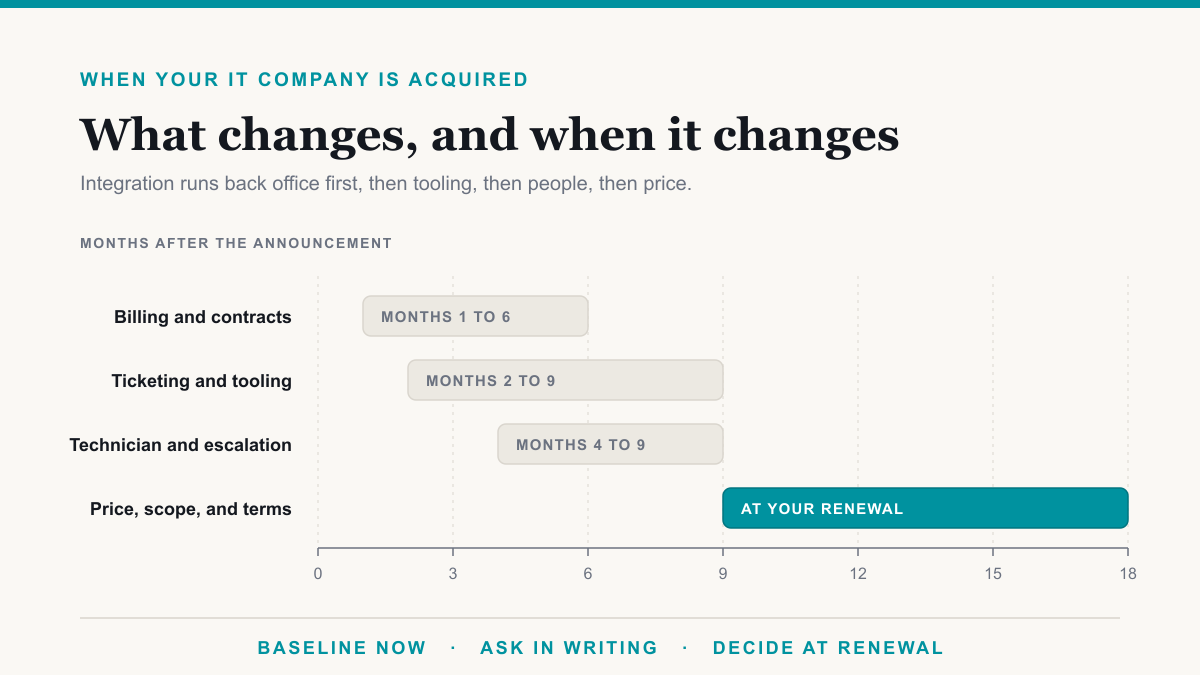
Your IT Company Was Acquired by Private Equity. Should You Leave?
Your IT company was acquired by private equity. What changes, what to ask this week, the warning signs in the first year, and when leaving is the right call.
Aug 10, 2026
Managed IT
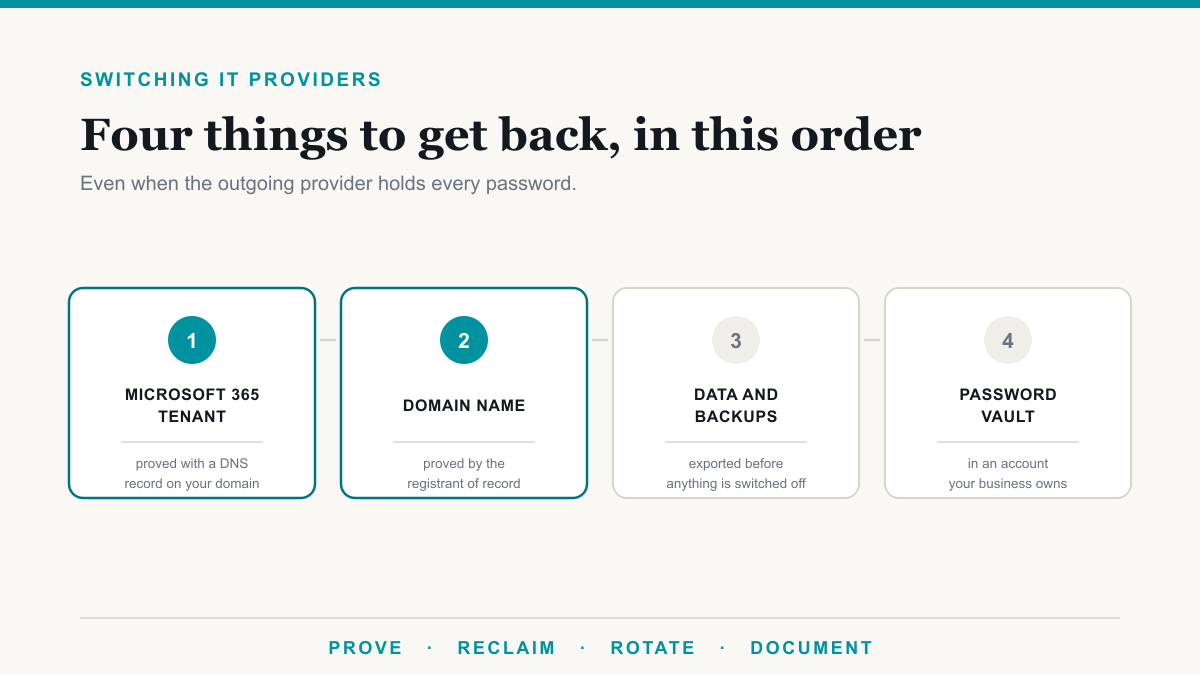
How to Switch IT Providers, Even Without Passwords
Switch IT providers without losing access, plus the recovery steps for when the outgoing provider holds every password to your domain and Microsoft 365.
Aug 6, 2026
Managed IT
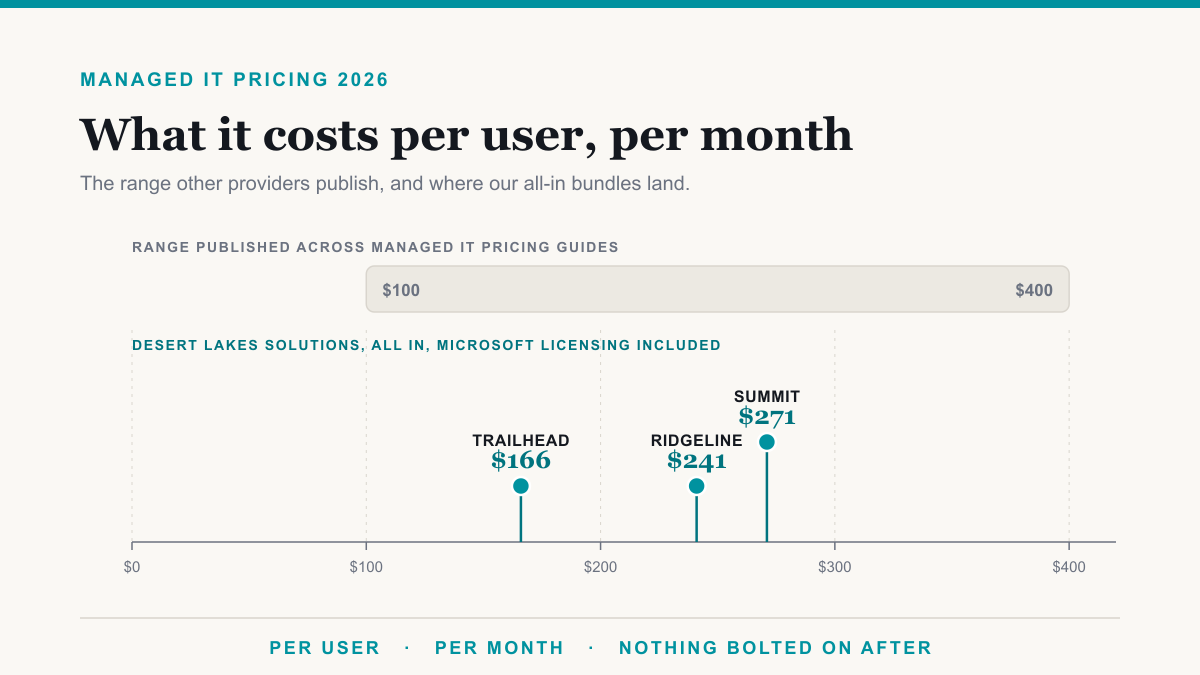
How Much Should Managed IT Cost Per User Per Month in 2026?
Managed IT runs $100 to $400 per user per month in 2026. Here are real published prices, what each tier buys, and how to normalize any quote you are holding.
Aug 6, 2026
Frequently asked questions
What Tempe owners and office managers ask before they pick a provider.
How much do managed IT services cost for a Tempe office?
Desert Lakes Solutions publishes three per-user bundles: $166, $241, and $271 per user per month, with the Microsoft 365 license inside each and a $1,400 monthly minimum. A 15-person Tempe office on Ridgeline comes to $3,615 a month, and servers, firewalls, and switches do not change that. You get a written quote after a 30-minute scoping call.
Is a six-person Tempe office too small for managed IT?
No, but the minimum matters at that size. Six people on Trailhead would be $996 at the per-user rate, so the $1,400 floor applies, which is $233.33 per person. The entry bundle clears the floor at 9 people.
How fast can an engineer get to a Tempe office?
Our office is in Phoenix on Central Avenue, so a Tempe visit is a drive, and it takes longer at rush hour on I-10 and US-60. Most tickets are solved remotely in minutes. When a job needs hands, such as a dead server or new cabling, we schedule the visit and give you an arrival window. The 15-minute standard response is a reply from a person, not an arrival time.
We hire ASU students and seasonal staff. How does that work with managed IT?
Onboarding a new person is $150 and offboarding is $75, charged per event, and each follows the same written checklist for accounts, licenses, devices, and access.
Can one provider cover Tempe, Mesa, Chandler, and Scottsdale?
Yes. Tempe borders all three, along with Phoenix, and engineers cover them from the same Phoenix base. Offices in more than one city get one help desk, one set of documentation, and one invoice.
Is outsourced IT cheaper than hiring one IT person in Tempe?
It depends on headcount and what you need covered. One employee is a single point of failure on vacation or sick leave, and one person rarely has security, backup, and Microsoft 365 depth at once. A managed plan is a staffed team on a fixed monthly figure, with the Microsoft 365 license inside it.
How do I compare quotes from an IT company in Tempe fairly?
Ask each provider the same four questions: is the Microsoft 365 license inside the per-user price, what is the monthly minimum, what is billed separately, and what does the response time measure. The checklist on this page has 8 questions in that shape.
Get a second opinion
Most people who contact us already have an IT provider. Tell us what is not working and we will tell you whether it is normal, fixable, or a reason to switch.
What happens next
- 1 Tell us what is not working.
- 2 We reply within one business day with an honest read, in writing.
- 3 If it makes sense, we scope a switch that does not interrupt your day.
Call (855) 737-9500 / (480) 573-3349
Email [email protected]
15-minute response on critical issues, 24/7. Onboarding in two to three weeks.